

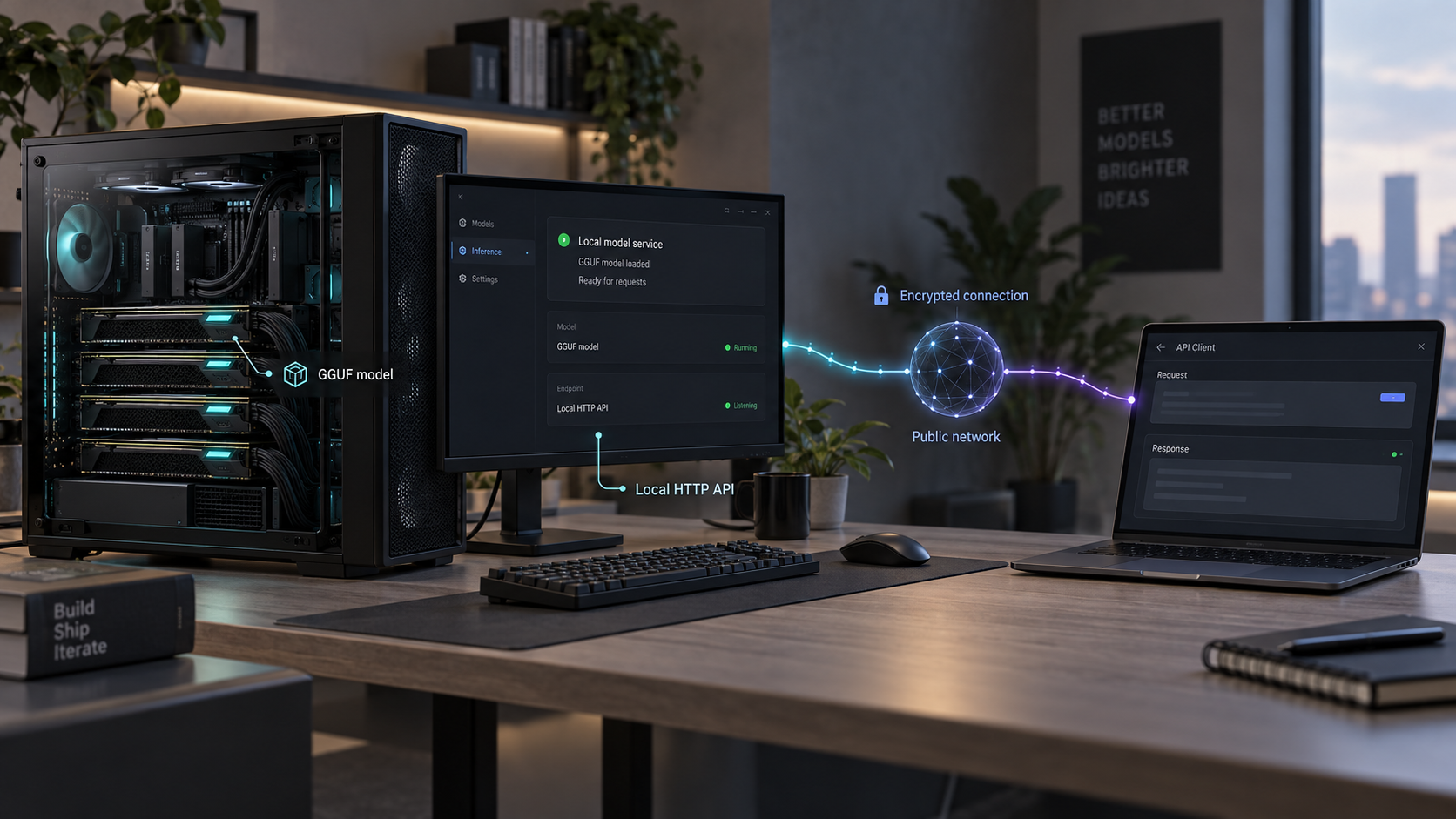
Run large GGUF models on your own hardware, verify the local API, and make it reachable through a controlled public endpoint
ggrun is a launcher for llama.cpp and ik_llama.cpp that calculates model placement across available VRAM, system RAM, and multiple GPUs before starting an inference server. This guide covers installation on Linux, macOS, and Windows, launching a local GGUF model, using ggrun's download workflow, checking the generated multi-GPU plan, and verifying the HTTP service without assuming a default port. After the local server works, we show how to expose its configured host and port through a Localtonet HTTP tunnel. Security and troubleshooting sections explain how to avoid accidentally publishing an unrestricted inference endpoint.
📋 What's in this guide
How ggrun, llama.cpp, and Localtonet fit together
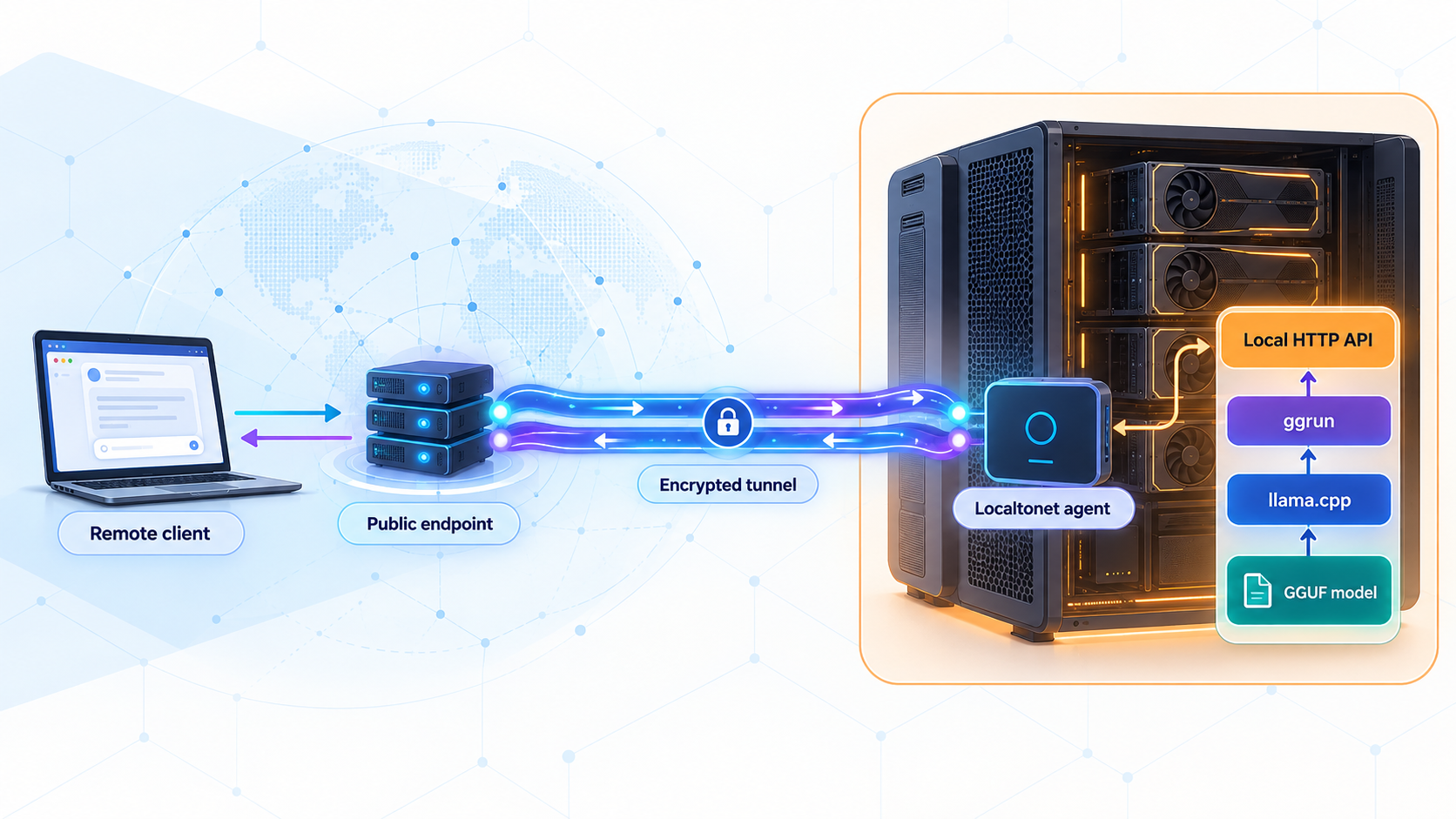
The first distinction to understand is that ggrun is not itself an inference engine. It examines a GGUF model and the available machine resources, creates a launch plan for a supported backend, checks whether the planned model placement, KV cache, and safety headroom fit, and then starts the backend server. The actual inference process is provided by llama.cpp or ik_llama.cpp.
This separation is useful on systems with several GPUs that do not have identical memory capacities or transfer characteristics. Manually deciding how to divide a large mixture-of-experts model across mismatched cards can require repeated trial and error. ggrun is designed to calculate that placement using the GGUF tensor layout, available VRAM and RAM, per-GPU bandwidth information, and backend capabilities. It supports dense and mixture-of-experts models across single-GPU, multi-GPU, CPU, and RAM-offload configurations.
Once the backend starts, it exposes the llama.cpp HTTP service at the host and port selected for that launch. This includes the OpenAI-compatible /v1 API for chat completions and completions. ggrun also supports the Anthropic-compatible endpoint used by its local Claude Code workflow, but the exact endpoint URL should be taken from the running configuration rather than guessed.
Localtonet enters the workflow only after that local HTTP service has been installed, started, and tested. Our client establishes an outbound connection to a Localtonet relay, so the machine does not require an inbound router port-forwarding rule, a public IP address, firewall changes for inbound internet traffic, or a separate VPN setup. An HTTP tunnel then maps its public address to the ggrun server's actual local IP address and port.
/v1 API at the configured host and port.
Prerequisites and planning decisions
Before installing anything, identify the machine that will run inference. It needs enough aggregate VRAM and system RAM for the chosen GGUF, its context requirements, the KV cache, and operational headroom. ggrun performs fit checks, but it cannot make an oversized model fit resources that are not physically available. CPU or RAM offload can broaden the configurations that are possible, although the resulting performance depends on the model and hardware.
The available project evidence does not define universal minimum GPU models, driver versions, operating-system versions, RAM capacities, or disk-space requirements. Those values depend on the backend, acceleration stack, model architecture, quantization, context length, and hardware. Confirm that llama.cpp or ik_llama.cpp supports your intended acceleration environment before treating the system as production-ready.
| Requirement | Why it matters | What to confirm |
|---|---|---|
| Linux, macOS, or Windows host | ggrun provides documented installer paths for these platforms. | Use a shell with the tools required by the corresponding installer and open a new terminal after installation if PATH changes were made. |
| Supported inference hardware | The backend must be able to execute the selected model. | Confirm backend support for your CPU, GPUs, drivers, and acceleration environment. |
| Enough VRAM, RAM, and storage | Model weights, cache allocation, runtime headroom, and downloaded GGUF files all consume resources. | Choose a quantization and context target appropriate for the actual machine. |
| A GGUF model source | ggrun needs either a local GGUF or a model repository it can download. | Review the model's license, file size, architecture, and hardware requirements. |
| A known HTTP host and port | API clients and the Localtonet tunnel need an exact destination. | Record the host and port shown or configured for the successful launch. Do not assume a default. |
| Localtonet client access | The client must run on a device that can reach the inference server. | Install the current client, keep its device token private, and select an available relay from the current dashboard. |
The quick-install commands below download and execute project-maintained scripts. This is convenient, but it also trusts the content delivered from the referenced branch at execution time. For a controlled environment, inspect the script first, choose the project's documented release or source controls, and follow your organization's software-review process.
Plan the network boundary before launching the server. If ggrun and the Localtonet client run on the same machine, a loopback listener can be sufficient because our client can target that local address. If the Localtonet client runs on a different device, the inference server must listen on an address reachable from that device, and the host firewall must allow only the necessary local path. Do not broaden the LAN listener merely because remote access will eventually be required.
Install ggrun on Linux, macOS, or Windows
ggrun provides a combined setup script for Linux and macOS and a PowerShell installer for Windows. The commands below are the documented quick-start paths. The project notes that these commands retrieve installers from the main branch. Windows normally installs the latest published launcher, while Linux setup can build the current source when Go is available. A successful check on the main branch does not necessarily mean every change has already reached the latest packaged release.
Linux and macOS installation
curl -fsSL https://raw.githubusercontent.com/raketenkater/ggrun/main/setup.sh | bash
Let the setup finish, read any messages it prints, and open a new terminal if the installer added ggrun to PATH. If you want to start it immediately from the documented standard installation location without reopening the shell, use:
~/ggrun/ggrunThe combined script handles the platform-specific setup path. The available evidence does not establish every package it may install or every prompt it may display on every distribution and macOS version, so review the installer output rather than assuming a silent, identical result across systems.
Windows PowerShell installation
$s = irm https://raw.githubusercontent.com/raketenkater/ggrun/main/install.ps1
iex "& { $s }"
This form loads the script text and invokes it as a script block. It is intentionally different from a simple pipeline into iex. The project adopted this approach to avoid problems caused by leading characters such as a UTF-8 byte-order mark and to handle installer behavior when standard input is redirected.
Open a new PowerShell terminal after installation so a newly added PATH entry is available. To run the launcher immediately from its documented standard location, use:
& "$env:USERPROFILE\ggrun\ggrun.cmd"Confirm that the launcher is available
In a new terminal, run ggrun without a model argument:
ggrunThis opens the project's terminal interface. Reaching that interface confirms that the launcher is callable, but it does not yet prove that a model can load, that the backend can access every GPU, or that an HTTP listener has started. Complete those checks separately.
The quick installers retrieve setup logic from the main branch, while the installed launcher or build path can depend on the platform and available tools. If you require a reproducible version, use the release and source controls documented by the ggrun project rather than assuming that every fresh installation resolves to the same commit.
Prepare ggrun for a multi-GPU machine
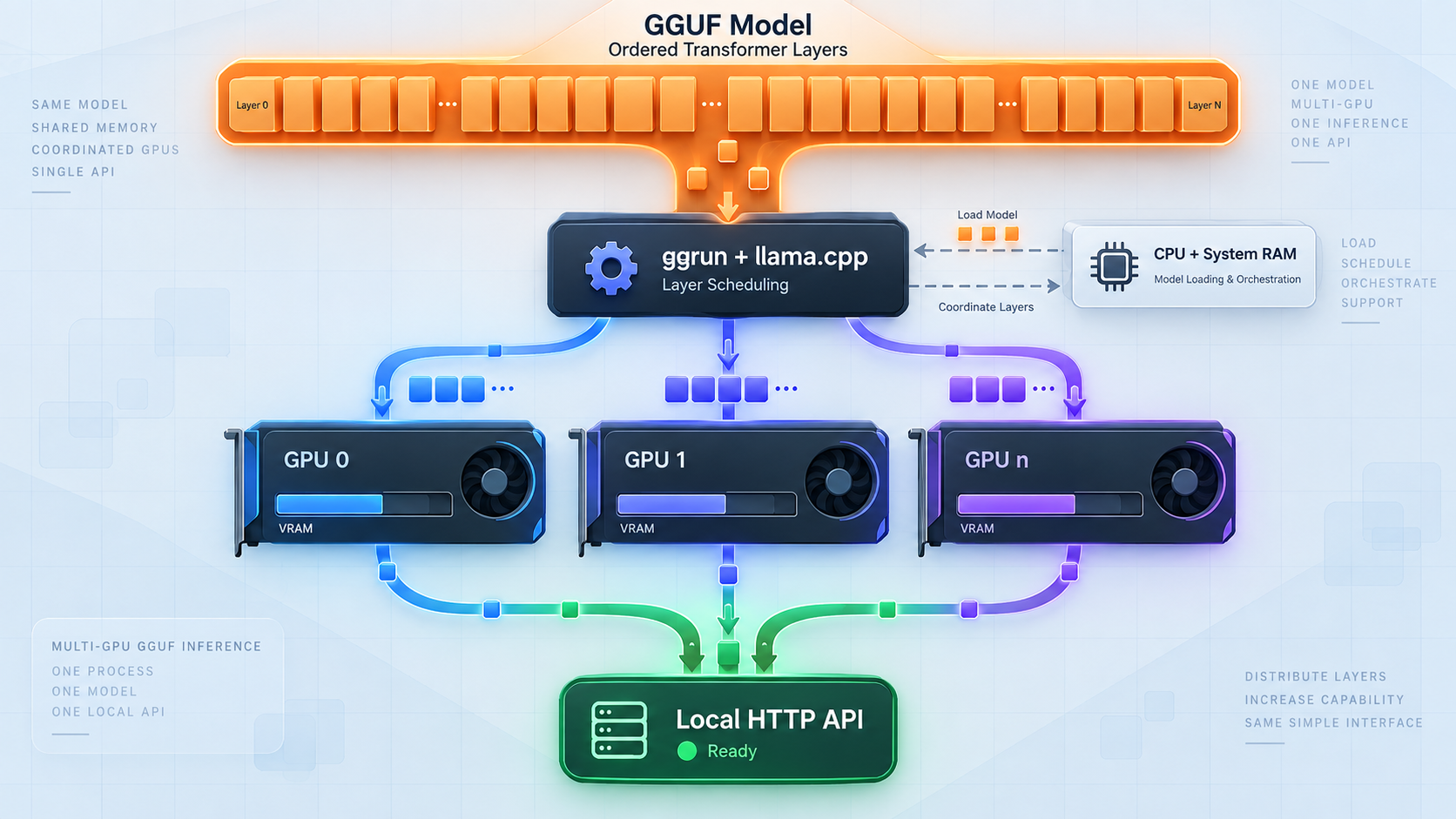
ggrun can derive placement information from the detected hardware, but NVIDIA users can also measure host-memory and pinned PCIe transfer bandwidth. The project recommends running the bandwidth detection once and repeating it after GPUs or card slots change:
ggrun detect --bandwidthThe resulting cached profile is tied to the CPU, RAM, GPU, and PCI layout that produced it. ggrun accepts it only when the current hardware matches that layout. If the profile is missing, stale, incomplete, or corrupt, normal detection and launches fall back to derived PCIe values rather than trusting unsuitable measurements.
This hardware matching matters on mixed rigs. Two cards with similar compute capability can still have different memory capacity, slot connectivity, or transfer behavior. A placement that fits mathematically may not be the best stable option for the requested context and workload. ggrun uses the information available to create a plan, check memory requirements, and keep the generated command visible for inspection.
The launcher also supports bounded tuning and comparison workflows. Its --ai-tune capability measures a bounded set of safe performance options and preserves the winning configuration for the same setup. Eligible direct or terminal-interface launches can perform a limited automatic comparison between a stable baseline and one high-confidence finalist.
Treat these measurements as configuration evidence, not as a universal benchmark. The project's synthetic serving workload uses repeated cache-backed turns and mixed prefill and decode activity. It does not prove maximum hardware throughput or predict the performance of every coding agent, prompt distribution, context length, or concurrent workload. Production evaluation should use your own representative requests.
Model quantization, context length, cache requirements, GPU placement, CPU offload, and concurrency can all affect memory pressure. Begin with a configuration that passes ggrun's fit checks and completes an actual inference request. Change one major variable at a time so an out-of-memory failure or slowdown can be traced to a specific adjustment.
Launch a local GGUF or download a model
After installation and hardware detection, choose one of three supported starting points: supply a local GGUF file, ask ggrun to download a model repository, or open the terminal interface and select the workflow there. The most direct local-file command is:
ggrun model.gguf
Run this from the directory containing the file, or replace model.gguf with the correct path to your own GGUF. Do not copy a placeholder path unchanged. ggrun reads the model, evaluates its tensor layout against the machine, builds the launch plan, checks whether the model and cache allocation fit with safety headroom, and starts the selected backend when the plan is accepted.
To download through ggrun and then launch, the project provides this form:
ggrun unsloth/Qwen3.6-27B-GGUF --downloadThe same documented example can be expressed as a download operation:
ggrun download unsloth/Qwen3.6-27B-GGUFThat repository name is an example, not a recommendation that the model will fit every system. Confirm its current files, quantizations, disk requirements, model license, and runtime compatibility before downloading it. Large repositories may contain multiple GGUF variants with substantially different resource needs.
Running ggrun without an argument opens the terminal interface, where model downloads, recommendations, launch planning, and generated commands are available in one flow. This is useful when exploring a machine for the first time because it keeps the selected settings and resulting backend command visible.
ggrun passes unknown flags through to llama-server. That makes backend-level customization possible, but it does not make arbitrary flags safe or portable. Only use flags documented for the exact backend version that ggrun launches. This article deliberately does not prescribe host, port, authentication, context, or cache flags because the supplied project evidence does not establish one universal set for every supported backend and installation.
Record the listener selected for the launch
Watch the launch output and generated command. Record the exact HTTP host and port that the server reports or that you explicitly configured. The ggrun documentation excerpt supplied for this guide does not establish a default port, so a hardcoded example would be unreliable.
In the remaining examples, PORT means the real numeric port from your successful launch. Replace it before running a command. If the server is not listening on 127.0.0.1, replace that address with the actual locally reachable address as well.
Verify the inference service locally first
Remote tunneling should never be the first test of an inference server. A local verification separates model-loading and backend problems from tunnel configuration problems. Keep the ggrun process running and confirm four layers in order: process startup, resource fit, HTTP connectivity, and an actual inference response.
Confirm that model loading completed
Read the ggrun and backend output. The process should remain running after the model and cache are initialized. If it exits, reports an out-of-memory condition, or never reaches the server-start stage, resolve that issue before testing HTTP.
Record the real host and port
Use the listener shown in the launch output or generated command. Do not assume a port from another llama.cpp tutorial because ggrun uses the configured host and port for the current launch.
Test basic HTTP connectivity
Send a verbose request to the listener from the inference host. An HTTP response confirms that a service accepted the connection, even if the root path returns a non-success status. A refusal or timeout means the listener, address, port, process, or local policy still needs attention.
Run a real API request with a compatible client
Configure an OpenAI-compatible client to use http://HOST:PORT/v1, then send a small completion or chat-completion request. This proves more than a socket test because it exercises request parsing, model inference, and response generation.
Observe resource use and stability
Check that the request completes without a backend crash or memory error. Repeat with a workload representative of your intended context and concurrency before allowing remote users to depend on the service.
On Linux or macOS, replace PORT with the actual value:
curl -v http://127.0.0.1:PORT/
In Windows PowerShell, calling curl.exe explicitly avoids ambiguity with shell aliases:
curl.exe -v http://127.0.0.1:PORT/The purpose of this request is transport verification. The root path's response body and status can vary with the backend build and configuration. A valid HTTP response proves that the listener accepted the request, while a successful OpenAI-compatible API call is the stronger functional check.
ggrun exposes llama.cpp's OpenAI-compatible interface under /v1. Many compatible applications ask for a base URL, while others ask for a full endpoint. Read the client's field description carefully and avoid appending /v1 twice.
Expose the working ggrun API with Localtonet
Once local inference works, an HTTP tunnel is the appropriate Localtonet tunnel family because the service is an HTTP API. The client must run on the inference host or on another device that can reach the recorded listener. If the server listens only on loopback, run our client on the same machine rather than opening the service across the LAN unnecessarily.
HTTP tunnel process types can use a random subdomain, a custom subdomain where supported, or a custom domain. Each serves the configured content at a public HTTPS address. Availability can vary by plan or current dashboard options, and custom-domain DNS requirements should be checked against current documentation rather than inferred.
Install and run the Localtonet client
Install the current Localtonet application on the device that can reach the ggrun HTTP listener. Keep the client running because the public endpoint is available only while the selected device is connected and the tunnel is active.
Authenticate or select the device
Use the device-specific authentication token supplied through your Localtonet account or select the corresponding connected device in the dashboard. Never place the token in application code, screenshots, logs, or this API's public configuration.
Select an available relay server
Choose from the server or region values currently available in the product. Do not copy a server code from an unrelated tutorial because availability can vary by account, plan, region, or product version.
Create an HTTP tunnel for the local listener
Select an HTTP tunnel and enter the exact local IP address and port verified earlier. If Localtonet and ggrun share a host, this can be the verified loopback target. If they run on separate devices, use the inference host address reachable from the client device.
Start the tunnel
Creating the configuration is not enough. Use the Start action and wait for the tunnel to become active. The dashboard then provides the public address assigned to the running HTTP tunnel.
Test through the public URL
Repeat the connectivity and functional API checks through the assigned public address. For an OpenAI-compatible client, use the public URL in the same place where you previously used the local base address, preserving the required /v1 path exactly once.
For the current dashboard workflow and fields, consult our Localtonet HTTP tunnel documentation. Exact client commands, region codes, and domain DNS values are intentionally not hardcoded here because they must come from the current application and account configuration.
Treat the assigned address as internet-reachable. Do not assume that an obscure URL is an access-control mechanism. Before sharing it, determine what authentication and authorization are enforced by the API or an approved protective layer, limit who receives the address, and stop the tunnel when public access is no longer required.
Secure a remotely reachable inference API
A self-hosted model can still expose sensitive capabilities. An unrestricted API may allow unknown users to consume GPU time, fill context windows, trigger large downloads through surrounding automation, submit confidential prompts, or interfere with workloads expected by local users. If the model is connected to an agent with tools, files, repositories, or credentials, the consequences can extend beyond inference capacity.
The supplied ggrun evidence establishes compatible API exposure, but it does not establish a universal authentication default. Therefore, do not assume that every generated server configuration requires credentials. Verify the effective behavior of your exact backend and launch command before starting a public tunnel.
Apply security in layers
- Bind narrowly: when the Localtonet client runs on the inference host, prefer a local listener over a broadly reachable LAN listener unless another local requirement needs network access.
- Require authorization: use authentication supported by the exact server build or place an approved authenticated application layer in front of it. Do not invent or rely on an undocumented ggrun credential option.
- Use least privilege: an application consuming the API should not automatically receive unrelated filesystem, shell, repository, or cloud credentials.
- Separate model inference from agent tools: publishing an inference endpoint does not require exposing every tool or local service used by an agent.
- Control distribution: share the public URL only with intended users and avoid placing it in public repositories, screenshots, client-side code, or searchable logs.
- Stop unused access: stop or delete the Localtonet tunnel after the remote session or integration no longer needs it.
- Protect device tokens: Localtonet authentication tokens identify client devices. Store them as secrets and rotate or replace them through the supported account workflow if exposed.
- Review model licenses and data handling: self-hosting changes where inference occurs, but it does not remove model-license obligations or the need to handle prompts and outputs appropriately.
If an application requires browser access from another origin, it may also have cross-origin request requirements. Do not enable permissive cross-origin behavior by default. Configure only the origins and methods needed by the intended client, using options supported by the actual backend or protective application layer.
Routine operation and maintenance
A reliable setup has two separate lifecycles. The inference lifecycle includes model availability, ggrun planning, backend startup, memory allocation, and request processing. The connectivity lifecycle includes the Localtonet client, device connection, relay selection, tunnel state, and public URL. Monitoring these independently makes failures easier to isolate.
Starting a session
- Confirm that the expected GPUs, RAM, and model storage are available.
- Run bandwidth detection again if the NVIDIA GPU or slot layout has changed.
- Launch the chosen GGUF through ggrun.
- Wait for loading to finish and verify a local API request.
- Start the Localtonet client and then the existing HTTP tunnel.
- Verify the public endpoint with a small request before handing it to an application.
Stopping a session
Stop incoming remote use first so new work is not submitted while the inference process is shutting down. Stop the Localtonet tunnel, then end the ggrun-managed server using the normal terminal or service-management mechanism for the way it was launched. If you run ggrun under an operating-system service manager, use that manager rather than starting a duplicate interactive process.
Changing models or listener settings
A new model can produce a different placement and memory requirement. Verify it locally again before reusing the public endpoint. If the local host or port changes, update the Localtonet HTTP target and retest. A tunnel still pointing to an old listener may remain configured while returning connection failures.
Evaluating performance
Separate startup success from acceptable application performance. A model may fit safely but still respond too slowly for an interactive workload. Test the prompt sizes, context lengths, request concurrency, and agent behavior you actually intend to run. ggrun's bounded measurements and saved evidence help compare safe configurations, but synthetic measurements do not replace application-level testing.
Troubleshooting the complete workflow
| Symptom | Likely layer | What to check |
|---|---|---|
ggrun is not found |
Installation or PATH | Open a new terminal. On Linux, try the documented ~/ggrun/ggrun path. On Windows, try $env:USERPROFILE\ggrun\ggrun.cmd. |
| The installer fails or behaves unexpectedly | Installer environment | Inspect the downloaded script, confirm the required shell and network access, and use the project's controlled release or source installation path when reproducibility is required. |
| The model will not fit | Model and memory planning | Review the chosen GGUF quantization, context and cache needs, available VRAM and RAM, and ggrun's fit output. Choose a configuration appropriate for the actual hardware. |
| GPU placement looks outdated after a hardware change | Hardware profile | Run ggrun detect --bandwidth again on NVIDIA hardware. Cached measurements are accepted only for the matching CPU, RAM, GPU, and PCI layout. |
| The model loads, but local HTTP is refused | Backend listener | Confirm that the process is still running and use the host and port shown by the current launch. Do not assume a default port. |
| The root URL returns an error status | HTTP routing | A response can still prove transport connectivity. Perform a real request through the documented OpenAI-compatible /v1 API to verify inference. |
| Local API works, but the tunnel does not | Localtonet target or lifecycle | Confirm the client device is connected, the tunnel was explicitly started, and the configured local IP and port match the verified listener. |
| The tunnel works only when both services share a host | LAN reachability | If the client moves to another device, loopback no longer points to the inference machine. Use a deliberately configured LAN-reachable listener and restrict local firewall access appropriately. |
| The client reports an invalid API path | Base URL configuration | Check whether the client expects the server origin, the /v1 base, or a full operation path. Avoid adding /v1 twice. |
| Requests are slow despite successful startup | Workload performance | Test representative prompts and concurrency, review placement and offload behavior, and compare controlled configurations rather than relying only on startup success. |
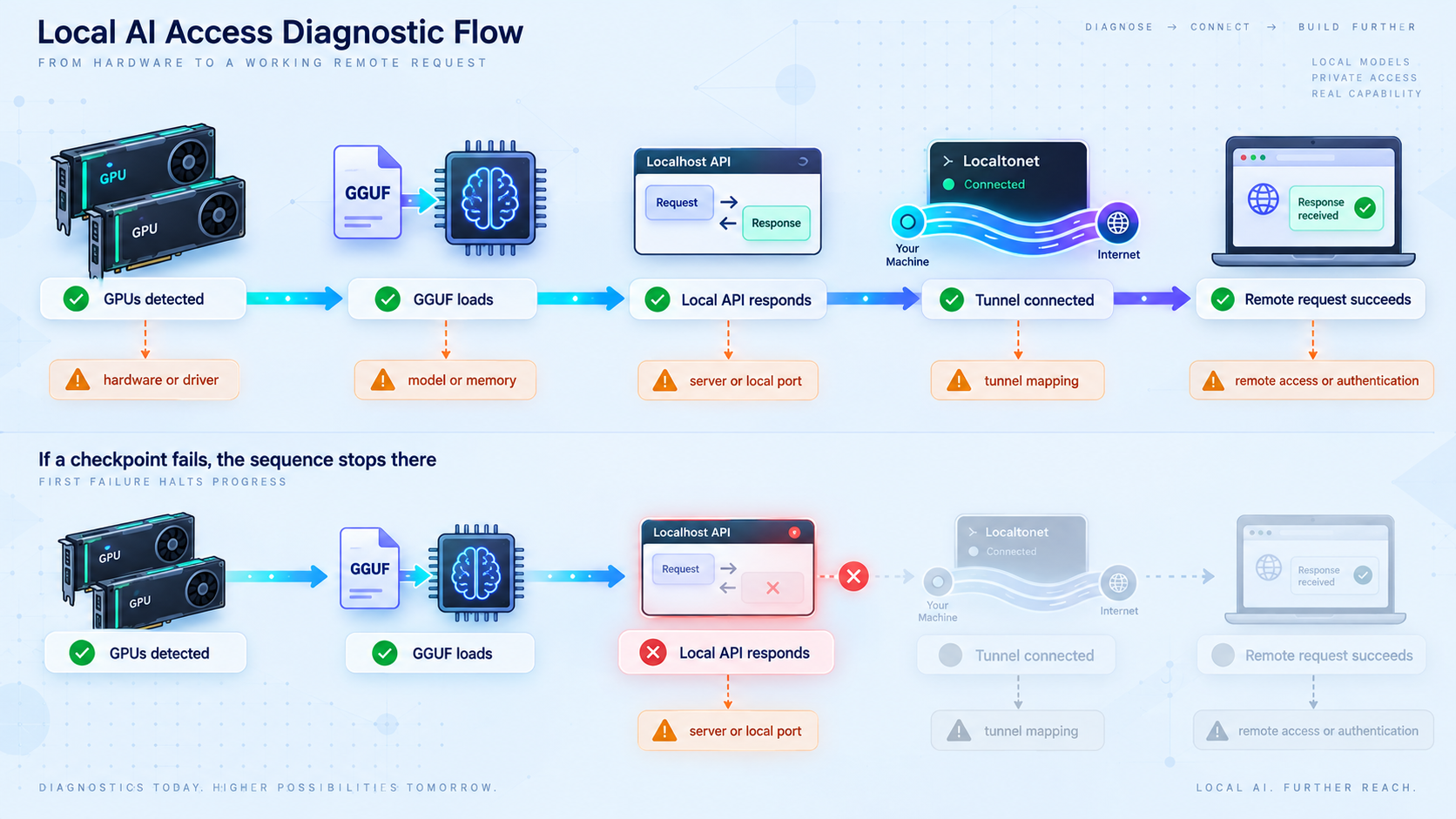
First prove that ggrun starts the backend. Next prove local HTTP connectivity. Then prove one local inference request. Only after those checks should you test the Localtonet public URL. This order prevents a model-loading problem from being misdiagnosed as a tunnel failure.
Frequently asked questions
Is ggrun an alternative inference engine to llama.cpp?
No. ggrun is a launcher around llama.cpp and ik_llama.cpp. It analyzes the GGUF and machine, builds and checks a placement plan, starts the selected backend, and keeps the generated command visible. The backend performs inference and serves the HTTP API.
Does ggrun require identical GPUs?
No. A central ggrun use case is planning large-model placement across mismatched multi-GPU systems. It considers available VRAM, RAM, bandwidth information, the GGUF tensor layout, and backend capabilities. A successful plan still depends on the total resources being sufficient for the selected model and runtime settings.
What port does the ggrun API use?
This guide does not assume a default because the supplied project evidence identifies the API as running at the configured host and port without establishing one universal port. Use the listener shown in the launch output or generated command, verify it locally, and enter that same value as the Localtonet target.
Can an OpenAI-compatible application connect to the server?
Yes. The launched llama.cpp server exposes an OpenAI-compatible /v1 API for chat completions and completions. Configure the application's base URL using the verified local address during initial testing and the Localtonet public address after the tunnel is active.
Does Localtonet require router port forwarding?
No. Our client establishes an outbound connection to a Localtonet relay. That allows the tunnel to provide a public URL without requiring inbound router port forwarding, a public IP address, inbound firewall changes, or a separate VPN setup.
Should the inference server listen on every network interface?
Not when that exposure is unnecessary. If the Localtonet client runs on the same machine, it can target a local listener. A LAN-reachable binding is needed only when the client runs elsewhere or another approved local consumer requires it. In that case, restrict firewall access to the necessary devices.
Is the public tunnel available after it is created?
Not automatically. Creating a Localtonet tunnel and running it are separate lifecycle actions. The selected client device must be connected, and the tunnel must be started. It becomes unavailable when the client disconnects or the tunnel is stopped or deleted.
Does a public HTTPS address automatically protect the inference API from unauthorized use?
No. A public HTTPS address provides an HTTP access path, but it should not be treated as proof of application authorization. Verify authentication and access-control behavior for the exact backend or protective application layer, keep credentials private, and stop the tunnel when remote access is not needed.
Connect your verified ggrun API with Localtonet
Start the model locally, confirm the configured HTTP listener and a real inference request, then create a Localtonet HTTP tunnel for that exact host and port. Keep the device token private and apply authentication before sharing the public endpoint.
Get Started Free →