

Publish the avatar interface, not the private GPU stack
A self-hosted AI avatar service may combine a browser interface, media-upload API, job queue, model runtime, GPU worker, temporary storage, and result-delivery path. Exposing that entire stack directly creates unnecessary risk. This implementation-neutral architecture guide explains how to place a narrowly scoped local gateway in front of those components and expose only that gateway through a Localtonet HTTP tunnel, without inbound router port forwarding, firewall changes, VPN setup, or a public IP address. It covers deployment planning, uploads, asynchronous jobs, previews, downloads, security controls, Localtonet configuration, verification, operations, troubleshooting, and protocol planning for real-time workloads.
📋 What's in this guide
What this guide does and does not implement
This article is an architecture and deployment-planning guide, not a reproducible installation tutorial for one named avatar project. Self-hosted avatar applications vary substantially in installation method, dependencies, GPU support, authentication, API design, ports, storage, and production startup procedures. No specific avatar application or production gateway implementation has been selected here, so it would be unsafe to invent package commands, container definitions, environment variables, route names, default ports, or persistence settings.
The guide is self-contained for its stated scope: deciding what to expose, designing the public boundary, mapping a generation workflow, preparing the host, creating the Localtonet HTTP tunnel, verifying the complete path, and operating it safely. You must still follow the supported installation and production deployment procedure for your chosen avatar software. Before adding a tunnel, that application must already be running behind a verified local HTTP interface.
An avatar web interface can be a static frontend, a framework development server, a production application server, a reverse proxy, or a gateway backed by several private services. Those designs are not interchangeable. Use only the installation paths, production commands, authentication controls, and persistent-storage settings documented by the project you selected.
The Localtonet portion is concrete because an HTTP tunnel has a defined target: a local IP address and port on, or reachable from, the device running our client. The dashboard workflow below preserves the supported sequence and terminology without inventing operating-system commands or hardcoded relay codes that can vary by client version, plan, region, or deployment.
Design a safe public architecture for an AI avatar service
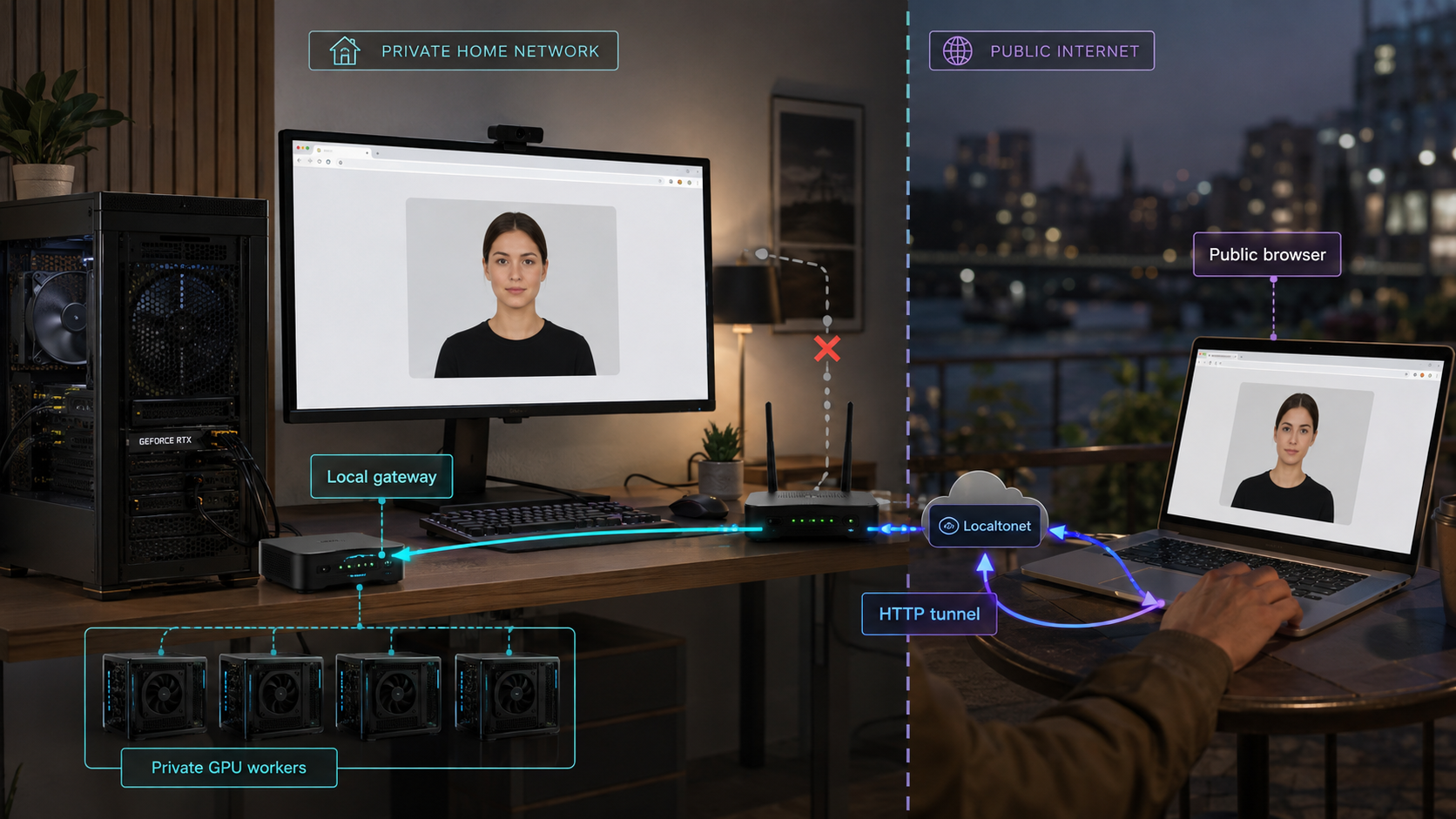
The safest exposure boundary is usually not the avatar model process itself. It is a small web application, production gateway, or API layer that accepts a limited set of requests, validates them, submits work to private components, and returns controlled responses. The GPU worker, queue, model server, database, object store, administrative tools, and development interfaces should remain inaccessible from the public tunnel unless there is a specific, reviewed reason to publish them.
This separation matters because media-generation stacks often grow organically. A development deployment might include a frontend that calls a model server directly, a queue dashboard without authentication, a temporary-output directory served by a basic web server, and an API that accepts local file paths. That arrangement may be convenient on a trusted workstation, but it is not an appropriate internet-facing boundary.
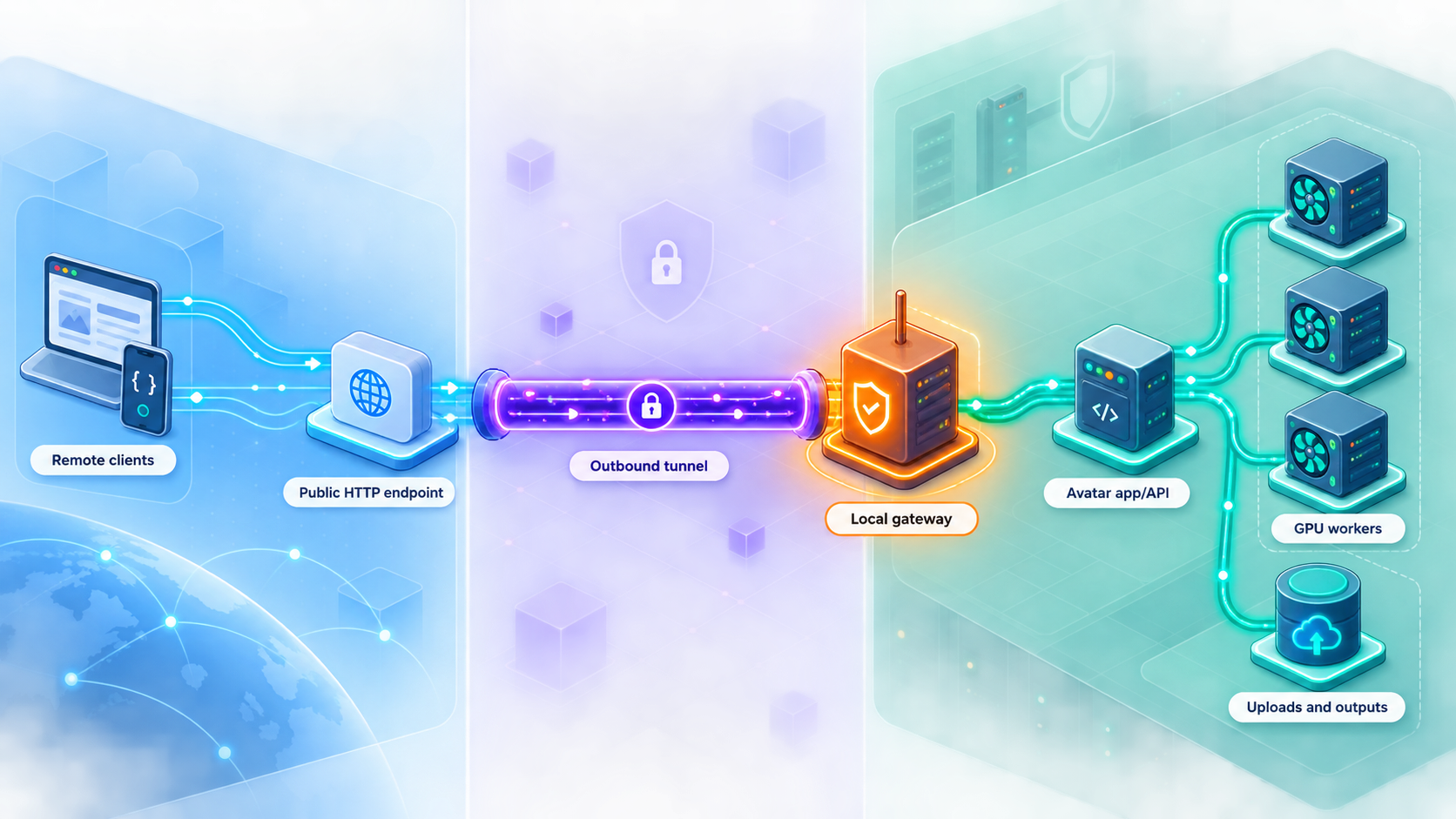
A safer design treats the public avatar application as an orchestrator. The browser or API client communicates with one local HTTP gateway. That gateway performs authentication and authorization, checks uploaded media, creates jobs, exposes narrowly scoped status endpoints, and authorizes result downloads. Internal calls from the gateway to the model runtime remain on the same machine or trusted private network.
With Localtonet, an HTTP tunnel points to a local IP address and port reachable from the device running our client. The tunnel does not need to know how the private inference stack is assembled. It only needs a working HTTP target. This makes the local gateway the natural boundary between public traffic and private GPU infrastructure.
Publishing an HTTP endpoint makes that endpoint reachable through its assigned public address. The avatar application must still enforce authentication, object-level authorization, request validation, safe file handling, and resource limits. Do not rely on an obscure URL as the only access control.
Map avatar generation to a web-friendly workflow
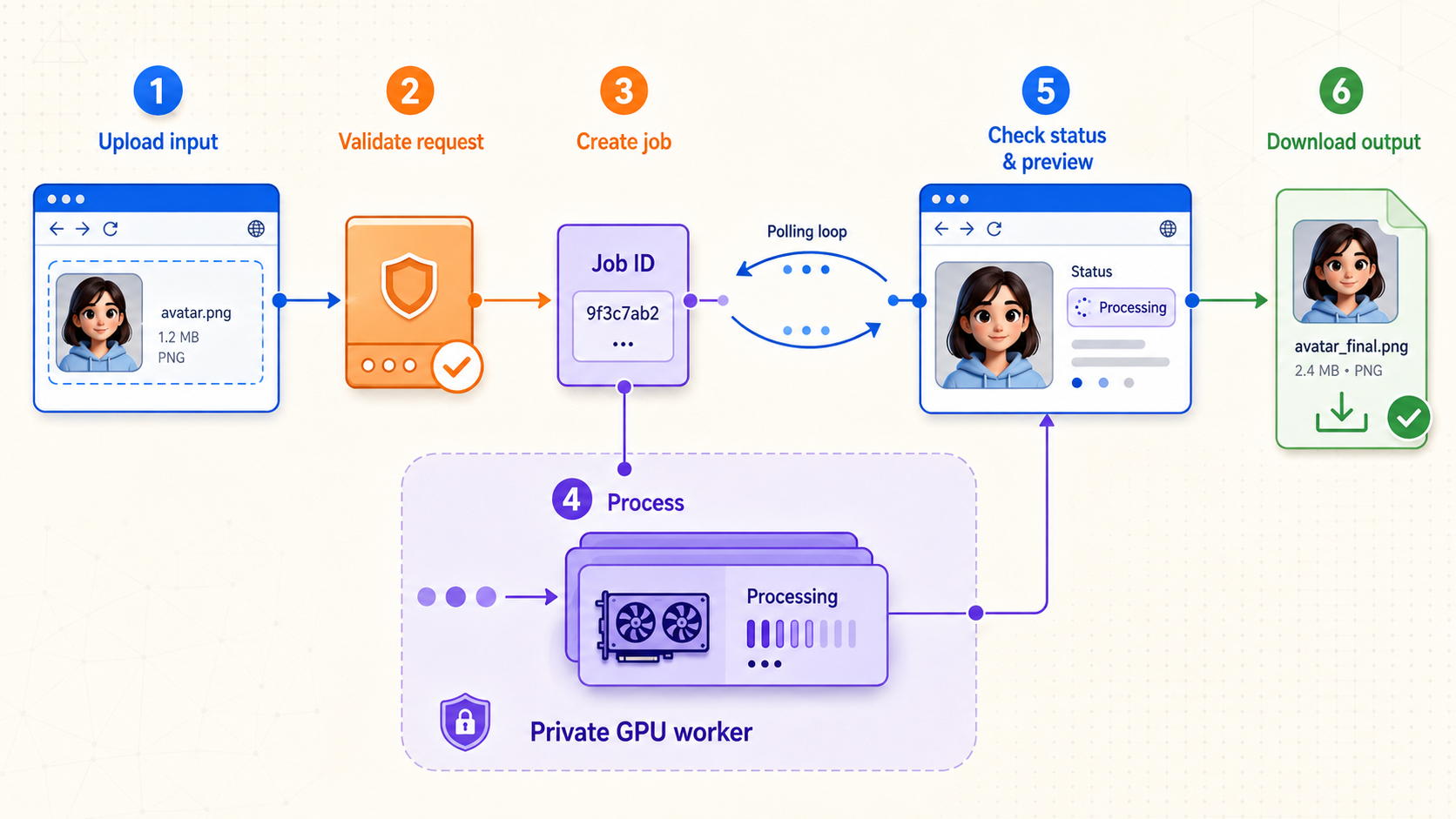
AI avatar systems differ in their models and rendering methods, but many remote-facing workflows share the same application pattern. A user uploads one or more inputs, creates a generation job, monitors progress, previews intermediate or final media, and downloads the result. Modeling these actions explicitly is safer and more reliable than holding one HTTP request open for an entire GPU render.
1. Upload source media
An upload might contain a portrait, source video, audio track, script, reference image, motion signal, or configuration document. The gateway should accept only the input types the selected workflow requires. It should reject oversized, unsupported, or malformed requests before they consume significant disk, memory, decoder, or GPU resources.
Store each accepted upload under a server-generated identifier. Do not use an untrusted filename as a storage path, and do not let the client choose an arbitrary local destination. Preserve the original filename only as non-authoritative display metadata when needed.
2. Create an asynchronous generation job
Avatar rendering can be expensive and unpredictable. Duration may depend on input length, output dimensions, frame rate, model state, available GPU memory, queue depth, and the implementation. A robust API therefore creates a job and returns an opaque job identifier instead of keeping the upload request open until rendering finishes.
The job record should belong to the authenticated user, tenant, or access scope that created it. The gateway can then place a trusted internal message on a queue for a private worker. Public clients should not be able to insert unrestricted worker commands, local filesystem paths, model paths, shell arguments, or arbitrary callback destinations.
3. Report state and progress
A status endpoint can return states such as queued, running, completed, failed, cancelled, or expired. Exact state names are an application decision, but they should be documented and stable. If numeric progress is available, state whether it represents frames processed, pipeline stages, estimated completion, or another measurement.
Polling is often the simplest remote-access design because it uses ordinary HTTP requests and recovers naturally after a temporary disconnection. Server-sent events or WebSocket-based updates may provide a more immediate interface, but the exact behavior must be tested with the application and current tunnel configuration. A page loading over HTTP does not prove that every feature uses short-lived HTTP requests.
4. Serve previews safely
A preview endpoint should return only media associated with a job the requester is allowed to view. Avoid exposing a temporary-output directory through directory listing. If previews are regenerated or replaced, use object identifiers that cannot be transformed into arbitrary filesystem paths.
Decide whether previews may be cached. Avatar images and videos can contain biometric, personal, confidential, or licensed material. Application responses should use cache behavior appropriate to the content and intended clients.
5. Authorize result downloads
Completion should not turn an internal output folder into a public file share. Deliver the result through an authenticated route, a short-lived application-controlled download mechanism, or another authorized storage workflow. Possession of a valid job identifier must not automatically prove that a requester may download its output.
6. Expire and delete artifacts
Uploads, extracted frames, audio intermediates, previews, final videos, logs, and failed-job remnants can consume storage rapidly. Define retention independently for each category. Cleanup should cover successful, failed, cancelled, abandoned, expired, and partially uploaded jobs.
| Public operation | Recommended application behavior | Keep private |
|---|---|---|
| Media upload | Authenticate, limit size, validate type, generate a storage name, and return an opaque media identifier | Host paths, raw temporary directories, and decoder controls |
| Create job | Validate parameters, enforce quotas, create an owned job record, and enqueue trusted work | Worker commands, model filesystem paths, and unrestricted pipeline graphs |
| Read progress | Return a limited status document for a job the requester may access | Queue administration, worker diagnostics, and other users' jobs |
| View preview | Authorize the request and stream only the expected preview asset | Directory listings and predictable temporary filenames |
| Download result | Check ownership or permission and use a controlled response path | The complete output directory and unrelated generated files |
| Cancel job | Verify authorization and apply a defined cancellation transition | General worker termination and process-management interfaces |
Prerequisites and deployment decisions
Complete the avatar application's supported installation process before configuring public access. Depending on the chosen project, that may involve native packages, Python or JavaScript dependencies, containers, model downloads, GPU drivers, persistent volumes, or a production application server. Those paths are project-specific and must not be mixed with instructions from an unrelated avatar stack.
Before configuring Localtonet, confirm all of the following:
- The avatar service is installed and starts successfully on the host or private network.
- The documented production startup method is being used instead of an interactive development server.
- A browser interface, application gateway, or reverse proxy provides the intended public HTTP boundary.
- You know the actual local IP address and port of that boundary.
- The device running the Localtonet client can reach that IP address and port.
- The gateway requires authentication before accepting uploads, creating jobs, reading status, viewing previews, cancelling work, or downloading results.
- Internal model, queue, database, storage, administration, and GPU worker interfaces are excluded from the public route set.
- Upload limits, job concurrency limits, retention rules, storage capacity, and cleanup behavior are defined.
- Application state that must survive restarts is stored using the avatar project's supported persistence mechanism.
- You have consented, non-sensitive test media and a low-cost test job for end-to-end verification.
Choose where the Localtonet client will run
The simplest arrangement places our client on the same machine as the public application gateway. If the gateway listens only on a loopback address, a Localtonet client on that machine can target the appropriate loopback IP address and application port.
The client may instead run on another device that can reach the gateway over a private network. In that design, the gateway must listen on an address reachable from the client device, and the private network must permit that connection. Do not make an internal service listen on every interface merely as a troubleshooting shortcut. Restrict private-network reachability to what the deployment requires.
Install the Localtonet client using the current supported package
Install the Localtonet application for the operating system on the device that will originate the tunnel. Use the current installer or package presented by Localtonet for that platform, then run the client and associate it with its device-specific auth token. Installation commands and package formats can change between operating systems and client versions, so this article does not publish an unverified command.
A device auth token identifies the Localtonet client that will run the tunnel. Treat it as a secret. Do not place it in frontend code, public repositories, screenshots, shared logs, support posts, or examples.
Confirm the local service before involving the tunnel
Test the gateway from the Localtonet client device. Confirm that the landing page or health endpoint responds, authentication is enforced, a test upload succeeds, a small job can be created, status can be retrieved, and the result can be downloaded. If the local path does not work, creating a public tunnel will not repair the application.
Plan persistence, restart, and cleanup
Identify which components must survive a restart: user accounts, job records, uploads, generated assets, queue state, model files, and application configuration. Use only persistence methods supported by the selected avatar project and gateway. Test a planned restart before exposing the service and confirm that jobs do not become permanently stuck in an incorrect state.
Also document cleanup. Removing public access means stopping or deleting the Localtonet tunnel. Removing the application may additionally require stopping its services or containers and deleting project-specific state, uploaded media, generated results, caches, models, and credentials. Follow the application's own uninstall procedure so that required data is not accidentally destroyed or sensitive data left behind.
Understand the tunnel lifecycle
Creating a Localtonet tunnel does not mean it is running. It must be started with the Start button. The public endpoint is available only while the selected client device is connected and the tunnel is running. Sleep, shutdown, client termination, network loss, or stopping the tunnel can make the endpoint unavailable.
First install, configure, start, and verify the avatar application and gateway locally. Then add Localtonet as the remote-access layer. This sequence makes failures easier to diagnose and prevents a tunnel configuration problem from being confused with an application, GPU, storage, or authentication failure.
Plan a narrowly scoped local gateway
The gateway is the most important security component in this architecture. It should expose a deliberately small public contract while translating accepted requests into private operations. It may be built into the avatar application or provided by a separate production web service or reverse proxy. This section defines the behavior to require, not a framework-specific configuration.
Define an explicit route allowlist
Inventory the routes remote users need. A typical design may require authentication, upload creation, job creation, job status, preview retrieval, result download, and cancellation. The exact route names depend on the application and should be taken from its implementation rather than copied from a generic example.
Deny or omit administrative routes, model-management endpoints, queue dashboards, interactive debuggers, sensitive metrics, unrestricted file browsers, development consoles, and general-purpose proxy behavior. If a bundled interface cannot hide those functions, place a restrictive production gateway in front of it rather than publishing the bundled server directly.
Use asynchronous job semantics
Keep job-creation requests short. Once validation succeeds and the job is durably recorded or queued, return its identifier. The client can retrieve state separately. This avoids coupling a potentially long GPU render to one network connection and gives the application a clear place to implement retries, cancellation, queueing, and failure reporting.
Job creation should be idempotent when an accidental retry might duplicate expensive work. One possible application design is to accept a unique request identifier within the user's authorized scope. A repeated request can then return the existing job instead of starting another render. The exact mechanism belongs to the avatar application, not the tunnel.
Control concurrency and cost
Authentication alone does not prevent an authorized user from exhausting a GPU. Set limits for active uploads, queued jobs, simultaneous renders, output duration, dimensions, frame count, input count, and storage consumption according to the local system's capacity. Reject excess work predictably instead of allowing the operating system or GPU runtime to fail under pressure.
Separate admission from execution. The gateway should decide whether a request is allowed before a worker allocates expensive resources. Queue capacity should be finite, and clients should receive a controlled response when capacity is unavailable.
Design safe failure responses
Public errors should explain what the user can correct without revealing internal paths, stack traces, environment variables, model locations, dependency versions, worker addresses, or secrets. Store detailed diagnostics in protected local logs and associate them with a request or job identifier that operators can search.
Handle callbacks carefully
If the application supports completion callbacks or webhooks, do not allow arbitrary users to make the gateway request any destination without validation. User-controlled callback URLs can create server-side request forgery risk. Restrict destinations, validate resolved addresses, control redirects, and block access to private or link-local destinations as appropriate to the implementation. Disable callbacks when polling satisfies the workflow.
The OWASP Server-Side Request Forgery Prevention Cheat Sheet provides primary implementation guidance for allowlists, network-layer controls, URL validation, DNS behavior, redirects, and private-address protections.
Secure uploads, jobs, previews, and downloads
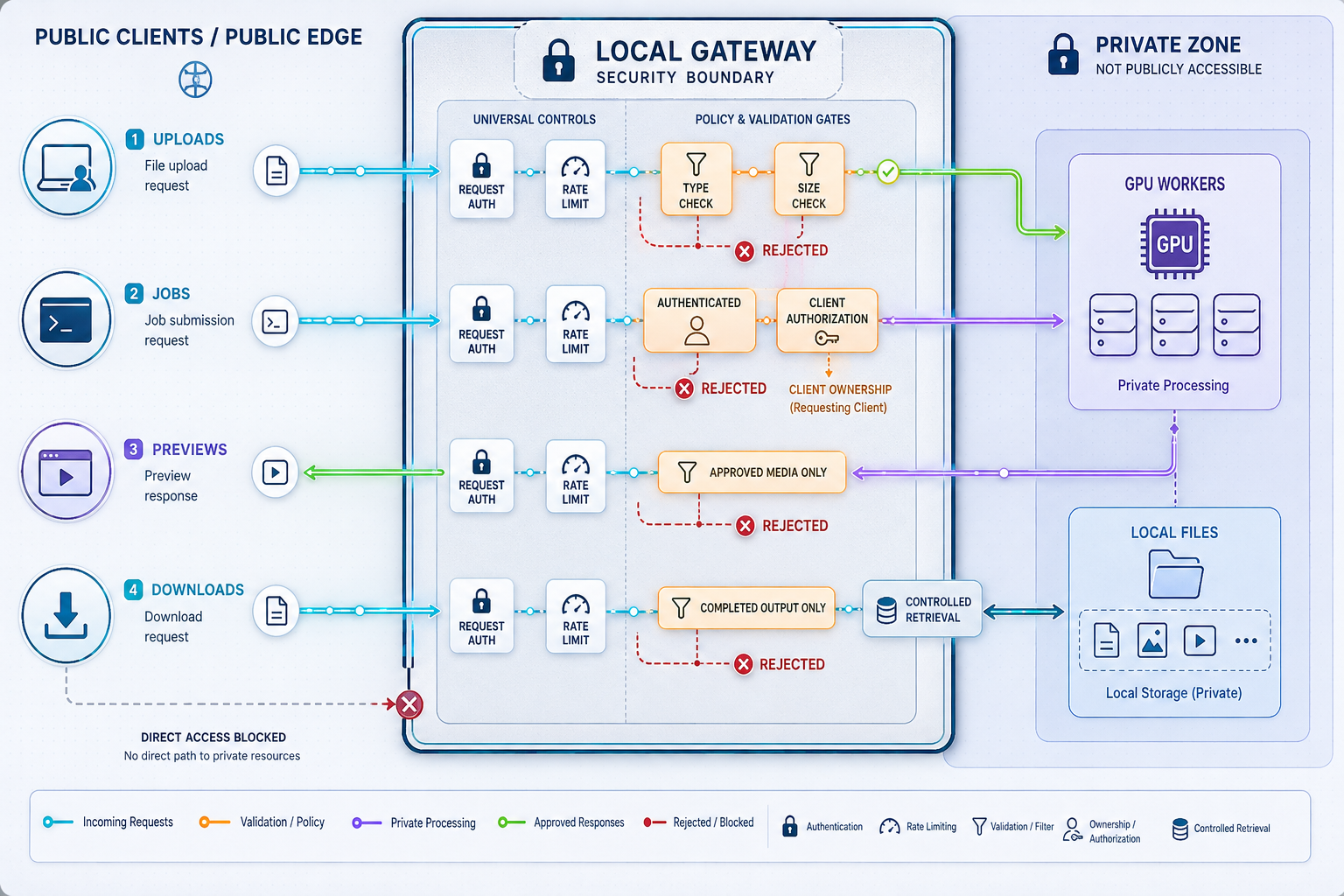
Public AI media endpoints combine several high-risk characteristics: large request bodies, complex decoders, long-running compute, sensitive content, and expensive output generation. Security must address both unauthorized data access and resource abuse.
Require authentication and object-level authorization
Authentication establishes who is making a request. Authorization determines whether that identity may perform the requested action. Apply both to every sensitive operation. A user allowed to create a job must not automatically be allowed to inspect every job on the server.
Use opaque, non-sequential identifiers for jobs and media, but do not treat opacity as authorization. Every status, preview, cancellation, deletion, and download request should verify ownership, project membership, role, tenant, or another explicit access rule. This is especially important for APIs that retrieve objects using identifiers supplied by clients.
The OWASP API Security guidance on Broken Object Level Authorization explains why every endpoint receiving an object identifier needs an authorization check tied to the authenticated identity.
Keep credentials out of URLs because URLs can appear in browser history, logs, analytics, screenshots, and referrer data. Never embed a Localtonet device token in frontend code or distribute it to users of the avatar application.
Validate media beyond the filename
File extensions and client-provided content types are hints, not proof. Apply an allowlist of formats the workflow supports, inspect content using a safe method appropriate to the application, reject malformed structures, generate server-side filenames, and process files with maintained libraries. If the pipeline invokes external media tools, pass structured arguments safely instead of building shell commands from user input.
Set limits for compressed and expanded size, dimensions, frame count, duration, channel count, archive contents, and metadata where relevant. A small compressed input can expand into a much larger in-memory or on-disk representation.
The OWASP File Upload Cheat Sheet recommends defense in depth, including extension allowlists, content-type skepticism, generated filenames, size limits, authorized uploaders, storage outside the web root, and appropriate malware or content checks.
Prevent path traversal and filename collisions
Generate internal storage names and keep uploads within a dedicated root. Normalize and validate paths before use, and reject attempts to escape the intended directory. Do not allow a request to overwrite model files, configuration, logs, another user's upload, or an existing result.
Use separate locations or namespaces for incoming uploads, validated inputs, working files, previews, final results, and quarantined failures. This separation makes cleanup, lifecycle management, and permission enforcement easier.
Set request, queue, and time limits
Apply maximum request-body sizes, upload time limits, header limits, and sensible idle timeouts at the gateway. Values must be selected for the expected media workload. A limit appropriate for a portrait-image generator may be unusable for source-video processing, while an unlimited body size creates unnecessary exposure.
Long inference duration should be handled by the job system rather than by setting every HTTP timeout to an extreme value. Keep upload, job creation, status, preview, and download operations separate so each can use behavior appropriate to its purpose.
Protect generated and source media
Treat source and generated assets as private unless the service is intentionally public. Use least-privilege filesystem permissions. Avoid writing sensitive media into a directory served without authorization. Define retention periods and expose deletion controls where appropriate.
Logs should contain enough information to investigate failures and abuse without copying credentials, complete request bodies, personal scripts, or sensitive media into general-purpose log streams. Review what the web framework, reverse proxy, application, and worker log by default.
Control browser origins and request forgery
If a browser frontend and API use different origins, configure cross-origin access narrowly. Do not permit every origin with credentials merely to make development easier. Allow only the expected frontend origins, methods, and headers. If the frontend and API share one public origin, deployment may be simpler, but authentication and request-forgery protections are still required.
Development servers and debug interfaces may reveal stack traces, source code, environment details, or interactive execution features. Use the avatar project's documented production configuration and place a controlled gateway in front of internal components. Because no specific project is selected here, this guide cannot safely prescribe a production command or default server.
| Risk | Gateway control | Operational control |
|---|---|---|
| Unauthorized generation | Authentication, authorization, and scoped API access | Review access and revoke credentials when no longer needed |
| GPU exhaustion | Finite queues, concurrency limits, quotas, and input constraints | Monitor queue depth, render duration, memory, and failures |
| Storage exhaustion | Upload limits and per-user or per-project quotas | Apply retention and cleanup to every terminal job state |
| Malicious media | Format allowlists, structural validation, and safe decoder use | Patch media libraries and isolate processing where practical |
| Cross-user data access | Object-level checks on jobs, previews, and downloads | Audit authorization failures without logging sensitive content |
| Callback SSRF | Destination allowlists, address validation, and redirect controls | Restrict outbound network access and monitor callback failures |
| Information leakage | Sanitized errors and protected administrative routes | Restrict logs, backups, temporary files, and diagnostics |
Expose the gateway with a Localtonet HTTP tunnel
Once the local gateway works and its security boundary has been reviewed, add remote access. Our client establishes an outbound connection to a Localtonet relay server. The resulting HTTP tunnel provides a public HTTPS address for the selected local IP address and port without requiring inbound router port forwarding, firewall changes, VPN setup, or a public IP address.
HTTP tunnels use a Process Type of Random Sub Domain, Custom Sub Domain, or Custom Domain. These Process Types serve the same local content at a public HTTPS address. Availability may vary by plan or current dashboard configuration. Check current custom-domain DNS requirements before making DNS changes.
The supported dashboard sequence is:
Install and run the Localtonet application
Install the current Localtonet client for the operating system on a device that can reach the avatar gateway. Run the application and make sure the device is connected. Use the current platform package and authentication flow presented by Localtonet rather than an old or unverified command.
Open the HTTP Tunnel page
In the Localtonet dashboard, go to the HTTP Tunnel configuration page. Use an HTTP tunnel only for a gateway that you have verified is actually serving HTTP.
Select the Process Type
Choose Random Sub Domain, Custom Sub Domain, or Custom Domain according to the options currently available to your account. Confirm current DNS requirements before selecting Custom Domain.
Select the AuthToken and server
Select the device-specific AuthToken for the client that will run the tunnel, then select an available server from the dashboard. Do not hardcode or guess a server code or region. Keep the AuthToken private.
Enter the local IP address and port
Enter the actual IP address and port of the protected avatar gateway as reachable from the selected client device. Do not target the GPU worker, queue dashboard, database, unrestricted model API, administrative interface, or temporary-file server.
Press Start
Review the target and press Start. Creating the tunnel configuration does not make it active by itself. The public address remains available only while the selected client is connected and the tunnel is running.
The Localtonet HTTP tunnel documentation is the canonical place to confirm the current dashboard presentation, platform installation choices, relay availability, domain behavior, and any plan-specific options.
A target that works from your laptop may still be unreachable from the device running our client. Test the gateway from that client device. If the client and gateway are on different machines, verify the private address, listening interface, local firewall policy, and network route.
Verify the complete remote workflow
A successful landing page proves only that one route can respond. An avatar service needs an end-to-end test that exercises authentication, upload validation, asynchronous generation, progress, preview delivery, downloads, cleanup, and failure behavior.
Run a local baseline first
Perform the workflow against the local gateway from the Localtonet client device before testing the public URL. Record expected responses and resource behavior. Use non-sensitive test media and a small job that does not consume unnecessary GPU time.
Test from outside the local network
Use an external device or network that is not relying on the same private route. Open the assigned public address and confirm that unauthenticated access is rejected where expected. Then authenticate with a test identity that has only the permissions required for the workflow.
Exercise each workflow stage
- Upload one valid test asset and confirm that the application assigns an opaque identifier.
- Attempt a disallowed file type and confirm that validation rejects it safely.
- Attempt an oversized request and confirm that the gateway returns a controlled response.
- Create one inexpensive job and verify the documented duplicate-submission behavior.
- Read job status until the job reaches a terminal state.
- Open a preview and confirm that an unauthorized identity cannot retrieve it.
- Download the result and verify its content and media type.
- Test cancellation if the selected application supports it.
- Confirm that expired or deleted assets are no longer retrievable.
Test object authorization
Create jobs under two separate test identities if the application supports multiple users. Verify that changing a job or media identifier does not expose another user's status, preview, result, deletion, or cancellation action. Test both accidental identifier changes and deliberate attempts to access another object.
Test interruption and recovery
Stop the tunnel while a private worker is processing a test job. The public client should lose access, but whether the private job continues depends on the avatar application's job semantics. Restarting the tunnel does not guarantee that an interrupted browser request will resume. The client should query the job again after connectivity returns.
Also test a Localtonet client restart, gateway restart, failed render, full queue, insufficient storage, and invalid input. The application should return controlled states rather than leaving jobs permanently marked as running.
Observe resource behavior
During testing, inspect CPU usage, GPU memory, system memory, disk consumption, temporary storage, queue depth, and generation duration. Verify that one user cannot create an unbounded number of jobs or simultaneous uploads. Confirm that cleanup occurs after success, failure, cancellation, and expiration.
Avatar inputs and results may contain personal likenesses, voices, or confidential content. Use media you are authorized to process and share. Technical access controls do not replace consent, licensing, disclosure, or other obligations applicable to the deployment.
Operate, stop, and troubleshoot the service
Remote access is reliable only when the application, gateway, worker, storage, Localtonet client, and tunnel lifecycle are operated as one system. Monitoring should distinguish a public-connectivity failure from a local gateway failure or an inference failure.
Monitor separate health layers
- Public reachability: Can an authorized external check reach the assigned public address?
- Gateway health: Can the Localtonet client device reach the configured local IP address and port?
- Dependency health: Can the gateway reach its private queue, storage, database, and worker?
- Inference health: Can a controlled test job complete without exhausting resources?
Keep public health responses minimal. They should not reveal internal hostnames, model paths, GPU details, dependency versions, queue contents, or environment configuration.
The public address does not respond
Confirm that the selected Localtonet client is connected and that the tunnel is running. Remember that creating a tunnel is not the same as starting it. Check whether the host is sleeping, shut down, disconnected, or running the client under a user session that ended.
Test the local gateway from the client device. If that fails, confirm the target IP address, target port, listening interface, process state, and private-network route. A connection-refused response commonly indicates that no service is listening at the destination. A timeout may indicate routing, firewall, or process availability problems, but exact interpretation depends on the operating system and application.
The interface loads, but jobs fail
If basic HTTP routes work, the tunnel has reached the gateway. Investigate the private application path: validation, queue insertion, worker availability, model loading, GPU memory, input decoding, storage permissions, and output creation. Do not address an internal worker failure by exposing the worker publicly.
Uploads fail or stop partway through
Compare the file with application-level body-size, duration, dimension, and format limits. Check temporary storage and gateway logs. A reverse proxy or web framework may have its own request limit or timeout. Adjust limits deliberately and retain a finite ceiling instead of disabling every protection.
Generation completes, but the download fails
Verify that the job record points to the expected result and that the gateway process can read it. Confirm authorization for the correct user, make sure cleanup did not run too early, and check that the response is not attempting to expose an invalid internal path. Test the same download locally before attributing the failure to the tunnel.
Progress updates do not appear
Determine how the application transports updates. Polling, server-sent events, WebSockets, and custom media transports have different connection behavior. If polling works but a persistent update channel does not, review the application's protocol and connection requirements. Verify compatibility for the exact mechanism rather than assuming it.
Requests duplicate after a retry
Network interruptions can cause clients to retry without knowing whether the original job was accepted. Use application-level idempotency or a safe lookup mechanism for expensive job-creation requests. The tunnel forwards traffic, but it does not define duplicate-submission semantics.
Storage usage keeps increasing
Inspect abandoned uploads, failed decoder output, extracted frames, cancelled jobs, preview caches, completed results, and logs. A cleanup process that handles only successful jobs is incomplete. Use explicit retention states and verify cleanup through routine tests.
Stop public access and clean up safely
Press Stop for the tunnel when remote access is no longer required. Delete obsolete tunnel configurations if they should not be reused. Stopping or deleting a tunnel does not remove local uploads, generated media, application accounts, model files, logs, or credentials. Clean those up through the avatar application's supported administration or uninstall process.
| Symptom | First check | Likely layer |
|---|---|---|
| Public URL unavailable | Client connection and tunnel running state | Localtonet lifecycle or host connectivity |
| Public and local target both fail | Gateway process, IP address, port, and listener | Local application or private network |
| Login works, generation fails | Queue, worker, model, GPU, and storage logs | Private inference stack |
| Small uploads work, large uploads fail | Request limits, timeouts, disk capacity, and format checks | Gateway or application configuration |
| Other users can read a job | Object-level authorization on every object route | Application security |
| Jobs duplicate after reconnect | Job-creation idempotency and retry behavior | Application protocol |
Plan separately for real-time and interactive avatars
Batch avatar generation maps naturally to HTTP: upload media, create a job, poll status, and download a result. A real-time avatar may have a different media path involving persistent sessions, bidirectional control, continuous audio, continuous video, or application-specific TCP or UDP traffic.
Do not choose a tunnel based only on the fact that the control page opens in a browser. Inspect the protocol used for the actual media path. Application documentation, browser developer tools, server configuration, and authorized network observation can help identify whether the system uses ordinary HTTP requests, a persistent browser protocol, raw TCP, UDP, or multiple related flows.
| Workload component | Possible network pattern | Planning guidance |
|---|---|---|
| Upload and job creation | Ordinary HTTP requests | Use an HTTP gateway and enforce authentication, validation, and limits |
| Status polling | Repeated short HTTP requests | Keep responses small and apply sensible polling intervals |
| Persistent progress channel | Long-lived HTTP-derived connection | Test the exact application behavior and current tunnel compatibility |
| Result delivery | HTTP media download | Authorize every object and define caching and retention behavior |
| Interactive media stream | Application-specific TCP, UDP, or multiple flows | Document every required flow before selecting tunnel types |
| Private worker control | Internal HTTP, TCP, queue, or process interface | Keep it private and reach it only through trusted internal paths |
Localtonet supports HTTP/s, TCP, UDP, TLS, and combined UDP/TCP tunnel families. This does not mean that every real-time avatar system will work by opening each observed port. Interactive protocols may negotiate addresses dynamically, require multiple related flows, depend on browser behavior, or contain their own authentication assumptions.
Start with an inventory of protocol, direction, local address, local port, session lifetime, authentication method, and whether the flow carries public user data or private control traffic. Expose only the minimum public flows. Keep administrative and worker-control paths private even if they use the same protocol family as public media.
An HTTP tunnel is appropriate for a verified HTTP interface. If live audio or video uses raw TCP, UDP, combined transport, or another specialized protocol, plan that path separately and confirm current Localtonet options in the dashboard and documentation. Do not expose additional ports speculatively.
Frequently asked questions
Is this a complete installation tutorial for a specific AI avatar project?
No. It is an implementation-neutral architecture and deployment-planning guide. It defines a safe public boundary and the complete Localtonet exposure workflow, but it does not invent installation commands, ports, routes, credentials, or production settings for an unspecified avatar application.
Can I expose a self-hosted AI avatar service without router port forwarding?
Yes. The Localtonet client establishes an outbound connection to our relay, and an HTTP tunnel can provide a public address for a local avatar gateway. This does not require inbound router port forwarding, firewall changes, VPN setup, or a public IP address. The client must remain connected and the tunnel must be running.
Should I point the tunnel directly at the model server or GPU worker?
Usually no. Point it at a narrowly scoped application gateway that authenticates users, validates uploads, enforces quotas, creates jobs, and authorizes previews and downloads. Keep unrestricted model controls, workers, queues, databases, storage services, and debugging tools private.
Does creating a Localtonet tunnel start it automatically?
No. Creating a tunnel configuration does not mean it is running. Start it with the Start button. The selected device must be connected, and the tunnel remains available only while the client is connected and the tunnel is running.
Does an HTTP tunnel authenticate users of my avatar API?
The tunnel provides connectivity to the configured target. Your gateway must enforce application authentication and authorization. Protect upload, job, status, preview, cancellation, deletion, and download operations, and verify object-level access on every request.
How should long-running avatar generation requests work?
Prefer an asynchronous workflow. Validate the request, create and enqueue a job, return an opaque identifier, and let the client query status separately. This provides clearer retry, cancellation, queue, and failure behavior than holding one request open for the entire render.
Can Localtonet expose an avatar gateway running on another machine?
The HTTP target may be on or reachable from the device running our client. If it is on another private machine, the client device must be able to reach the selected IP address and port. Configure private listening addresses, routes, and firewall rules according to least privilege.
Which port should I use for my self-hosted avatar application?
Use the port configured by the actual production gateway or avatar project. There is no universal AI avatar port. Verify the application's configuration and test that exact address from the Localtonet client device before creating the tunnel.
Is an HTTP tunnel enough for a real-time talking avatar?
It depends on the application's media path. Uploads, job creation, polling, and downloads commonly fit HTTP. Interactive audio or video may use persistent browser connections, raw TCP, UDP, combined flows, or another protocol. Inspect the implementation, choose the minimum suitable tunnel type, and test it end to end.
What happens to a running generation job if the tunnel stops?
Public access stops when the tunnel or selected client is no longer running. Whether an already queued or running generation continues is determined by the local avatar application's job system. A robust client should reconnect later and query the job state instead of assuming the original request remains active.
Can I use a custom domain for the avatar interface?
HTTP tunnels have Random Sub Domain, Custom Sub Domain, and Custom Domain Process Types. Availability may vary, and exact custom-domain DNS requirements must be checked against the current Localtonet documentation and dashboard before configuration.
Publish your protected avatar gateway with Localtonet
Verify the avatar workflow locally, keep the model runtime and GPU worker private, then create an HTTP tunnel to the narrowly scoped gateway. Begin with test media, minimum privileges, finite resource limits, and documented shutdown, retention, and cleanup procedures.
Get Started Free →