

Connect an authorized remote CoAP client to a locally reachable UDP endpoint
CoAP uses UDP and application-level exchange rules that differ from an ordinary web application. This guide explains how to prepare a CoAP endpoint, install Localtonet on a supported Debian or Ubuntu host, create a UDP tunnel, and verify the same resource locally and through the assigned public host and port. It also covers Confirmable messages, Observe relationships, block-wise transfers, DTLS, authorization, lifecycle management, and troubleshooting. The goal is to establish controlled remote reachability without confusing UDP forwarding with endpoint security.
📋 What's in this guide
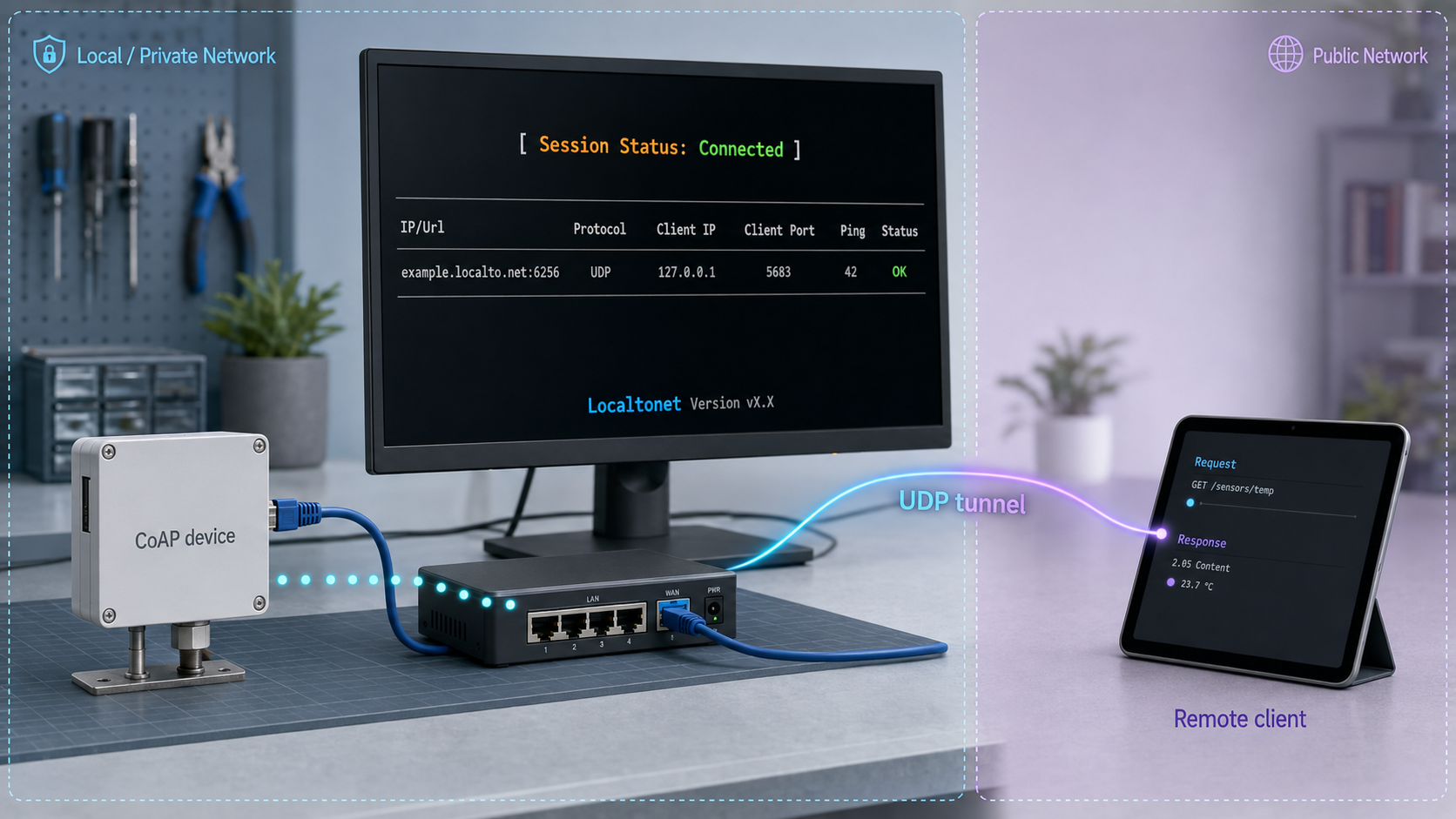
How a Localtonet UDP tunnel fits into CoAP remote access
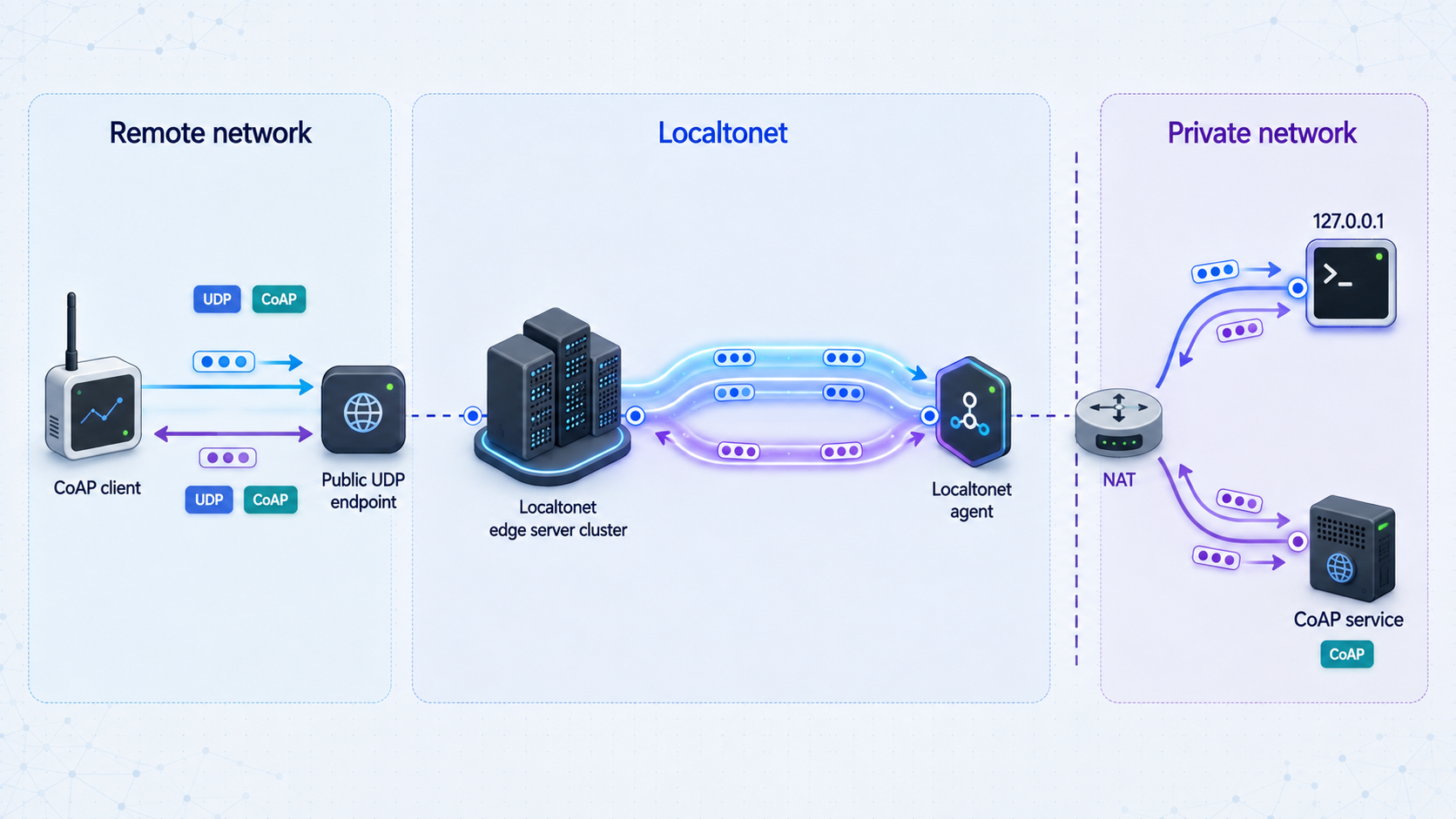
A CoAP server in a development lab is commonly reachable only from its own computer or private network. It might listen on a loopback address, a LAN address, a container network, or an interface attached to an embedded-device gateway. A remote client cannot normally address that private endpoint directly because private addresses are not routed across the public internet and an inbound NAT or firewall rule may not exist.
With Localtonet, our client application runs on a device that can reach the CoAP server. The client establishes an outbound connection to a Localtonet relay server. A UDP tunnel then provides a public host and port and forwards incoming UDP traffic toward the configured local IP address and port. This avoids inbound router port forwarding, a new public listener on the router, VPN setup, and the need for a public IP address on the lab network.
Placement of the Localtonet client matters. It does not need to run inside the CoAP server process, but the selected client device must be able to route UDP traffic to the target. If the server listens only on 127.0.0.1, run Localtonet on that same host. If the server listens on a LAN interface, Localtonet may run on another reachable machine, subject to the server host's routing and local firewall policy.
The selected Localtonet device must be connected and the tunnel must be started with the Start control. The public endpoint remains available only while that device is connected and the tunnel is running.
The tunnel changes how a remote client reaches the service, but it does not change CoAP into a connection-oriented protocol. Message correlation, retransmission, duplicate detection, Observe, block-wise transfer, and DTLS behavior remain the responsibility of the participating CoAP implementations. Test those behaviors across the complete public path rather than inferring them from one successful request.
CoAP behavior that matters across a UDP tunnel
The Constrained Application Protocol is standardized in RFC 7252. It is designed for constrained nodes and constrained networks and provides a resource model with methods such as GET, POST, PUT, and DELETE. Its binary framing and exchange rules are designed around datagrams rather than a persistent TCP byte stream.
A CoAP message contains a message type, code, message ID, token, options, and an optional payload. The message ID participates in acknowledgment and duplicate detection. The token associates a response with a request from the client's perspective. Because these fields serve different purposes, a test should not assume that matching message IDs alone is sufficient for every exchange.
Confirmable and Non-confirmable exchanges
A Confirmable message asks the recipient to acknowledge receipt at the CoAP layer. If the sender does not receive the expected acknowledgment or response, the implementation can retransmit according to the algorithm described by the protocol and its configured parameters. A Non-confirmable message does not request a CoAP acknowledgment. It reduces exchange overhead, but transmission alone is not proof of delivery.
An acknowledgment can carry a response in a piggybacked exchange. A server may instead acknowledge the request and return a separate response later. A Reset reports that a message was received but could not be processed in the expected context. A useful remote test therefore checks response codes, tokens, message behavior, payloads, and timing rather than treating any returned datagram as success.
| CoAP mechanism | Purpose | What to verify remotely |
|---|---|---|
| Confirmable message | Requests application-level acknowledgment and supports retransmission | The expected ACK or response arrives, and retries stay within the implementation's configured policy |
| Non-confirmable message | Sends without requesting a CoAP acknowledgment | The application tolerates loss and does not treat transmission as proof of delivery |
| Piggybacked response | Carries the response in the acknowledgment | The code, token, options, content format, and payload are correct |
| Separate response | Allows an acknowledgment first and the result later | The delayed response returns and remains associated with the original token |
| Reset message | Reports that a message cannot be processed in the expected context | The client distinguishes a protocol Reset from a network timeout |
| Observe | Allows resource changes to produce notifications | Registration and notifications survive the expected operating interval and recover correctly after interruption |
| Block-wise transfer | Splits a larger representation across multiple CoAP exchanges | All blocks arrive and the completed representation is reconstructed correctly |
Observe creates a longer-lived relationship
CoAP Observe is defined in RFC 7641. It allows a client to register interest in a resource and receive notifications when the represented state changes. This is useful for sensor readings and device status, but it creates a longer-lived relationship than a single GET.
A successful initial registration proves only that the first exchange worked. It does not establish how the deployment behaves after a quiet interval, network transition, relay interruption, server restart, or Localtonet client reconnection. Test Observe with realistic update intervals and document whether the client automatically re-registers.
Block-wise transfer still depends on the complete path
Block-wise transfer is specified in RFC 7959. It divides a larger request or response into smaller CoAP exchanges. This can help with configuration documents, batches of sensor data, and firmware-related payloads without changing the application to TCP.
Block-wise transfer does not mean arbitrary UDP datagram sizes will work across every network. The path may include a mobile network, NAT devices, the public relay path, the Localtonet client host, a LAN, and the constrained device. Start with a block size supported by both endpoint implementations, then test the complete representation through the actual remote path.
Prerequisites and tutorial scope
This reproducible path uses a Debian 12 or Ubuntu 22.04 or newer x64 host for the Localtonet client. The current Linux package requirements documented by Localtonet include systemd 247 or newer and OpenSSL 3. The same host must be able to reach the CoAP server over UDP.
The verification path uses Python 3, the standard venv module, and the aiocoap-client utility installed into an isolated Python environment. It demonstrates plain CoAP for a known read-only resource. DTLS credentials and identity policies vary between deployments, so the plain test must not be used as a substitute for the separate CoAPS validation described later.
Required endpoint information
- The local IP address or hostname as seen from the Localtonet client host.
- The UDP port on which the CoAP server actually listens.
- A known read-only resource path, such as an implementation's health or telemetry path.
- The expected response code, content format, and payload for that resource.
- Whether the endpoint uses plain CoAP or CoAP over DTLS.
- Any endpoint credentials and authorization policy required for later protected testing.
Plain CoAP conventionally uses UDP port 5683, while CoAP secured with DTLS conventionally uses UDP port 5684. These are defaults documented by the CoAP specification, not requirements for every deployment. Always use the port configured by your server.
Required Localtonet information
- A Localtonet account and device-specific authentication token.
- A relay server or region currently available to the account.
- A connected Localtonet client device that can route to the CoAP endpoint.
- The assigned public UDP host and port after the tunnel is started.
Authentication tokens identify Localtonet client devices and must be treated as credentials. Never place a real token in this article's commands, screenshots, source control, public logs, issue reports, or shared shell transcripts. Relay and regional options should be selected from the current dashboard instead of copied from an old example.
Begin with a read-only resource whose output you understand. Do not start with actuator commands, firmware replacement, credential rotation, network reconfiguration, factory reset, or other state-changing operations.
Install Localtonet and the CoAP test client on Debian or Ubuntu
The commands in this section are deliberately scoped to a supported x64 Debian or Ubuntu package installation. Other supported downloads, including ARM64 Linux, RPM-based Linux, macOS, Windows, Docker, and Android, are listed in the current Localtonet installation documentation.
1. Download the current x64 DEB package
Open the Localtonet documentation on the Debian or Ubuntu host and download the current localtonet-linux-x64.deb package. Run the installation command from the directory containing that downloaded file:
sudo apt install ./localtonet-linux-x64.debDo not substitute an unverified third-party package or an old download URL. The documentation page is the maintained location for the current package and supported platform choices.
2. Configure the device authentication token
Edit /etc/localtonet/auth-token as root and replace the placeholder in that file with the device-specific token on one line. Using an editor avoids putting the token directly in a shell command:
sudoedit /etc/localtonet/auth-token
sudo chmod 600 /etc/localtonet/auth-token
sudo localtonet --headless --authtoken-file /etc/localtonet/auth-token --check-config
Continue only after the configuration check succeeds. The restrictive file mode limits ordinary local users from reading the credential, but administrators must still protect backups and support bundles containing the file.
3. Start and inspect the Localtonet service
sudo systemctl enable --now localtonet.service
sudo systemctl status localtonet.service
sudo journalctl -u localtonet.service
The service must be running and the corresponding device must appear connected in Localtonet before a tunnel can carry traffic. If startup fails, inspect the journal for package, token, network, OpenSSL, or configuration errors. Do not publish complete logs until they have been reviewed for credentials and private endpoint details.
4. Install a scoped CoAP client in a Python virtual environment
Install Python 3 and virtual-environment support from the operating system, create an isolated environment, and install aiocoap into it:
sudo apt update
sudo apt install python3 python3-venv
python3 -m venv "$HOME/coap-test"
. "$HOME/coap-test/bin/activate"
python -m pip install --upgrade pip
python -m pip install aiocoap
aiocoap-client --help
The final command should display the installed client's usage information. Keeping the client in a virtual environment avoids modifying the operating system's Python packages. Activate the same environment in each new shell before running the later examples:
. "$HOME/coap-test/bin/activate"The commands below establish a basic request and response path without DTLS. A production CoAPS test must use credentials, trust settings, identity validation, and authentication modes that match the actual endpoint. Do not remove DTLS from an existing protected deployment merely to make this example work.
Run a local CoAP baseline before creating public reachability
A tunnel can provide a path to a working UDP service, but it cannot repair an endpoint that is stopped, bound to the wrong interface, blocked locally, using a different protocol, or rejecting the requested resource. Establish a local baseline from the same host that runs Localtonet.
Set the known endpoint values
Replace the example values with the address, port, and read-only path used by your CoAP server. The path must begin with /. If the service runs on the same machine and listens on loopback, 127.0.0.1 is appropriate. If it runs on another device, use the LAN address that is reachable from this host.
export LOCAL_COAP_HOST="127.0.0.1"
export LOCAL_COAP_PORT="5683"
export COAP_PATH="/status"

aiocoap-client "coap://${LOCAL_COAP_HOST}:${LOCAL_COAP_PORT}${COAP_PATH}"
A successful GET should produce the payload for the selected resource. Confirm the result against the endpoint's documented behavior or server logs. Record the response code, content format, payload, and approximate timing. The exact payload is application-specific, so this guide does not invent a universal success string.
If your server supports resource discovery and permits it, /.well-known/core may provide a list of discoverable resources. Do not assume that every server enables discovery, and do not expose discovery casually if it reveals sensitive device capabilities.
Interpret local failures first
- Name resolution or routing failure: verify the local hostname or address from the Localtonet host.
- Timeout: confirm that the server process is running and listening on the expected UDP interface and port.
- Protocol error: confirm that the target is plain CoAP rather than a DTLS listener.
- Not Found: verify the exact resource path and capitalization.
- Unauthorized or Forbidden: inspect the endpoint's authentication and authorization policy.
- Unexpected payload: confirm that the request reached the intended device and resource.
If the request fails from the Localtonet host, fix the server binding, local firewall, route, resource path, or endpoint configuration first. Otherwise, the public test will add another network layer without resolving the original problem.
Configure the Localtonet UDP tunnel
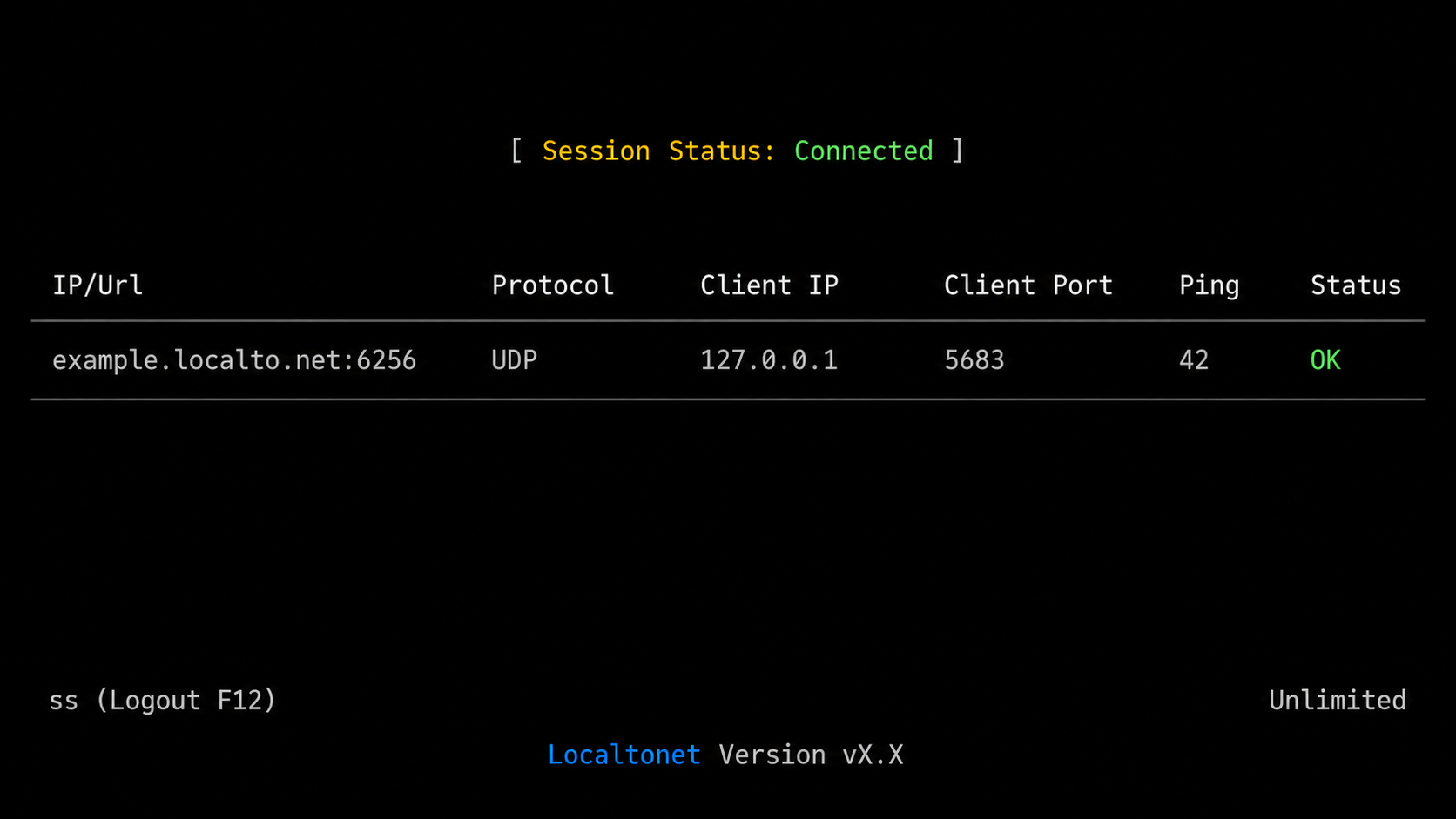
The current Localtonet documentation confirms UDP as a supported tunnel category. A separate canonical UDP-specific documentation URL was not established in the material available for this revision, so use the maintained Localtonet documentation index and the current dashboard rather than relying on an unverified deep link or an old interface screenshot.
Run and connect the Localtonet client
Confirm that the installed Debian or Ubuntu service is running and that its device appears connected. The device must be able to reach the CoAP server using the same address and UDP port that passed the local baseline.
Authenticate and select the client device
Select the device identified by its device-specific authentication token. Treat that token as a secret and do not reveal it in screenshots, logs, scripts, or support messages.
Select an available relay server
Choose a server or region from the values currently offered to the account. Do not copy a server code from another account or an old article because availability can vary by plan, region, and current product configuration.
Create a UDP tunnel to the CoAP target
Select the UDP tunnel type and enter the local IP address and UDP port that succeeded in the baseline test. Use the address as seen from the Localtonet client device and the server's actual configured port.
Start the tunnel and record the public endpoint
Start the tunnel with the Start control. Once it is running, record the assigned public host and port. Do not record or share the authentication token with those endpoint coordinates.
Stop or delete it when no longer needed
Keep the tunnel running only for the required access period. Stop it to remove active public reachability and delete obsolete configurations that are no longer required.
UDP forwarding does not authorize a request. Require appropriate endpoint authentication and resource-level authorization before exposing write-capable resources, actuators, firmware functions, credentials, network settings, or safety controls.
Test the assigned public host and port
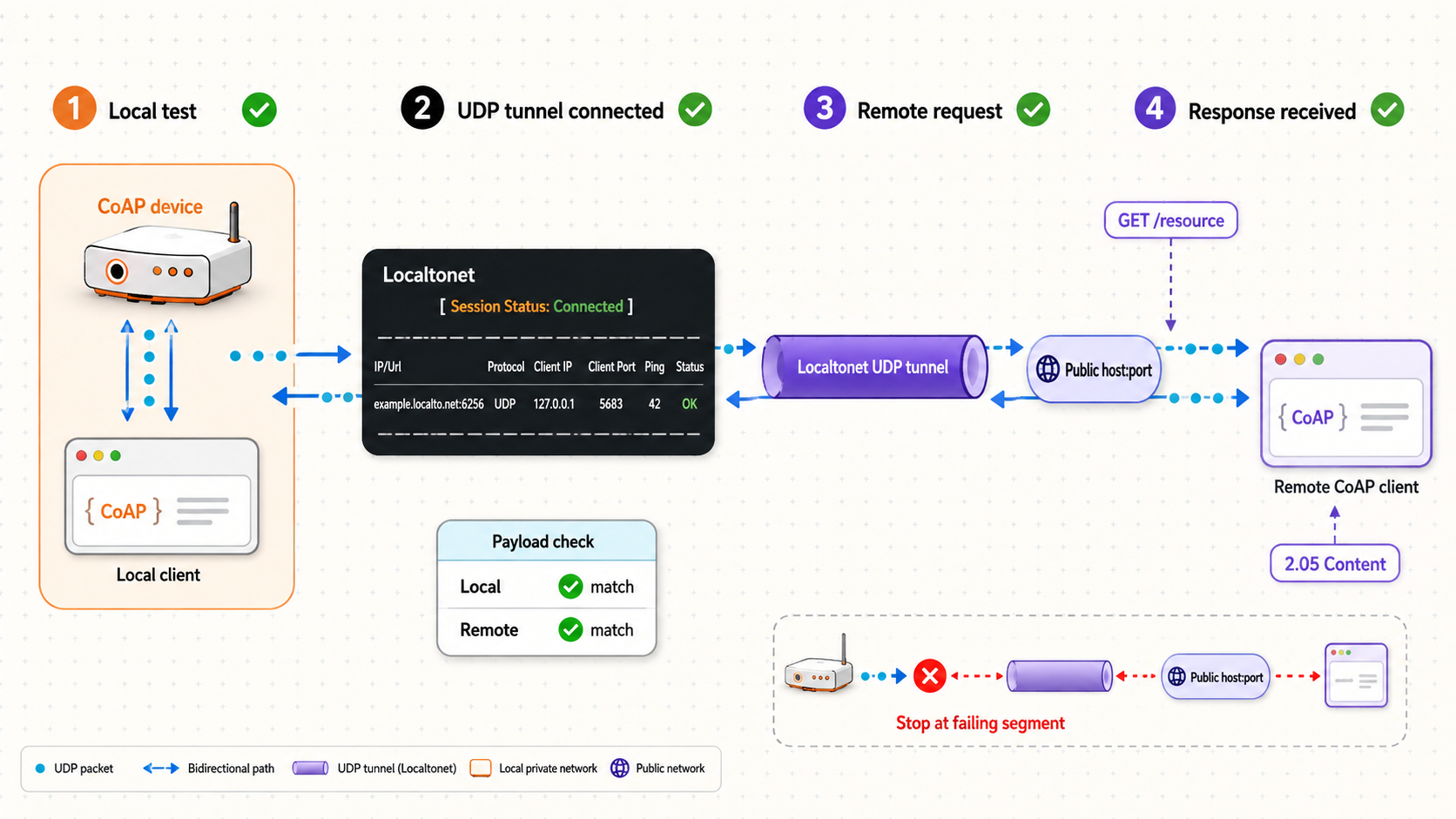
Run the public test from a genuinely remote network, not merely from another shell on the Localtonet host. An authorized laptop on a separate development connection is suitable. Install and activate the same isolated aiocoap client environment on that remote machine.
Send the same request through Localtonet
Set the public values exactly as assigned by the running UDP tunnel. Keep the original resource path unchanged:
export PUBLIC_COAP_HOST="replace-with-assigned-public-host"
export PUBLIC_COAP_PORT="replace-with-assigned-public-port"
export COAP_PATH="/status"

aiocoap-client "coap://${PUBLIC_COAP_HOST}:${PUBLIC_COAP_PORT}${COAP_PATH}"
The public port is not necessarily the same as the local CoAP port. The remote client must use the assigned public port, while the Localtonet tunnel continues to target the verified private port.
Expected result
The remote request should return the same application result as the local baseline, allowing for expected timing differences. Compare the response code, content format, and payload. For a read-only resource, the result should represent the same endpoint state unless that state changed naturally between tests.
A returned error response is useful diagnostic evidence, but it is not equivalent to successful application access. For example, an authorization error proves that a response path exists while also showing that the requested operation was not authorized. A malformed response, unexpected device identity, or protocol Reset also requires investigation.
Change one variable at a time
For the first remote test, change only the destination host and port. Keep the method, path, content format, payload, message style, and endpoint policy consistent with the local request. Changing the path, credentials, security mode, and message type at the same time makes failures difficult to isolate.
| Checkpoint | Expected evidence | If it fails |
|---|---|---|
| Local baseline | The expected response arrives from the private address and port | Fix the server, local route, firewall, resource path, or protocol mode |
| Localtonet service | The selected client device is connected | Inspect the systemd service, configuration check, journal, and outbound connectivity |
| Tunnel state | The UDP tunnel is started and shows an assigned public host and port | Confirm device selection, target values, relay selection, and Start state |
| Remote GET | The expected code, content format, and payload return | Compare the public destination and private tunnel target with the recorded values |
| Confirmable exchange | The ACK or valid response arrives within the client's configured behavior | Inspect packet loss, server processing, return traffic, and retransmission logs |
| Observe test | Registration succeeds and multiple expected notifications arrive | Check idle behavior, relationship state, tunnel interruptions, and re-registration logic |
| Block-wise test | The complete representation is transferred and reconstructed | Test smaller supported blocks and inspect MTU, timeout, memory, and buffer limits |
| DTLS test | Authentication and protected application exchange both succeed | Check identity, credentials, trust, DTLS version, cryptographic compatibility, and timing |
Extend the test only after the basic GET succeeds
If the application uses Confirmable requests, verify that acknowledgment and response behavior match the endpoint implementation. Where separate responses are possible, exercise a normal operation that takes long enough to produce one. Confirm that the delayed result remains associated with the request token.
Test Non-confirmable traffic only if the application uses it. A Non-confirmable transmission does not prove delivery, so success criteria must come from the application rather than an expected ACK. For state-changing operations, account for duplicate delivery and retransmission before sending any test with side effects.
Use endpoint logs when possible. The client side should show request creation, response correlation, retransmission decisions, and security failures. The server side should show whether the datagram arrived, whether parsing succeeded, which resource was selected, and why the request was accepted or rejected.
DTLS, identity validation, and the tunnel security boundary
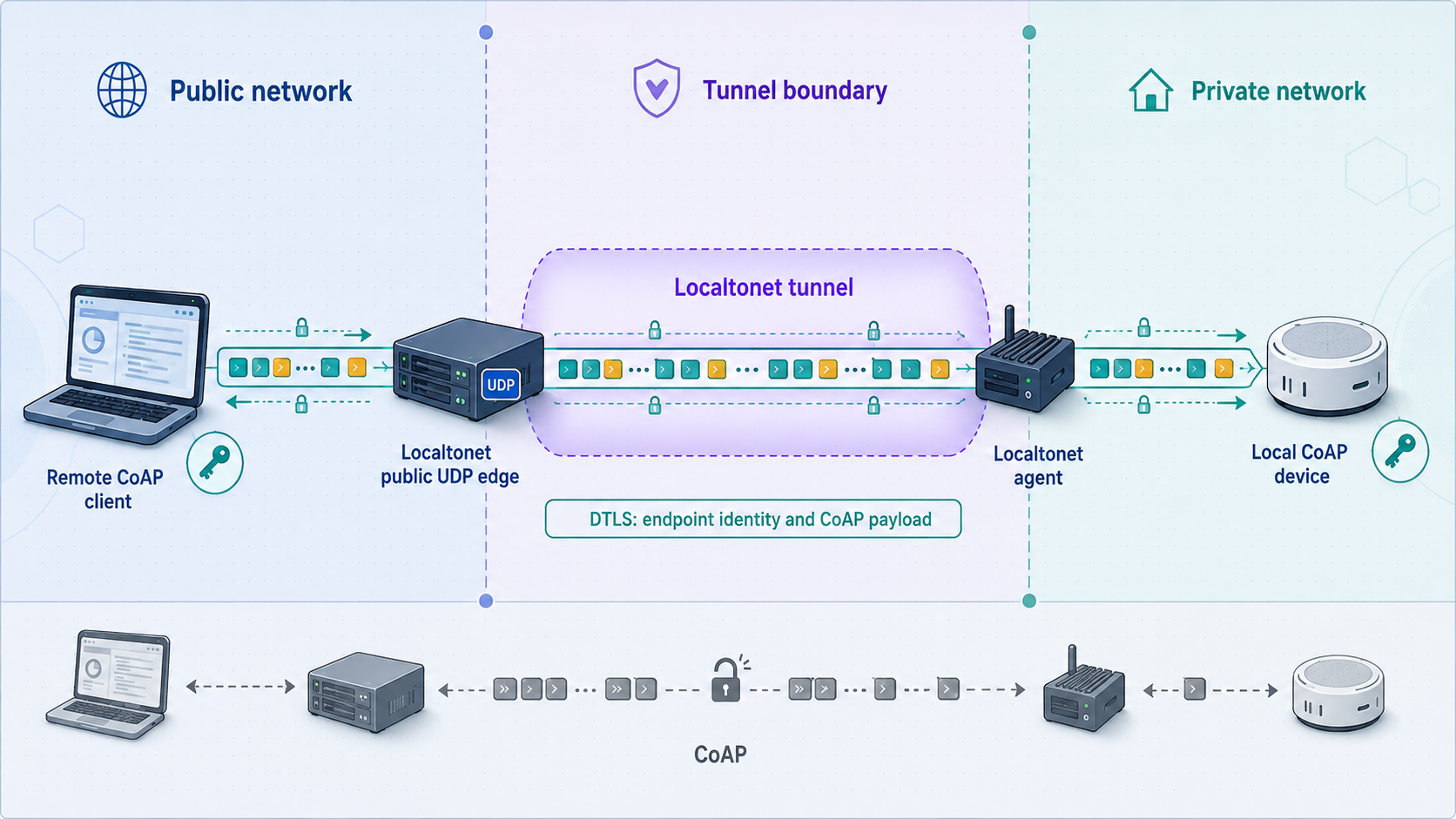
A UDP tunnel provides reachability. It does not automatically turn plain CoAP into CoAP secured by DTLS, and it does not make an unauthenticated resource authorized. CoAP's use of DTLS is described in RFC 7252. The current DTLS 1.3 specification is RFC 9147. Actual version support depends on the CoAP client and server implementations.
Public destination and authenticated identity are different
The public host and port tell the network where to send UDP traffic. The authenticated identity tells the client which endpoint it trusts. Depending on the library and credential model, the expected identity may be configured independently from the transport destination. Do not disable identity verification merely because the client now sends traffic through a different public host.
If credentials were provisioned around a private hostname, IP address, pre-shared-key identity, raw public key, or device certificate, determine how the selected implementation validates that identity when the transport destination changes. Test with the actual client and server versions rather than assuming that all credential models behave like HTTPS certificates.
Validate handshake and retransmission behavior
DTLS operates over datagrams, so handshake flights, loss recovery, and retransmission timers matter. Added latency or packet loss can expose assumptions that were invisible on a LAN. A constrained endpoint may also limit simultaneous security associations or the memory available for handshake state.
Test the initial handshake, valid protected traffic, invalid credential rejection, timeout behavior, and recovery after restarting the CoAP server or Localtonet client. Success means that the intended authentication completed and protected application data was exchanged. A packet merely arriving at the UDP port is not sufficient.
Disabling identity validation can make a test look functional while allowing communication with an unintended endpoint. Correct the destination, trust configuration, identity expectation, credentials, time settings, protocol version, or implementation compatibility instead.
Authorization remains necessary after authentication
Authentication establishes an identity according to the selected security model. Authorization determines what that identity may do. Apply least privilege to methods and resource paths. A telemetry reader should not automatically gain access to actuator commands, firmware replacement, credential rotation, network configuration, or factory-reset operations.
If the server cannot enforce suitable resource-level authorization, place a purpose-built application gateway in front of the sensitive device or expose a separate endpoint designed for the limited remote workflow. Treat discovery and verbose diagnostics as potentially sensitive because they can reveal device capabilities and software details.
Observe, retransmissions, block sizes, and routine operations
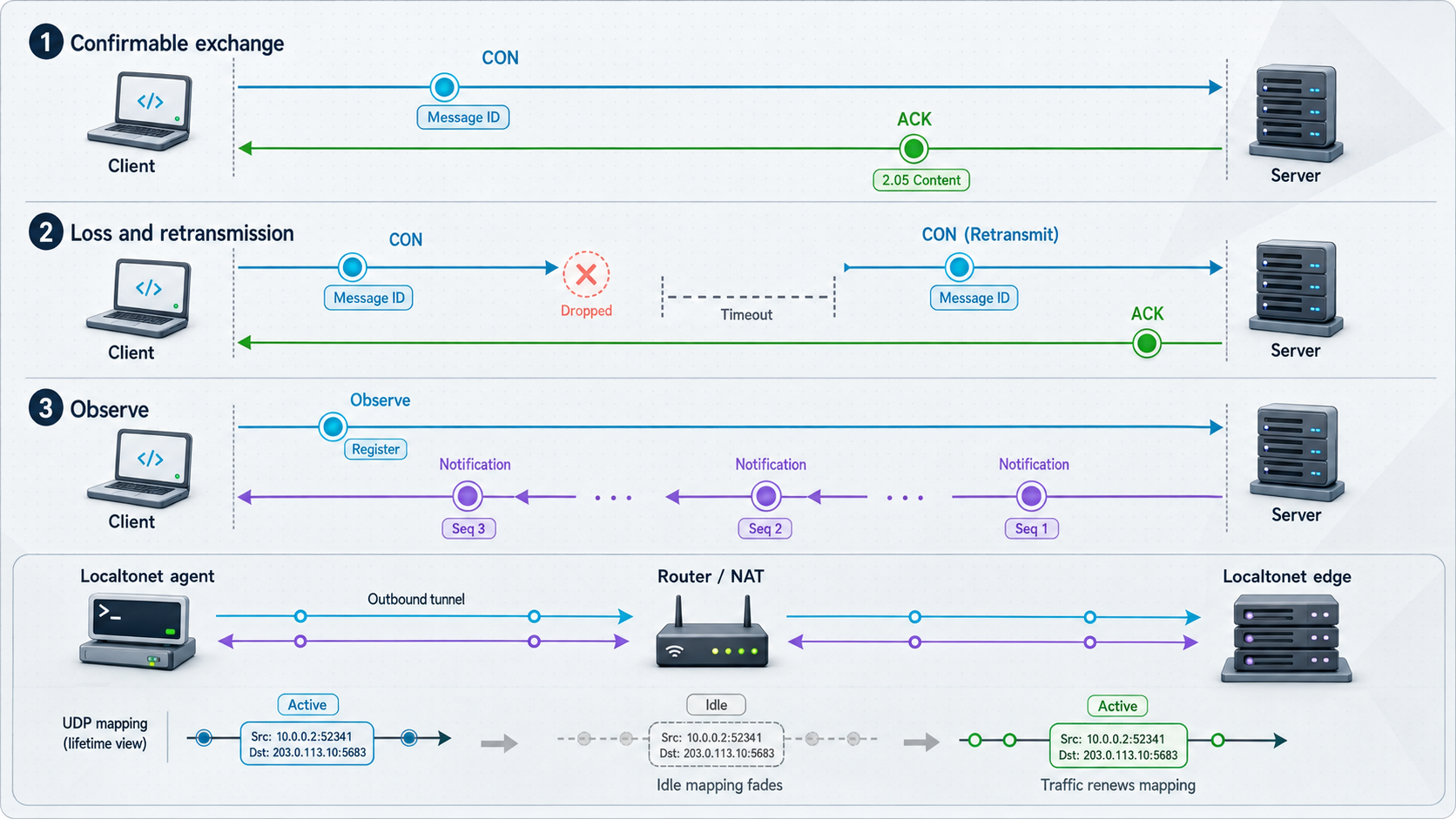
UDP has no TCP-style connection that proves an ongoing session exists. Networking equipment and software can still maintain temporary state for routing request and response traffic. The duration and behavior of that state varies, so long-lived workflows require operational testing beyond initial setup.
Test Observe across realistic quiet intervals
Register an Observe request, verify the first representation, and leave the relationship quiet for an interval representative of the real deployment. Trigger a resource change and confirm that the notification reaches the client. Repeat after restarting the remote client, Localtonet client, CoAP server, and relevant network interface one at a time.
Document whether the client re-registers automatically and whether the server removes stale observers. Since the tunnel is available only while the selected Localtonet client is connected and the tunnel is running, an interruption may require the application-level Observe relationship to be established again.
Measure retransmissions instead of guessing
CoAP implementations usually manage Confirmable retransmissions internally, but timer values and limits can be configurable. Record the settings actually used by both endpoints. During controlled testing, introduce representative latency or loss only in an authorized environment and verify that retries do not cause duplicate side effects.
Repeated requests can indicate a missing response, packet loss, slow application processing, an overloaded device, or unsuitable timeout settings. They do not automatically identify a tunnel failure. Compare server receipt logs with the remote client timeline to determine whether the original request arrived and whether the response was generated.
Validate representative message and block sizes
Test a small request first, then representative payloads, followed by the largest supported operation. For block-wise transfer, verify the completed body rather than only the first block. A successful tiny GET does not establish that a multi-block response or firmware-related operation will work.
Limits can exist in the CoAP library, DTLS implementation, embedded stack, gateway, operating-system buffers, or network path. A verified numeric Localtonet UDP payload limit is not available in the supplied product information, so no universal value is stated here. Test the required sizes in the actual deployment and choose conservative block sizes supported by both endpoints.
Manage the complete lifecycle
- Monitor whether the selected Localtonet client device remains connected.
- Confirm the UDP tunnel is running before scheduled remote operations.
- Expect public reachability to end when the tunnel stops or the selected device disconnects.
- Define recovery after tunnel, network, client, server, or device restart.
- Re-establish Observe and DTLS state when required by the application.
- Stop the tunnel when remote access is no longer needed.
- Delete obsolete configurations and rotate endpoint credentials if exposure is suspected.
Do not assume that the CoAP server observes the original remote source address exactly as it would on a directly routed network. If logging, rate limiting, authorization, or response logic depends on source IP and port, test the observed behavior in the actual deployment. Prefer cryptographic identity over source-address trust for security decisions.
Troubleshooting common CoAP tunnel failures
Troubleshoot from the inside out. First prove the CoAP service locally, then prove that the Localtonet client host can reach it, verify the connected device and running tunnel, check the public destination, and only then investigate Observe, block-wise transfer, or DTLS.
| Symptom | Likely area | Recommended check |
|---|---|---|
| No local response | Server, binding, port, local firewall, route, or resource path | Confirm the process is running and listening on the intended UDP address and port |
| Local request works but public request times out | Client connectivity, tunnel state, target, or public destination | Confirm the device is connected, the tunnel is started, and all addresses and ports match the recorded values |
| Server receives nothing | Wrong private target or host routing | Repeat the baseline from the Localtonet host using the exact configured destination |
| Server receives the request but the client gets no response | Response generation, correlation, timing, or return traffic | Compare message IDs, tokens, response codes, and timestamps in both endpoint logs |
| Confirmable request repeats | Missing ACK, delayed response, packet loss, or timeout policy | Determine whether the server received the first request and generated its acknowledgment or response |
| DTLS handshake fails | Identity, credentials, trust, version, algorithm support, or timing | Compare both endpoint configurations and inspect explicit DTLS alerts without disabling validation |
| Small exchanges work but larger transfers fail | Block size, fragmentation, path MTU, buffers, or implementation limits | Test smaller supported blocks and identify where transfer progress stops |
| Observe begins but notifications stop | Idle behavior, relationship state, restart, or tunnel interruption | Test realistic quiet intervals and determine whether re-registration is required |
| Unexpected duplicate action | Retransmission and application duplicate handling | Use a harmless operation and verify server-side duplicate detection or application safeguards |
| A previously working tunnel is unavailable | Localtonet client or tunnel lifecycle | Check that the selected device is connected and the same UDP tunnel is running |
Loopback and LAN binding mistakes
If the server listens on 127.0.0.1 but Localtonet runs on another device, that other device cannot reach the loopback listener. Run Localtonet on the CoAP server host or configure the server to listen on an appropriate LAN interface after applying local firewall and authorization controls.
The reverse mismatch is also possible. A tunnel may target a LAN address even though the process accepts traffic only on loopback. Use the exact address that passed the baseline from the machine running our client.
Container and virtual-network targets
If the endpoint runs in a container or virtual machine, the Localtonet client must target an address and UDP port reachable from its own network namespace. A container's internal address may not be reachable from the host, and a host-published UDP port may differ from the container's internal port. Inspect the actual runtime network configuration rather than assuming that a TCP port mapping also covers UDP.
Plain CoAP and CoAPS are not interchangeable
Sending an unprotected CoAP request to a DTLS listener will not produce a normal application response. Directing a DTLS client at a plain CoAP listener will also fail. Confirm the server's protocol mode and port in the local test before diagnosing the tunnel.
A timeout does not identify the failed layer
A timeout can mean that the request never reached the server, the endpoint rejected it silently, the DTLS handshake failed, the response was lost, the device was asleep, processing exceeded the client timer, or response correlation failed. Use logs from both sides and change one variable at a time.
Frequently asked questions
Can Localtonet expose a CoAP server without router port forwarding?
Yes. Run our client on a device that can reach the CoAP server, configure a UDP tunnel to the server's local address and port, and start it. The Localtonet client establishes an outbound connection to our relay, so no inbound router forwarding rule or public IP is required. The selected device must remain connected and the tunnel must remain running.
Should I use an HTTP tunnel for a UDP CoAP endpoint?
No. Use a Localtonet UDP tunnel for a CoAP endpoint that communicates over UDP. An HTTP tunnel should not be assumed to translate CoAP messages or preserve CoAP exchange semantics.
Does a Localtonet UDP tunnel automatically add DTLS?
No. UDP forwarding and DTLS endpoint security are separate concerns. For CoAPS, configure compatible DTLS versions, credentials, trust, identity validation, and authorization on the CoAP client and server, then verify the complete protected exchange through the public endpoint.
Which local port should I enter?
Enter the UDP port on which the server actually listens. Plain CoAP conventionally uses 5683 and CoAP over DTLS conventionally uses 5684, but a deployment can use different ports. Prove the selected destination with a local request first.
Why is the assigned public port different from port 5683?
The public endpoint and private target are separate coordinates. The remote client uses the host and port assigned to the running tunnel, while Localtonet forwards traffic to the configured local address and CoAP port. Do not replace the assigned public port with 5683 unless that is the value actually assigned.
Will an Observe relationship continue indefinitely?
Do not assume so. Observe behavior depends on the client, server, network path, idle interval, application lifecycle, and recovery logic. Test realistic quiet periods and define whether the client must re-register after a tunnel, network, client, or server interruption.
Can I rely on the remote source IP for authorization?
Source-address behavior must be tested and should not be assumed. Avoid using source IP as the sole security identity for an internet-reachable device. Prefer cryptographic endpoint authentication and explicit resource authorization.
How should I test block-wise transfers?
Begin with a small known-good request, then test representative payloads and a complete multi-block transfer. Verify the reconstructed representation, timeout behavior, and recovery from loss. Use block sizes supported by both endpoints and validate them over the real remote path.
Why can a Confirmable operation appear more than once?
A client can retransmit a Confirmable request when it does not receive the expected acknowledgment or response. Preserve the implementation's duplicate-detection behavior, prefer idempotent operations where appropriate, and use application-level operation identifiers when stronger protection against repeated side effects is required.
Test your CoAP endpoint with Localtonet
Install our client on a supported device that can reach the CoAP service, prove a low-risk resource locally, create and start a UDP tunnel, then repeat the request through the assigned public host and port. After the basic path works, validate DTLS, authorization, Confirmable exchanges, Observe, block-wise transfers, and recovery behavior before relying on the deployment for a real device.
Get Started Free →