

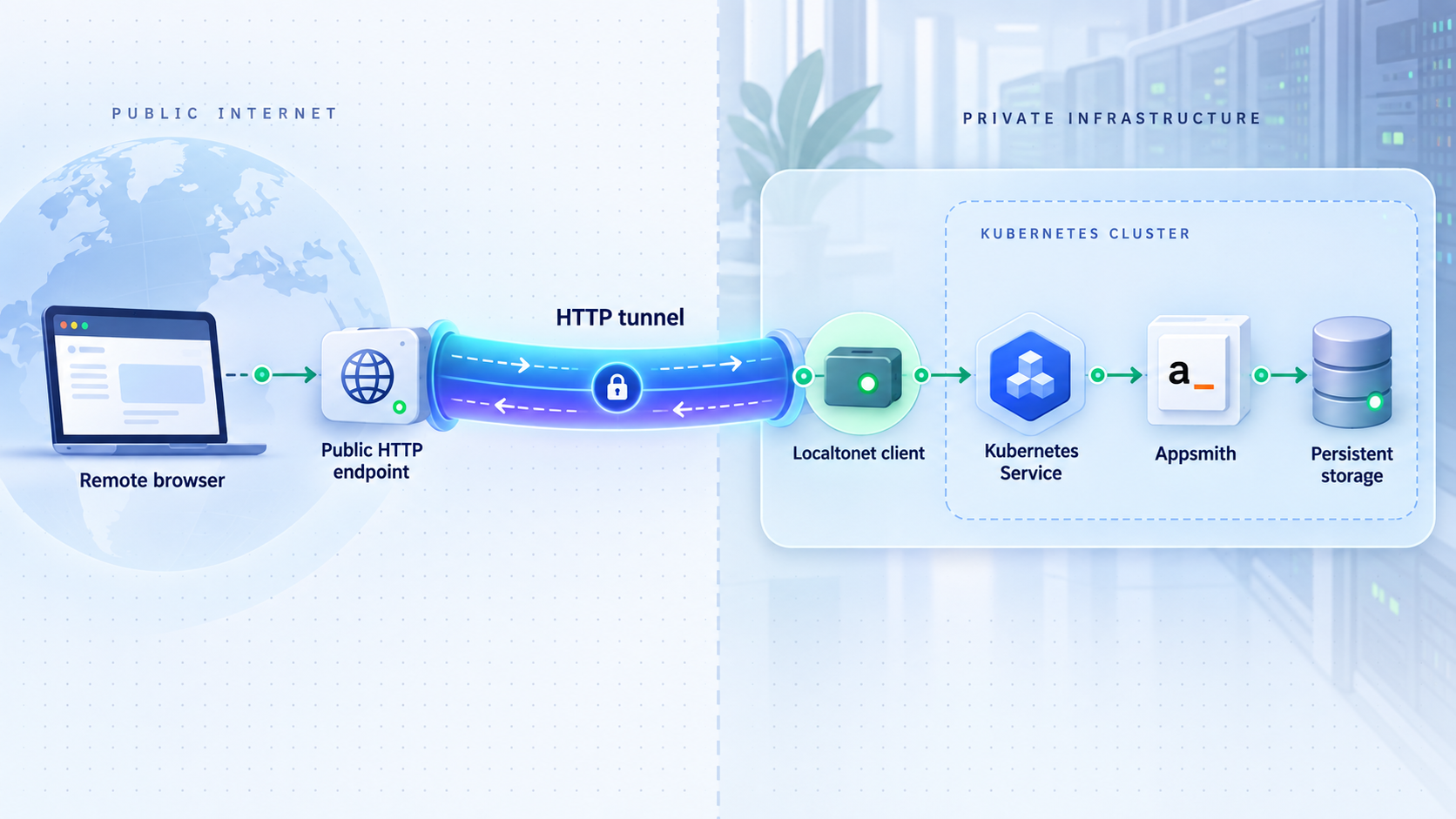
Run your low-code workspace in Kubernetes, verify it locally, and add controlled remote access
Appsmith is an open-source low-code platform for building internal tools, dashboards, admin panels, and applications that connect to databases and APIs. This guide explains how to prepare a Kubernetes environment, follow Appsmith’s supported Kubernetes deployment path, inspect the resulting workload, and identify the correct local web endpoint. Once Appsmith is working inside your environment, we show how to publish that interface with a Localtonet HTTP tunnel without configuring inbound router port forwarding or requiring a public IP address. Exact Appsmith chart values, manifest locations, resource names, and ports must come from the current official Appsmith Kubernetes documentation because those details are not established by the available project evidence and may change between releases.
📋 What's in this guide
Why deploy Appsmith on Kubernetes and publish it with Localtonet?
Appsmith provides a browser-based environment for building custom business applications. Its public project describes common uses such as dashboards, admin panels, customer views, service-management tools, IT automation, and other internal applications. Applications can connect to databases, SaaS products, large language models, and REST or GraphQL APIs, while their interfaces can be assembled from widgets and customized with JavaScript.
Self-hosting can be useful when Appsmith needs network proximity to private data sources, when an organization wants to operate the application in its own infrastructure, or when the deployment must fit an existing Kubernetes operating model. Appsmith’s project documentation identifies Docker as its recommended installation method, while also listing Kubernetes and AWS AMI as supported documented installation paths. This article focuses specifically on the Kubernetes path.
Kubernetes and Localtonet solve different parts of the workflow. Kubernetes schedules and operates the Appsmith workload. It also provides service discovery and a way to make the application reachable within the cluster or the surrounding private network. Localtonet handles public connectivity after a working HTTP endpoint exists. Our client establishes an outbound connection to a Localtonet relay server, so the environment does not need an inbound router rule, a public IP address, or a separately configured VPN merely to publish the selected web endpoint.
Keeping these layers separate makes failures easier to diagnose. If Appsmith does not start, changing tunnel settings will not repair the Kubernetes workload. If Appsmith works locally but not through its public URL, the investigation can focus on endpoint reachability, tunnel configuration, application URL behavior, and access controls.
The available Appsmith project evidence confirms that Kubernetes is an official installation method, but it does not establish the current chart repository, release name, namespace, manifest URL, required values, resource names, local port, default credentials, or endpoint path. We therefore do not invent those details. Obtain them from the current Appsmith Kubernetes installation guide and preserve its documented sequence for the version you intend to deploy.
Prerequisites and deployment decisions
Before installing Appsmith, make sure the Kubernetes cluster itself is operational and decide where the Localtonet client will run. The client must run on a device that can reach the final Appsmith HTTP endpoint. That device might be a Kubernetes node, a management host on the same private network, or another authorized machine with a route to the service. The best choice depends on your cluster networking and security model.
Kubernetes access
You need a working Kubernetes cluster and a configured kubectl context with enough permission to create and inspect the resources required by Appsmith’s official deployment procedure. The exact Kubernetes versions, CPU, memory, and storage requirements are not established by the supplied Appsmith evidence. Check the current Appsmith requirements before allocating production capacity.
Confirm that your current context points to the intended cluster:
kubectl cluster-info
kubectl get nodes
Do not continue if these commands target the wrong cluster, return authorization failures, or show that required nodes are unavailable. A namespace should also be selected according to the official installation guide and your organization’s conventions. Avoid assuming that Appsmith must use a particular namespace unless the current guide explicitly requires it.
Storage and data lifecycle
Treat Appsmith as a stateful platform rather than as a disposable demonstration pod. Review the current deployment guide to identify its persistent resources, storage-class expectations, backup procedure, and upgrade requirements. Confirm that the intended storage class exists in the cluster and that its retention behavior matches your recovery plan.
A successful pod restart is not the same as a tested recovery process. Before production use, document which Appsmith data must be backed up, how backups are created, where they are retained, and how restoration is tested. Do not infer those procedures from generic Kubernetes practices when Appsmith provides version-specific tooling or guidance.
DNS, certificates, and application URLs
Decide whether the initial goal is private testing or a long-lived public deployment. For private verification, a temporary access path can be enough. A stable deployment may require application-side URL settings, trusted origins, callback addresses, email links, or external integration URLs. The available evidence does not establish the names or defaults of any Appsmith settings related to these behaviors, so they must be checked against the documentation for the deployed version.
Localtonet requirements
Install and run our client on the device that can reach the chosen Appsmith endpoint. The device is identified by its Localtonet authentication token. Tokens are device-specific and must be handled as secrets. You will also select an available relay server or region from the current dashboard rather than copying a server code from an article.
| Requirement | What to confirm | Why it matters |
|---|---|---|
| Kubernetes context | kubectl reaches the intended cluster with appropriate permissions |
Prevents deploying resources into the wrong environment or failing partway through installation |
| Cluster capacity | Current Appsmith CPU, memory, and storage requirements are satisfied | Insufficient capacity can leave workloads pending, restarting, or unstable |
| Persistent storage | The required storage class and retention behavior are available | State should survive routine workload replacement and planned maintenance |
| Private endpoint | An HTTP IP address and port are reachable from the intended client device | Localtonet forwards to an existing reachable service rather than creating the service itself |
| Authentication token | A valid device-specific Localtonet token is selected without exposing it | The token identifies the client device that runs the tunnel |
| Access policy | Appsmith authentication and organizational controls are ready before publication | A public URL changes reachability and should not remove application authorization |
Deploy Appsmith using its supported Kubernetes procedure
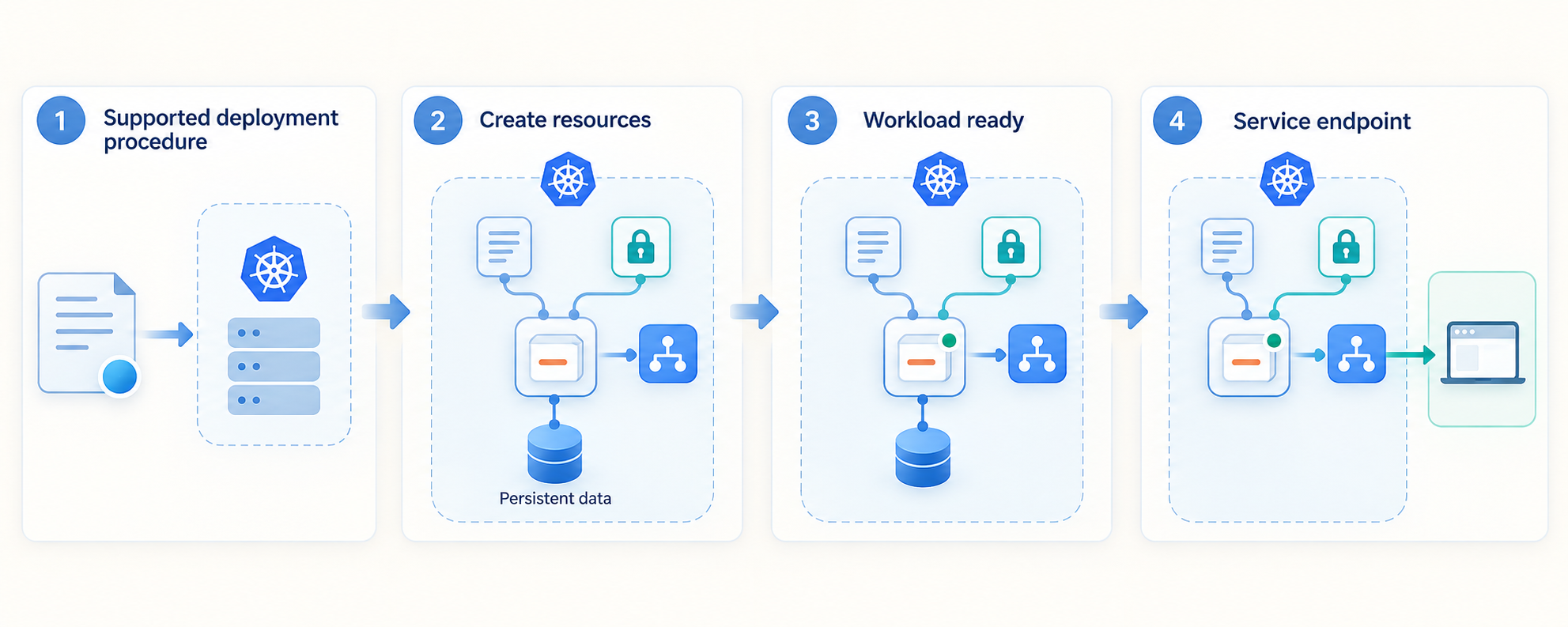
Use the current official Appsmith Kubernetes installation procedure for the exact release you plan to operate. Appsmith is actively developed, and deployment artifacts can evolve. Pinning a reviewed version is generally safer than allowing an installation tool to select an unspecified future release, but the exact version syntax and supported upgrade path must come from Appsmith’s documentation.
The public project evidence available for this draft does not contain the installation commands or the linked Kubernetes guide’s contents. As a result, this section provides a deployment validation framework without fabricating a Helm repository, chart name, manifest URL, release identifier, namespace, password, or port. During editorial review, the current official Appsmith commands should be inserted only after they have been verified against the intended release.
1. Record the intended Appsmith release
Choose a release supported by the current deployment guide and record it in your change plan. Appsmith publishes release information that can include security corrections, dependency updates, reliability improvements, and operational changes. Review the release notes between your current and target versions before an upgrade.
Do not assume that a release number shown in an example is automatically the correct production target. The supplied evidence identifies release v2.4.1 as a published release and describes security and reliability changes, but it does not establish compatibility with your Kubernetes version or make that release a universal recommendation.
2. Prepare the namespace and configuration exactly as documented
Follow the current Appsmith guide to determine whether it creates a namespace automatically or expects one to exist. Review every configurable value before applying it. Pay particular attention to persistent storage, external URL behavior, email or identity settings, resource allocation, and any secrets required by the deployment.
Keep secrets out of shell history, public repositories, screenshots, and shared ticket logs. If your organization uses a Kubernetes secret-management system, integrate it according to Appsmith’s supported configuration rather than translating settings into unverified environment variables.
3. Apply the official deployment artifacts
Run the commands from the current Appsmith Kubernetes guide without substituting guessed resource names or unofficial manifests. Save the exact reviewed configuration in your controlled infrastructure repository where appropriate. This gives operators a reproducible record of what was deployed and makes future upgrades easier to assess.
Wait for the resources to be created before diagnosing application behavior. Kubernetes controllers may need time to schedule workloads, attach storage, pull images, and pass readiness checks.
4. Inspect the resources created by the installation
Replace <appsmith-namespace> with the namespace actually used by the official deployment:
kubectl get all -n <appsmith-namespace>
kubectl get pods -n <appsmith-namespace>
kubectl get services -n <appsmith-namespace>
These commands do not assume Appsmith’s resource names. They let you discover the names and statuses created by the supported installation. If persistent volume claims are part of the deployment, inspect them as well:
kubectl get pvc -n <appsmith-namespace>
A pod shown as Running is encouraging, but it is not sufficient by itself. Check the readiness columns, restart counts, service endpoints, events, and application logs. A container can be running while the application remains unready or while a dependency is unavailable.
5. Investigate incomplete startup before adding public access
Use Kubernetes inspection commands with the actual names discovered from the cluster:
kubectl describe pod -n <appsmith-namespace> <pod-name>
kubectl logs -n <appsmith-namespace> <pod-name>
kubectl get events -n <appsmith-namespace>
If the selected pod contains more than one container, Kubernetes may require a container selection when retrieving logs. Determine the correct container from the pod specification instead of guessing its name.
Keep Appsmith private until its workloads are ready, persistent storage is healthy, the browser interface loads through a local route, and the intended authentication policy is active. A tunnel cannot repair failed pods, missing storage, application initialization errors, or an incorrect Kubernetes Service.
Identify an Appsmith endpoint reachable by the Localtonet client
A Localtonet HTTP tunnel needs a local IP address and port. In this architecture, “local” means local to the machine running our client, not necessarily localhost and not necessarily the Kubernetes pod itself. The correct target is a stable HTTP endpoint that the client device can reach.
Start by examining the Services produced by the official Appsmith installation:
kubectl get services -n <appsmith-namespace>Note the Service type and the exposed ports shown by your actual cluster. Do not copy a port from an unrelated tutorial. The supplied Appsmith evidence does not state its Kubernetes Service name, local URL, listening port, or endpoint path.
| Access pattern | When it can fit | Operational consideration |
|---|---|---|
| Kubernetes ingress | The cluster already has an ingress route to Appsmith that the client machine can resolve and reach | Use the ingress address and port only after verifying host routing and application behavior locally |
| Node-reachable Service | The documented deployment exposes Appsmith on an address reachable from the client device | Confirm firewall policy, selected port, node reachability, and service stability |
| Local forwarding session | A temporary test needs to map the Kubernetes service to the same machine as the client | The public route depends on that forwarding process remaining active, so it is usually unsuitable as an unmanaged production design |
| Client inside the private network | A dedicated host can reach the service through internal routing | Use the service address visible from that host, not an address valid only inside a pod |
Kubernetes ClusterIP addresses are generally intended for cluster-internal access. Whether a client outside the cluster can reach one depends on the network design. Likewise, a pod IP can change when a pod is replaced and should not be treated as a stable target unless your architecture explicitly manages that behavior. Prefer a documented service-level route.
Avoid automatically entering 127.0.0.1 as the target. That address refers to the Localtonet client machine. It is correct only when Appsmith, an ingress proxy, or a deliberate forwarding process is actually listening on that machine’s loopback interface.
Verify Appsmith locally before creating the tunnel
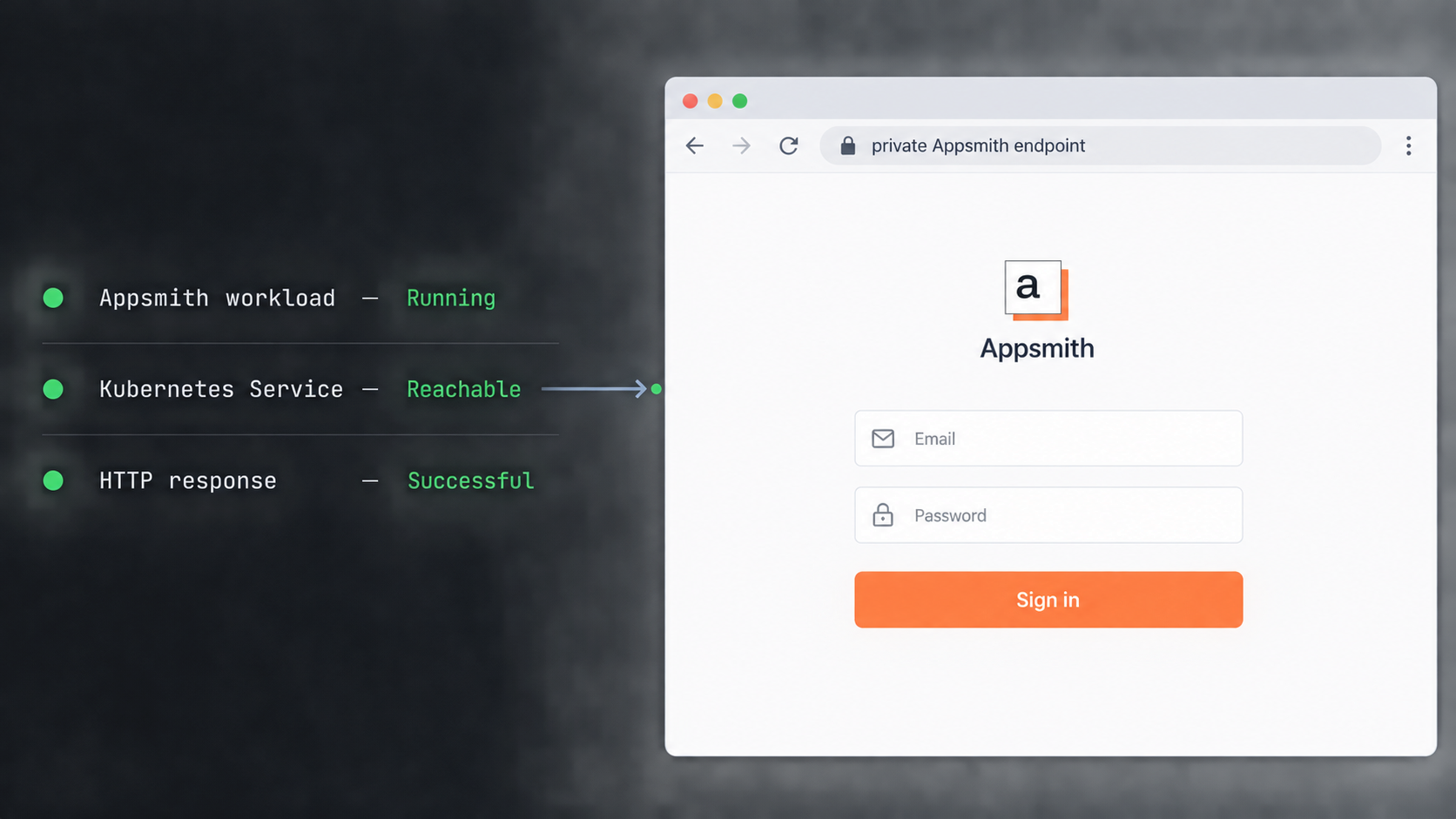
Test from the same machine that will run our client. This is important because successful access from an administrator’s laptop does not prove that the client device has the same DNS resolution, routes, firewall permissions, or network policy.
Open the selected private URL in a browser on that machine, or use an HTTP client against the verified scheme, host, and port. The exact URL is environment-specific and must be discovered from the Appsmith deployment rather than inferred from this article.
A useful local verification should cover more than the first response:
- Confirm that the browser reaches Appsmith rather than a default ingress page or an unrelated service.
- Confirm that the login or initial setup experience loads correctly.
- Check that static assets load and that browser developer tools do not show repeated failed requests.
- Verify that navigation works after the initial page load.
- Sign in with a designated test account if authentication has already been configured.
- Create or open a non-sensitive test application and confirm that expected interface actions work.
- Confirm that required data sources are reachable according to your application design.
- Restart or replace an Appsmith workload through your normal operational process and verify that required state remains available.
Record the working target in the form scheme://host:port, but do not publish private hostnames, internal IP addresses, credentials, or tokens in public documentation. For the Localtonet HTTP tunnel, the dashboard will require the local target information applicable to your service.
An HTTP response proves that something is listening, but it does not prove that Appsmith is fully usable. Complete a browser-based workflow and check application logs before proceeding. This distinction prevents a healthy proxy or ingress from hiding a failed backend.
Publish the verified Appsmith interface with a Localtonet HTTP tunnel
Once the Appsmith endpoint works from the intended client device, create an HTTP tunnel. Our client establishes the connection outbound to a Localtonet relay server. The resulting public address remains available only while the selected client is connected and the tunnel is running.
HTTP tunnels can use a random subdomain, a supported custom subdomain, or a custom domain through the available Process Type options. These options serve the same target content at a public HTTPS address. Availability can vary, so select only options shown in the current dashboard. Exact custom-domain DNS instructions should be taken from current Localtonet documentation rather than inferred.
Install and run the Localtonet client
Install our client for the operating system on the device that can reach the verified Appsmith endpoint. Keep the client running for as long as remote access is required.
Authenticate or select the client device
Use the device-specific authentication token associated with the intended client. Do not paste the token into documentation, source control, screenshots, or support messages that are not approved for secrets.
Select an available relay server
Choose a currently available server or region from the Localtonet dashboard. Do not hardcode a server code from an old guide because available values can change.
Create the HTTP tunnel configuration
Select the HTTP tunnel family and enter the local IP address and port for the Appsmith endpoint that was verified from the client device. Choose the available Process Type appropriate for the deployment.
Start the tunnel
Creating a tunnel does not start it. Use the Start button and confirm that the selected device is connected and the tunnel reports that it is running.
Test the assigned public URL
Open the assigned public address in a separate browser session and repeat the essential Appsmith checks. When access is no longer required, stop the tunnel or delete it if the configuration should not be retained.
The complete dashboard workflow is also available in our HTTP tunnel documentation. Use the current interface values shown in your account because regions, options, and plan availability should not be assumed from a static tutorial.
Test through the public address
Do not stop after seeing the Appsmith landing page. Test sign-in, navigation, asset loading, application editing or viewing as appropriate, and a non-destructive data-source action. Browser developer tools can help identify failed requests, blocked origins, redirect loops, or resources that still reference a private hostname.
If local access works but the public URL does not, compare the browser network behavior for both routes. A failure that appears only through the public hostname may point to application URL assumptions, cookie scope, origin policy, callback configuration, or proxy-aware behavior. The exact Appsmith settings involved are version-specific and are not established by the supplied evidence, so consult the current Appsmith configuration reference before changing them.
Security and production-readiness checklist
Publishing an internal tool changes who can reach its login surface. It does not automatically change who is authorized to use it, but the deployment should be reviewed before the tunnel starts. Use application authentication, least privilege, appropriate network policies, and organizational access controls rather than treating an unguessable URL as protection.
Do not rely on obscurity. Require appropriate Appsmith authentication and authorization, protect administrative interfaces, review connected data-source permissions, and avoid placing unrestricted destructive operations in broadly accessible applications.
Update planning
Appsmith releases can include security, reliability, dependency, deployment, and configuration changes. For example, the supplied release evidence for version v2.4.1 includes dependency security updates, validation improvements, reliability fixes, and a configuration precedence change involving database-related variables. This illustrates why release notes should be reviewed instead of treating every upgrade as a simple image replacement.
Before upgrading, back up the required data using the current supported process, record the deployed configuration, verify target-version requirements, and test restoration. After upgrading, repeat local verification before confirming that the public route is healthy.
Troubleshooting Appsmith, Kubernetes, and tunnel failures
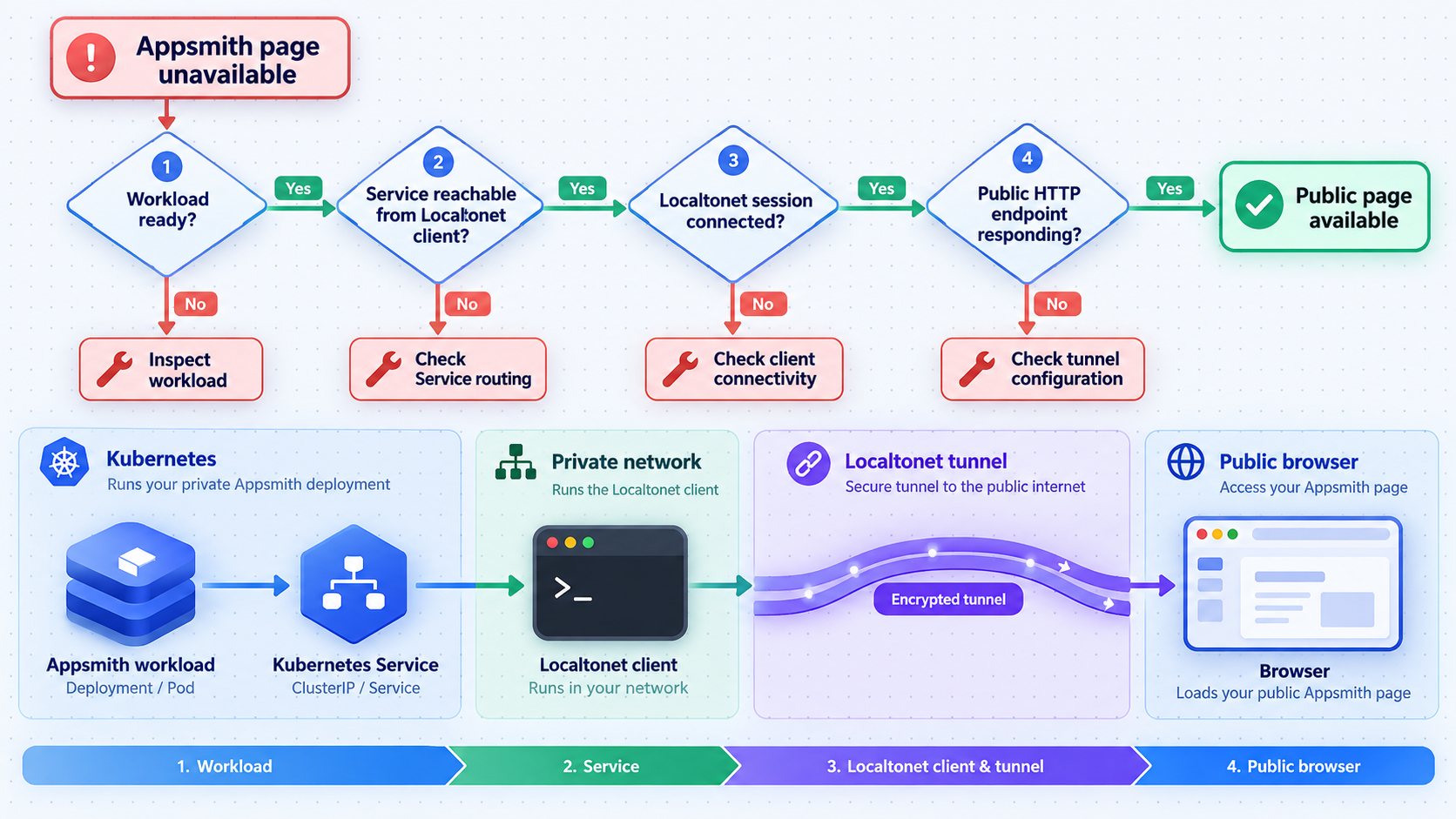
The Appsmith pods are pending
Inspect the pod description and recent namespace events. Common Kubernetes-level categories include unavailable capacity, unsatisfied scheduling constraints, image retrieval problems, and storage claims that cannot bind. The event messages are more useful than guessing. Correct the underlying cluster or configuration issue before creating a tunnel.
A pod repeatedly restarts
Check its current and previous logs, readiness state, and pod events. A restart loop can result from configuration, dependency, resource, or storage failures. Use the actual resource and container names reported by Kubernetes. Do not compensate by increasing restart limits or exposing the service before understanding why the application exits.
The Service exists, but the client device cannot reach it
Confirm the Service type, endpoints, destination port, network path, firewall policy, and DNS behavior. Run the test from the Localtonet client device. A ClusterIP service may be valid only inside the cluster, while a hostname may resolve differently on separate networks. Choose a supported route that is genuinely reachable from the client.
The Localtonet tunnel is configured but offline
Confirm that the selected client device is connected, that the device-specific token is valid, and that the tunnel has been started. Remember that creating the tunnel and starting it are separate actions. Also verify that the Localtonet client process remains running and can make its outbound connection.
The public URL returns an error
Test the exact local target from the client machine first. If it fails locally, repair the Kubernetes service route. If it succeeds locally, recheck the tunnel’s local IP and port, ensure the expected protocol is in use, and inspect whether Appsmith or an ingress controller is rejecting the public host.
The page loads, but assets or actions fail
Use the browser network console to identify failed requests. Look for requests sent to a private hostname, redirects to an unavailable address, origin-related failures, authentication-cookie problems, or backend requests that return errors. Resolve Appsmith’s external URL or proxy-related configuration only with setting names verified in the current Appsmith documentation.
The public route works only while a terminal is open
This often indicates that the Appsmith endpoint depends on a temporary local forwarding process. That can be acceptable for a short test, but it is fragile for unattended access. Replace it with a stable service route reachable from a continuously running Localtonet client, following your Kubernetes networking policy.
Appsmith works after deployment but loses expected data after replacement
Inspect persistent volume claims, mounted storage, retention behavior, and the application’s supported backup configuration. Do not assume that the presence of a PersistentVolumeClaim automatically means every required data component is protected. Validate the documented backup and restoration workflow with non-production data.
An upgrade changes behavior
Compare the old and new Appsmith release notes, deployment values, environment configuration, storage migrations, and logs. Restore service using the project’s supported rollback or recovery procedure rather than applying an unverified downgrade. Then retest locally before reopening or confirming the Localtonet route.
Frequently asked questions
Is Kubernetes an official Appsmith installation method?
Yes. Appsmith’s public project documentation lists Kubernetes as an installation method. It identifies Docker as the recommended method and also provides documented paths for Kubernetes and AWS AMI deployments.
What port does Appsmith use on Kubernetes?
The supplied project evidence does not establish a Kubernetes Service port or local listening port. Inspect the Service created by the current official Appsmith deployment and use the documented port that is reachable from the Localtonet client device. Do not copy a port from an unrelated deployment.
Should I point Localtonet directly at an Appsmith pod IP?
Usually, a stable service-level route is more appropriate because pod IP addresses can change when workloads are replaced. Use an ingress, Service exposure method, or another route supported by your cluster design, then verify it from the machine running our client.
Does Localtonet deploy or manage Appsmith inside Kubernetes?
No. Kubernetes runs Appsmith using Appsmith’s supported deployment procedure. With Localtonet, we publish an already working HTTP endpoint. Tunnel configuration does not create Appsmith resources, repair failed pods, or configure persistent storage.
Do I need router port forwarding or a public IP address?
No. The Localtonet client establishes an outbound connection to our relay server, so this workflow does not require inbound router port forwarding or a public IP address. The client device must still be able to reach Appsmith’s private HTTP endpoint.
Is the public address available after the client stops?
No. The tunnel is available only while the selected client device is connected and the tunnel is running. Creating a tunnel does not start it, and stopping the client interrupts the route.
Can I use a custom domain for Appsmith?
Localtonet HTTP tunnels support Process Type options for a random subdomain, a supported custom subdomain, or a custom domain. Availability can vary. Check the current dashboard and current custom-domain documentation before changing DNS because exact DNS requirements are not established in this guide.
Is a Localtonet HTTP tunnel the same as a VPN?
No. An HTTP tunnel publishes a selected web service. It should not be described as a VPN. Localtonet VPN Manager is our separate private mesh VPN feature.
What should I test after publishing Appsmith?
Test authentication, navigation, static assets, a non-sensitive application workflow, and any required data-source action. Check the browser network console for redirects, blocked requests, private hostnames, or origin problems. Also verify that application authorization remains effective through the public URL.
Publish your verified Appsmith endpoint with Localtonet
Deploy Appsmith using its current supported Kubernetes procedure, confirm that the web interface works from the intended client device, and then create an HTTP tunnel for the verified local IP address and port.
Get Started Free →