

Build a connectivity layer that can change with your locations, applications, teams, and devices
Business connectivity becomes difficult when every new service requires a public IP address, inbound firewall rules, or site-specific router changes. Outbound tunnels change that dependency by letting a client inside the private environment establish the connection to a relay. This guide explains how to classify workloads, choose an appropriate Localtonet connectivity model, prepare the client device, verify access, monitor connection state, and retire temporary exposure. The goal is not to place every system on the public internet, but to give each workload the narrowest connectivity model that supports its users and protocol.
📋 What's in this guide
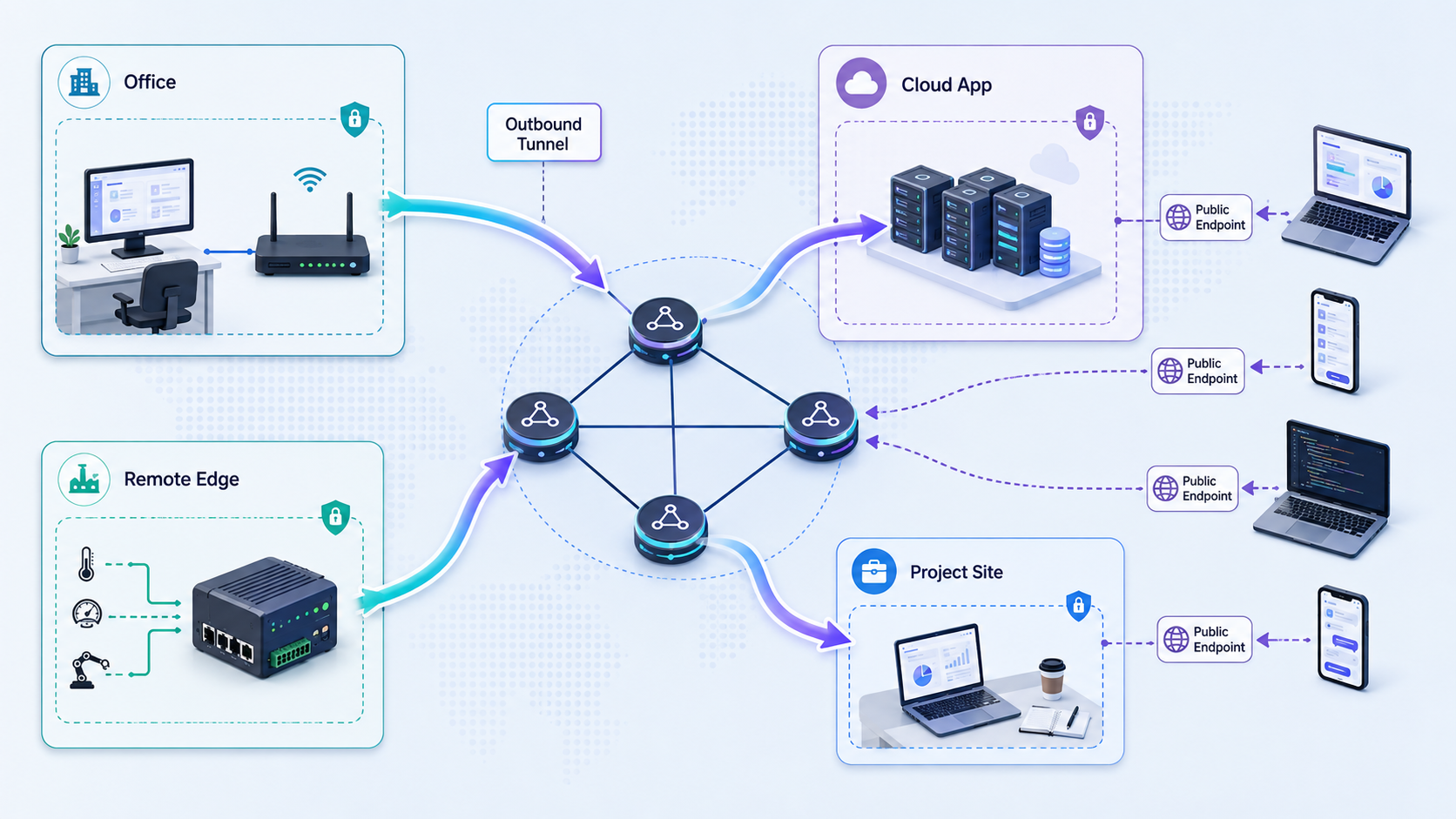
Why outbound tunnels support adaptable business connectivity
A traditional inbound publishing workflow starts at the network perimeter. The network team identifies the destination device, assigns or discovers an address, configures port forwarding, adjusts firewall policy, and gives an external user a public address. That model can be appropriate for stable production infrastructure, but it becomes cumbersome when the destination is a developer workstation, small office server, edge device, temporary event environment, or system behind carrier-grade NAT.
The larger problem is coupling. Service availability becomes coupled to a particular router, public address, location, and inbound network policy. Moving the service to another office, replacing its internet connection, or changing its host can require the organization to rebuild that publishing configuration.
With an outbound tunnel, a client running on the service device, or on another device that can reach the service, establishes an outbound connection to a relay. Remote traffic arrives at the assigned public URL or public host and port, then travels through the active tunnel to the selected local target. The private-side router does not need an inbound port-forwarding rule, and the site does not need a public IP address for this workflow.
With Localtonet, our client establishes the outbound connection to a Localtonet relay server. The tunnel is available only while the selected client device is connected and the tunnel is running. This lifecycle property is central to the design. Creating a tunnel stores its configuration, but does not make the path active. The tunnel must be started and can later be stopped or deleted.
Outbound does not automatically mean private
It is important to separate the direction used to establish a tunnel from the audience that can reach its assigned endpoint. The Localtonet client connects outward, but an HTTP tunnel, raw-port tunnel, or File Server tunnel can still create an internet-reachable endpoint. Removing inbound router configuration does not remove the need for application authentication, authorization, careful target selection, and ongoing review.
Do not expose a service merely because it can be reached through a tunnel. Confirm that the application is intended for remote access, uses appropriate authentication, limits user permissions, and does not reveal an administrative interface or sensitive data to unauthorized users. Always follow your organization's network and security policies.
Use tunnels as a connectivity layer, not a universal replacement
Outbound tunneling is useful for targeted service publication, protocol forwarding, temporary integrations, remote demonstrations, edge devices, and systems behind restrictive address translation. It does not eliminate every reason to use conventional production networking. Large public applications may still require dedicated load balancing, application firewalls, redundancy, capacity planning, and other infrastructure outside the scope of a tunnel.
A public tunnel is also not the same as a private network. When users need broad private connectivity among devices or LANs, VPN Manager is the relevant Localtonet capability. Standard HTTP, TCP, UDP, TLS, and File Server tunnels should not be described or operated as if they were a VPN.
Classify each workload before selecting a tunnel
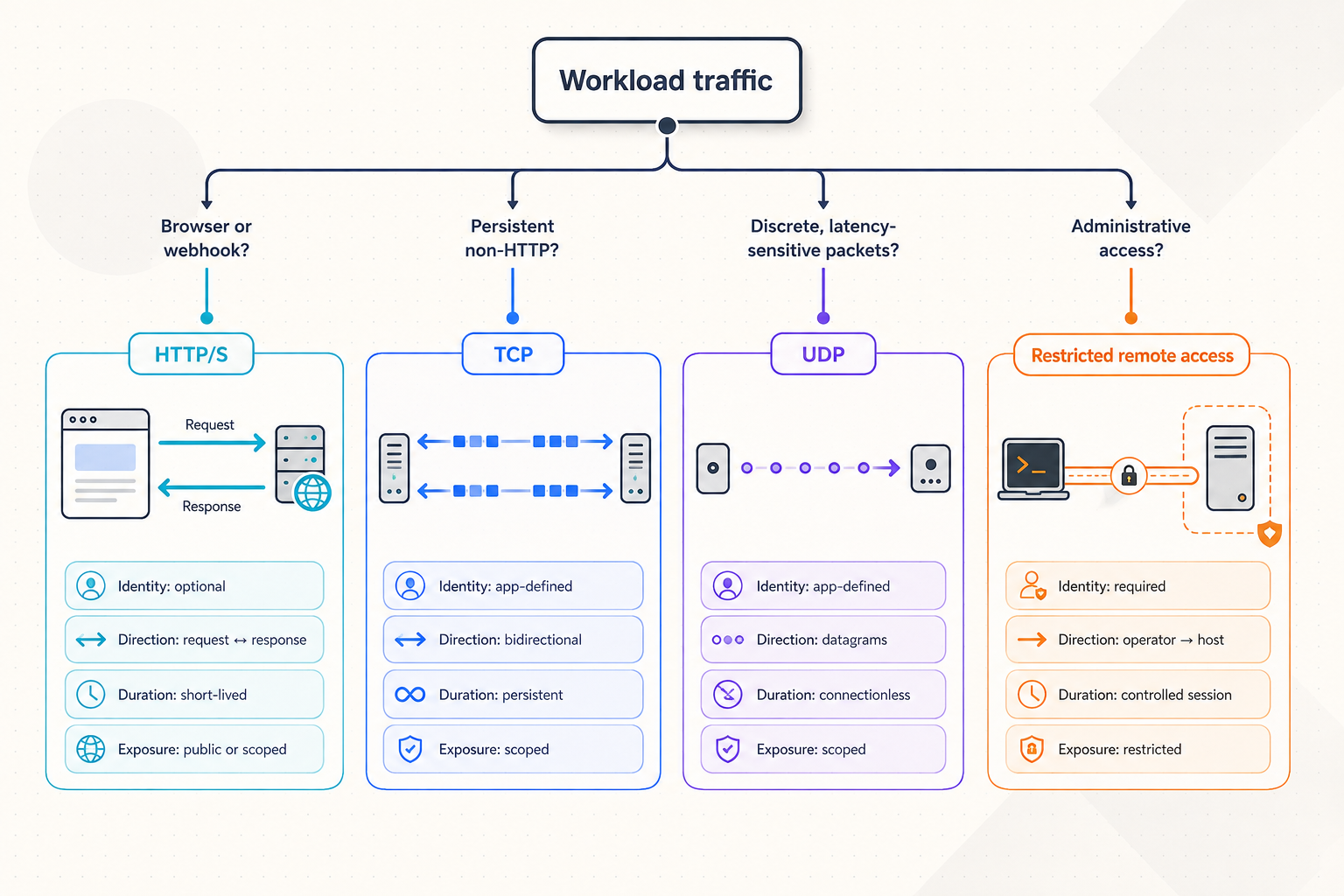
Adaptable architecture begins with classification, not configuration. For each requested connection, identify who needs access, what protocol the application actually uses, whether the endpoint should be public or private, where the target runs, how long access is needed, and who owns the service after deployment.
Avoid choosing a tunnel solely from a familiar port number. A custom application may use HTTP on an unusual port, while another service may use raw TCP on a port commonly associated with web traffic. The application protocol and client behavior should determine the tunnel family.
| Access model | Best fit | Target model | Important design question |
|---|---|---|---|
| HTTP/s tunnel | Web applications, browser interfaces, APIs, and webhook receivers | Local IP address and port | Does the application have suitable authentication and authorization for remote access? |
| TCP tunnel | Services that communicate over raw TCP | Local IP address and port | Can the native service authenticate clients and safely process internet-originated traffic? |
| UDP tunnel | Datagram-oriented applications that require UDP | Local IP address and port | Does the application depend on source addressing, timing, or datagram behavior that needs explicit testing? |
| Combined UDP/TCP tunnel | Applications that require both transport protocols | Local IP address and port | Has the complete application workflow been verified over both paths? |
| TLS tunnel | Applicable TLS-oriented service forwarding | Local IP address and port | What certificate, hostname, and application expectations must be preserved? |
| File Server | Publishing a folder through a browser manager, SFTP, or WebDAV workflow | Local folder path | Which files and operations should remote users be permitted to access? |
| HTTP or SOCKS5 proxy | Using the connected device as a proxy exit node | The connected device, not a conventional local service target | Who may use the proxy, and what business purpose does that access serve? |
| VPN Manager | Private mesh connectivity and bridging local LANs | Participating devices or networks | Which private routes and firewall rules should each participant receive? |
Public web access
Choose an HTTP/s tunnel when the target is a web application, API, dashboard, webhook receiver, or similar HTTP workload. HTTP and File Server tunnels can use a Random Sub Domain, Custom Sub Domain, or Custom Domain Process Type. All three serve content at a public HTTPS address.
A generated address is often suitable for a temporary test or demonstration. A stable naming requirement may point toward a selected subdomain or custom domain where supported. Exact custom-domain DNS requirements must be checked against the current Localtonet dashboard and documentation before making a DNS change. Do not infer the required record type or value from another provider's configuration.
The current Localtonet HTTP tunnel documentation should be used for the exact fields and options presented by the current product. Options can vary by plan, client version, region, or deployment.
Raw TCP and UDP services
Use a raw-port tunnel when the consumer is a native protocol client rather than a browser. TCP provides an ordered byte stream, while UDP carries independent datagrams. Combined UDP/TCP is relevant when the same application requires both. The resulting access details are a public host and port rather than a web URL.
Protocol forwarding does not add application-level login semantics to a service that lacks them. If a legacy TCP or UDP service trusts every client that can connect, publishing it may expose privileged behavior. In that situation, change the service configuration, place an appropriate authenticated gateway in front of it, restrict the use case, or choose a private connectivity design instead.
Because the precise fields differ by tunnel family, use the current protocol-specific page available through the Localtonet documentation. Do not copy an HTTP setup sequence into a TCP, UDP, combined UDP/TCP, or TLS procedure.
Folder publication
File Server is different from an IP-and-port tunnel because its target is a local folder path. The Default subtype provides a browser-based file manager. SFTP supports standard SFTP clients and automation tools such as FileZilla, WinSCP, and rsync. WebDAV can mount the folder as a native operating-system network drive through tools such as File Explorer on Windows or Finder on macOS.
The Default web file manager includes upload, download, rename, move, copy, delete, folder creation, search, preview, tagging, archiving, sharing, a recycle bin, version history, full-text document search, an inline document viewer, and an integrated code editor. It also supports global Upload, Download, Delete, Create Folder, Move, and Share flags, plus per-path overrides where the most specific path wins.
File Server has file-event webhooks for upload, delete, rename, and move events, with optional path filtering and HMAC signing. These are distinct from platform-wide Token/Tunnel webhooks, which report connectivity changes. Their payloads and purposes should not be combined in an integration design.
Proxy exit-node access
Choose an HTTP or SOCKS5 proxy when the requirement is for traffic to exit through a connected device. A proxy tunnel does not forward to a conventional local IP address and port in the same way as an HTTP or TCP tunnel. The connected device becomes the proxy exit node.
This creates a different trust model. A compromised or broadly shared proxy credential could allow unintended outbound traffic through the device's network. Define who may use the proxy, what business purpose it serves, how long it should remain active, and how the organization will review that access.
Private mesh connectivity
Use VPN Manager when the objective is a private mesh with granular firewall rules or when local LANs need to be bridged. This is better aligned with private device-to-device or site-to-site reachability than publishing many separate services through public endpoints.
A mesh increases the importance of route and firewall governance. Individual tunnels make service boundaries explicit, but can become difficult to inventory if teams create too many overlapping endpoints. Choose between them according to the reachability required, not merely according to which configuration seems easier.
Design a reusable outbound-tunnel architecture
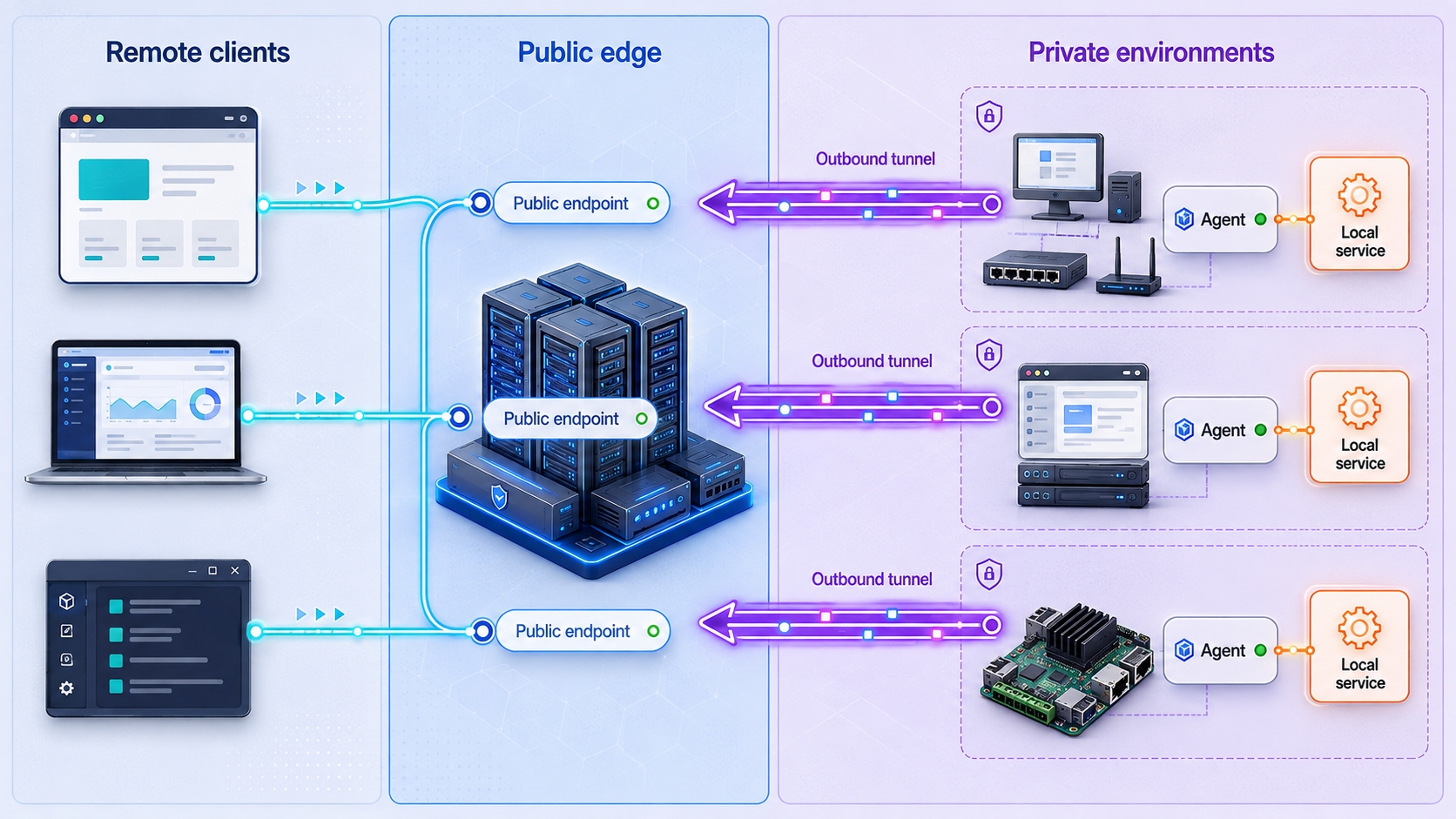
A scalable design separates four concerns: the workload, the Localtonet client, the access endpoint, and the control process. This separation lets a company change one part without casually changing all the others.
Place the client where it can reach the target
The Localtonet client can run on the same device as the application or on another device that can reach the application over the local network. Running it beside the application usually creates a narrower path with fewer internal dependencies. Running it on a local gateway may simplify maintenance when several approved services exist on the same network, but it also expands that gateway's potential reach.
Use an explicit local target and confirm that the target listens on the intended interface and port. Test the connection from the actual Localtonet client device. A service that works from an administrator's workstation may still be unreachable from the machine running the client.
Treat devices and authentication tokens as separate identities
A Localtonet authentication token identifies the client device that will run a tunnel. Tokens are device-specific. They should never be guessed, exposed in screenshots, committed to a source repository, placed in an unsecured support ticket, or copied into public documentation.
Assigning a separate device identity to each operational environment improves accountability. A branch gateway, test server, edge appliance, and developer workstation should not all be represented as one indistinguishable client. Device-specific identity also makes retirement clearer because access associated with a decommissioned device can be handled without confusing it with unrelated systems.
Separate ongoing, recurring, and temporary access in your operating process
Organizations can classify access as ongoing, recurring, or temporary even when the underlying tunnel type is identical. Ongoing tunnels support approved services without a predetermined end date. Recurring access may be started and stopped around maintenance windows or demonstrations. Temporary tunnels support a specific incident, test, vendor session, or integration task.
The verified product information supplied for this guide does not establish a built-in Localtonet tunnel scheduling feature. If your organization wants a recurring access window, treat it as an internal operating or automation process and validate any implementation against current dashboard or REST API documentation. Do not assume that saving a schedule is a standard tunnel option.
Temporary access should have an owner and an end condition before it begins. Record the requester, service owner, target, protocol, authorized audience, start time, expected stop time, and deletion decision. This is an internal governance practice rather than a required Localtonet dashboard schema.
Design failure behavior explicitly
A Localtonet tunnel is available only when its selected client device is connected and the tunnel is running. Client shutdown, local network loss, target-service failure, or a stopped tunnel can interrupt access. That behavior can help limit temporary availability, but it must be incorporated into expectations for business-critical services.
Decide whether a disconnected tunnel should generate an incident, a low-priority notification, or no alert. A permanent customer-facing endpoint may justify rapid escalation. A developer preview that is intentionally stopped at the end of a work session does not. Monitoring without ownership creates noise rather than resilience.
Maintain an internal service inventory
Our dashboard provides a central place to manage tunnels, and our REST API supports programmatic management. Neither replaces an internal ownership model. Maintain an inventory that connects each tunnel to a business purpose and service owner. At minimum, record the device, connectivity type, local destination or folder, intended audience, expected lifecycle, data classification, and retirement condition.
Use internal inventory categories to distinguish production, development, recurring, and temporary access. Do not describe those categories as Localtonet tunnel groups unless a current product feature explicitly provides that terminology. The verified grouping concept for platform-wide status webhooks is a Token Group.
Prepare the environment before creating a tunnel
The exact configuration screen depends on the selected tunnel family, but the underlying preparation is consistent. Complete these checks before exposing any endpoint.
Choose a supported installation path
Install and run the Localtonet client on the device that hosts the target or can reach it through an approved local path. Installation details can differ by operating system and client version. Use the current installation option presented by Localtonet rather than reusing an unverified command or package from another system.
This article intentionally does not provide guessed package names, service-unit names, command-line flags, or startup commands. If those details are not visible in the current product or official documentation for your platform, confirm them before creating an internal runbook. After installation, ensure the client can make its required outbound connection and that the correct device appears connected.
Verify the target locally
For an HTTP workload, open the exact local address and port from the Localtonet client device and confirm that the expected application responds. Verify more than a generic status page when the real workflow requires authentication, API calls, uploads, or callbacks.
For TCP or UDP, use the intended native client and complete a representative transaction. A successful socket connection alone may not prove that the protocol works. For combined UDP/TCP applications, test both transports locally.
For File Server, confirm that the folder exists on the client device and that the operating-system account running Localtonet has the intended filesystem access. Windows paths such as C:\Users\Work and Unix-style paths such as /root or /usr/share illustrate the expected path format, but you must select a real approved folder on your own system.
For proxy and VPN Manager workflows, the target model is different. A proxy uses the connected device as an exit node, while VPN Manager connects participating devices or networks through a private mesh. Do not attempt to configure either one by copying an IP-and-port tunnel procedure.
A relay or tunnel configuration cannot repair a stopped local application, an incorrect folder path, missing filesystem permissions, or a route that the client device cannot use. Resolve the private-side problem first.
Use the common Localtonet lifecycle without merging configuration procedures
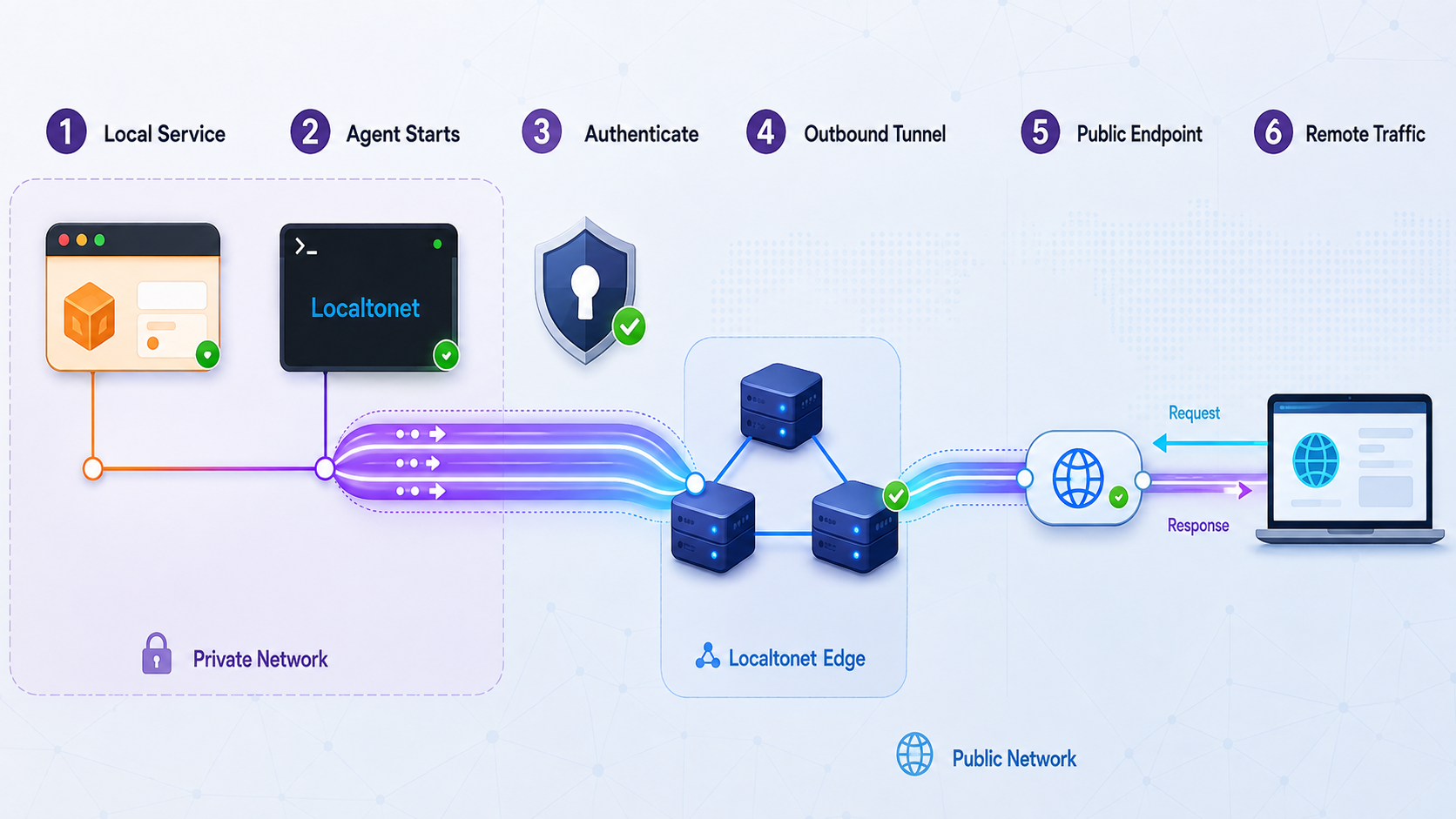
The following sequence is a conceptual lifecycle shared by Localtonet workflows. It is not the exact setup procedure for every product family. HTTP, TCP, UDP, combined UDP/TCP, TLS, File Server, proxy, and VPN Manager have different targets and configuration requirements.
Prepare and locally verify the workload
Start the application or prepare the folder or network workflow. Confirm from the intended client device that the required local path works before configuring external access.
Install and connect the Localtonet client
Run our client on the device that hosts or can reach the workload. Authenticate that device with its own token and confirm that the intended device is connected.
Choose the correct connectivity family
Select a web, raw-port, File Server, proxy, or VPN Manager workflow according to the actual protocol, target model, and required access scope.
Complete the protocol-specific configuration
Use the current dashboard and relevant documentation. Service tunnels use a local IP address and port, File Server uses a folder path, proxy types use the connected device as the exit node, and VPN Manager defines private mesh connectivity.
Start and remotely verify access
Start the configured tunnel, then test the assigned public URL, public host and port, proxy access, or private mesh path with the intended client. Confirm authorized success and expected denial of unauthorized actions.
Monitor, stop, and retire the access path
Observe the workflow according to its business importance. Stop the tunnel when active access should end and delete configurations that no longer have an approved purpose.
Protocol-specific configuration boundaries
| Family | Configuration input | Remote verification |
|---|---|---|
| HTTP/s | Reachable local IP address and port, Process Type, device token, and available server selection | Open the assigned HTTPS address and complete the intended browser or API workflow. |
| TCP, UDP, combined UDP/TCP, or TLS | Reachable local IP address and port plus the current protocol-specific options | Use the assigned public host and port with the actual native client and complete a representative transaction. |
| File Server | Process Type, device token, server, and local folder path | Use the assigned endpoint with the selected Default, SFTP, or WebDAV workflow and verify permitted file operations. |
| Proxy | Current proxy configuration associated with the connected exit device | Use an authorized proxy client and confirm only the intended workflow. Do not treat it as local service forwarding. |
| VPN Manager | Participating devices or networks and granular firewall rules | Verify required private routes and confirm that unnecessary paths remain denied. |
Available server choices, regions, protocol options, and capabilities may vary by plan, client version, region, or deployment. Obtain current values from the Localtonet dashboard. Do not hardcode an unverified server code or assume that every option is available to every account.
Configure a File Server tunnel using the documented sequence
File Server provides a concrete example of how a protocol-specific procedure differs from the high-level lifecycle. The documented workflow uses a folder path instead of an IP address and port.
Install the Localtonet application for your operating system
Install and run the current Localtonet client on the device that contains the folder you intend to publish.
Open the File Server Tunnel page
Go to the File Server Tunnel page in Localtonet to begin the folder-publishing configuration.
Select the Process Type
Choose Random Sub Domain, Custom Sub Domain, or Custom Domain according to the currently available options and your naming requirement.
Select the AuthToken and server
Select the device-specific authentication token for the client that can access the folder, then choose from the server values currently available in the product.
Enter the local folder path
Enter the exact path on the client device, such as C:\Users\Work on Windows or an applicable Unix-style path such as /root or /usr/share on Linux or macOS.
Press Start
Start the File Server tunnel after reviewing the selected device, server, Process Type, and folder path.
See the Localtonet File Server documentation for the current interface and configuration flow.
Verify File Server locally and remotely
Before starting the tunnel, confirm that the path exists and that the account running the Localtonet client can read or modify it as required. Avoid choosing a broad home directory, system directory, or mounted drive merely because it is convenient. Publish the narrowest approved folder.
After starting the tunnel, test with the client appropriate to the selected subtype. For Default, open the browser-based file manager. For SFTP, use a compatible SFTP client or approved automation. For WebDAV, test the mounted network-drive workflow. Confirm that allowed operations succeed and denied operations remain unavailable.
For the Default web manager, review global permissions and any per-path overrides. The most specific path wins, and permission changes apply without restarting the tunnel. If public share links are used, apply an expiry date, download limit, and separate link password where appropriate.
The available evidence does not establish whether Default web-manager features such as per-folder encryption, Immich-compatible photo backup, and Smart Collections also apply to the SFTP and WebDAV subtypes. Do not promise those features for SFTP or WebDAV without confirming current product behavior.
Stop and retire File Server access
Stop the tunnel when the remote file-access period ends. If the saved configuration has no continuing approved purpose, delete it. Also remove obsolete share links, review temporary credentials, update the internal inventory, and confirm that sensitive files were not copied into the published folder during the task.
Apply authentication, least privilege, and exposure controls
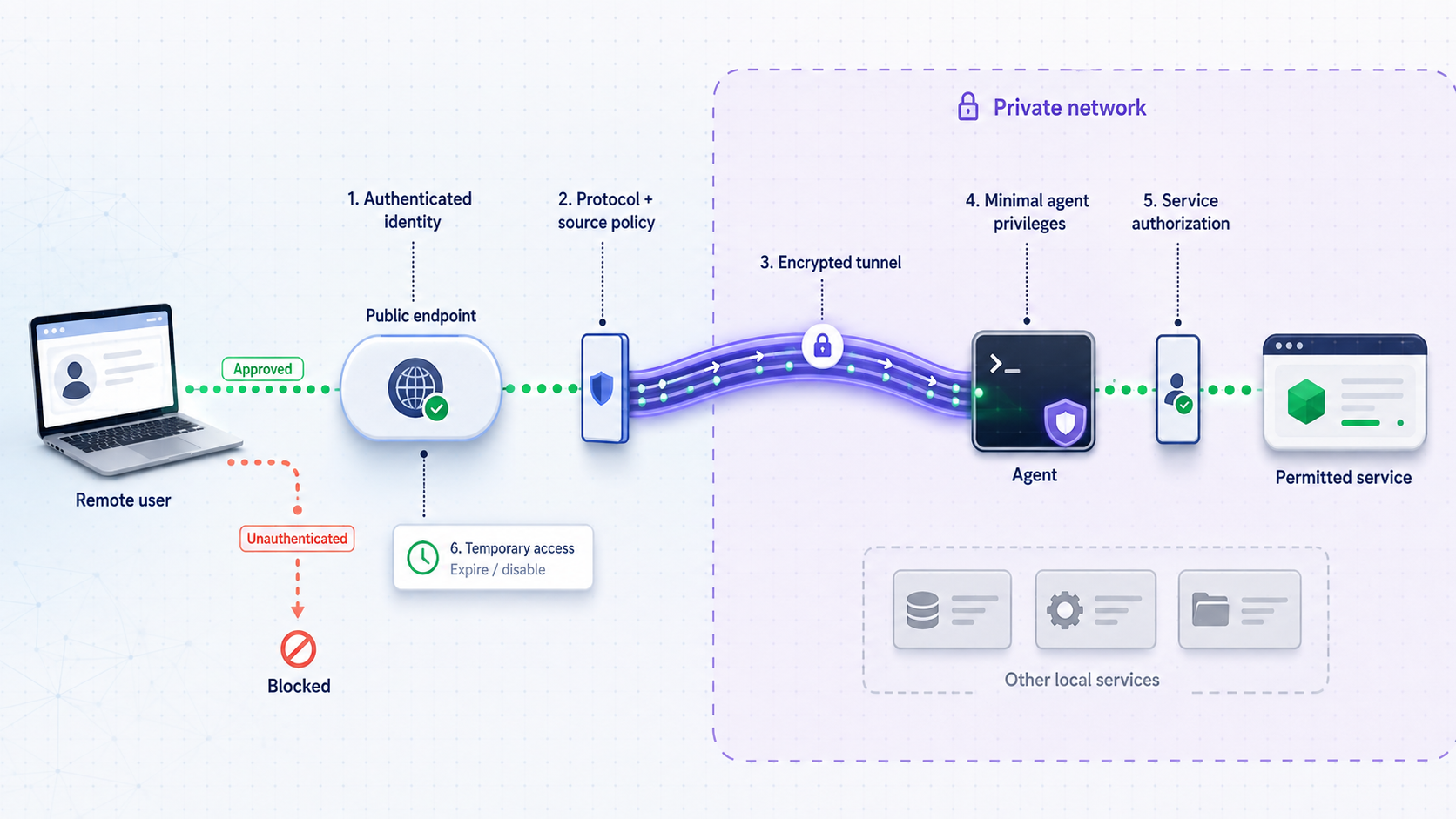
Outbound tunneling removes specific network prerequisites, but it does not eliminate security engineering. A strong design combines a narrow network path, application authentication, least-privilege authorization, device identity protection, controlled lifecycle, and monitoring.
Keep the local target narrow
Point a tunnel only at the service that must be reached. Do not expose a management interface when users only need an application endpoint. Do not publish an entire file tree when one project folder is sufficient. If a gateway device can reach many internal systems, treat its configuration and credentials as more sensitive than those of a single-purpose host.
Require application-level authentication
Internet reachability and user authorization solve different problems. A public HTTPS address gives users an encrypted web endpoint, but the application must still decide who may sign in and what each user may do. Use the application's supported authentication and authorization controls. Avoid shared administrator accounts, unchanged default credentials, and anonymous access to sensitive functions.
Raw TCP and UDP services require particular caution because some were designed for trusted local networks. Confirm their security properties before publication. If the protocol cannot authenticate clients or safely process untrusted input, a public tunnel is generally the wrong boundary.
Protect device tokens and operational credentials
Treat each device authentication token as a secret. Limit it to administrators and the system that needs it. Do not include it in documentation examples, chat messages, broad-audience logs, screenshots, or client-side application code.
Apply the same protection to application passwords, proxy credentials, SFTP accounts, API secrets, and webhook verification material. Tunneling should not become a reason to distribute credentials more widely than the underlying service requires.
Use File Server controls deliberately
The Default File Server includes path-traversal protection, per-IP rate limiting, blocked executable extensions with an optional allowlist mode, hidden dotfiles, and TLS termination at the tunnel edge. These defaults reduce common risks, but permissions still need to match the business use case.
Per-folder encryption uses AES-256-CBC with a key derived from the folder password through PBKDF2 with 100,000 iterations. The key and password are never stored. A hidden .fsvault file contains only a salt and verification hash, and unlock tokens last 30 minutes. There is no administrator override or password recovery.
Store the folder password through an approved organizational secret-management process. Losing it means the protected content cannot be recovered through a Localtonet administrator override.
Do not use tunneling to bypass policy
Localtonet should be deployed with organizational approval. An outbound connection can operate without inbound router changes, but it should not be used to evade firewall policy, authorization processes, or data-handling requirements. Security teams should know which services are exposed, why they are exposed, who owns them, and how they will be retired.
Operate, monitor, and retire tunnels safely
Adaptability depends as much on operations as initial configuration. A tunnel that can be created quickly but cannot be inventoried, monitored, or retired predictably becomes technical debt.
Distinguish the operational layers
| Layer | Question | Verification |
|---|---|---|
| Configuration | Does the intended tunnel definition exist? | Review its type, selected device, server, target, and business purpose. |
| Client device | Is the selected Localtonet client connected? | Check device status and the host's outbound network availability. |
| Tunnel | Has the tunnel been started? | Confirm its current state instead of assuming creation activated it. |
| Local target | Can the client device reach the application or folder? | Perform a local protocol-specific test from that device. |
| Remote endpoint | Can an intended remote client reach the assigned endpoint? | Test from outside the private network with the real client type. |
| Application | Does the complete authorized workflow succeed? | Test login, API behavior, file operations, or a native protocol transaction. |
Configure platform-wide status webhooks within their documented scope
Localtonet platform-wide Token/Tunnel webhooks fire when a token or tunnel in a selected Token Group changes to Connected or Disconnected. The documented setup model is to provide a receiving URL, select the relevant Token Group, and use either Token Webhooks or Tunnel Webhooks according to the object whose state you need to monitor.
The receiver must accept the webhook POST and parse a WebHookRequest JSON body containing Id, ActionDate, Type, and Status. The documented values for Type are Token and Tunnel. The documented values for Status are Connected and Disconnected.
{
  "Id": "tunnel-id-or-auth-token",
  "ActionDate": "event action date",
  "Type": "Token or Tunnel",
  "Status": "Connected or Disconnected"
}
This sample shows field meanings only. It contains no real token, tunnel identifier, or private receiver endpoint.
Validate the webhook receiver
Before relying on alerts, confirm that the receiver URL is reachable from the service delivering the webhook and that the application accepts the POST body. Associate a non-production token or tunnel with the selected Token Group, then produce a controlled Connected or Disconnected transition. Verify that the receiver records the expected identifier, action date, type, and status without exposing the identifier to unnecessary users.
Test both the event type you configured and the state transitions your workflow depends on. A device disconnect can affect several tunnels associated with that client, while a tunnel event concerns the state of an individual tunnel. Correlate incoming identifiers with your internal inventory so an operator can determine the affected service and owner.
The supplied webhook documentation establishes the event model and Token Group selection, but it does not establish delivery retries, signing, ordering, or a universal receiver-authentication mechanism for platform-wide webhooks. Do not assume those properties. Design the receiver so repeated or delayed status events do not trigger unsafe automation, and verify any additional behavior against the current Localtonet Token and Tunnel webhook documentation.
Platform-wide Token/Tunnel webhooks report Connected and Disconnected states for objects in a selected Token Group. File Server webhooks report upload, delete, rename, and move events and support optional path filters and HMAC signing. Choose the webhook system that matches the event you need.
Define response procedures
A disconnected event should lead to a proportionate response. First determine whether the tunnel was intentionally stopped. Next check whether the selected Localtonet client is connected. Then verify the local application or folder and its network reachability. Only after those checks should an operator consider changing or recreating the tunnel configuration.
Record who may start, stop, modify, and delete production tunnels. The dashboard and REST API provide management paths, but internal approval and audit requirements are determined by the organization. Avoid automation that creates broad exposure without validating the target, audience, and planned shutdown.
Retire access completely
Stopping a tunnel ends its active availability, while deleting it removes the saved tunnel configuration. A complete retirement review may also include removing application accounts, revoking temporary credentials, deleting File Server share links, disabling related automation, updating the service inventory, and confirming that the local service no longer expects remote traffic.
When relocating a service, avoid leaving both old and new paths active accidentally. Verify the new endpoint, communicate the transition, stop the old tunnel, observe for unexpected dependencies, and then delete obsolete configuration according to policy.
Troubleshoot outbound tunnel connectivity systematically
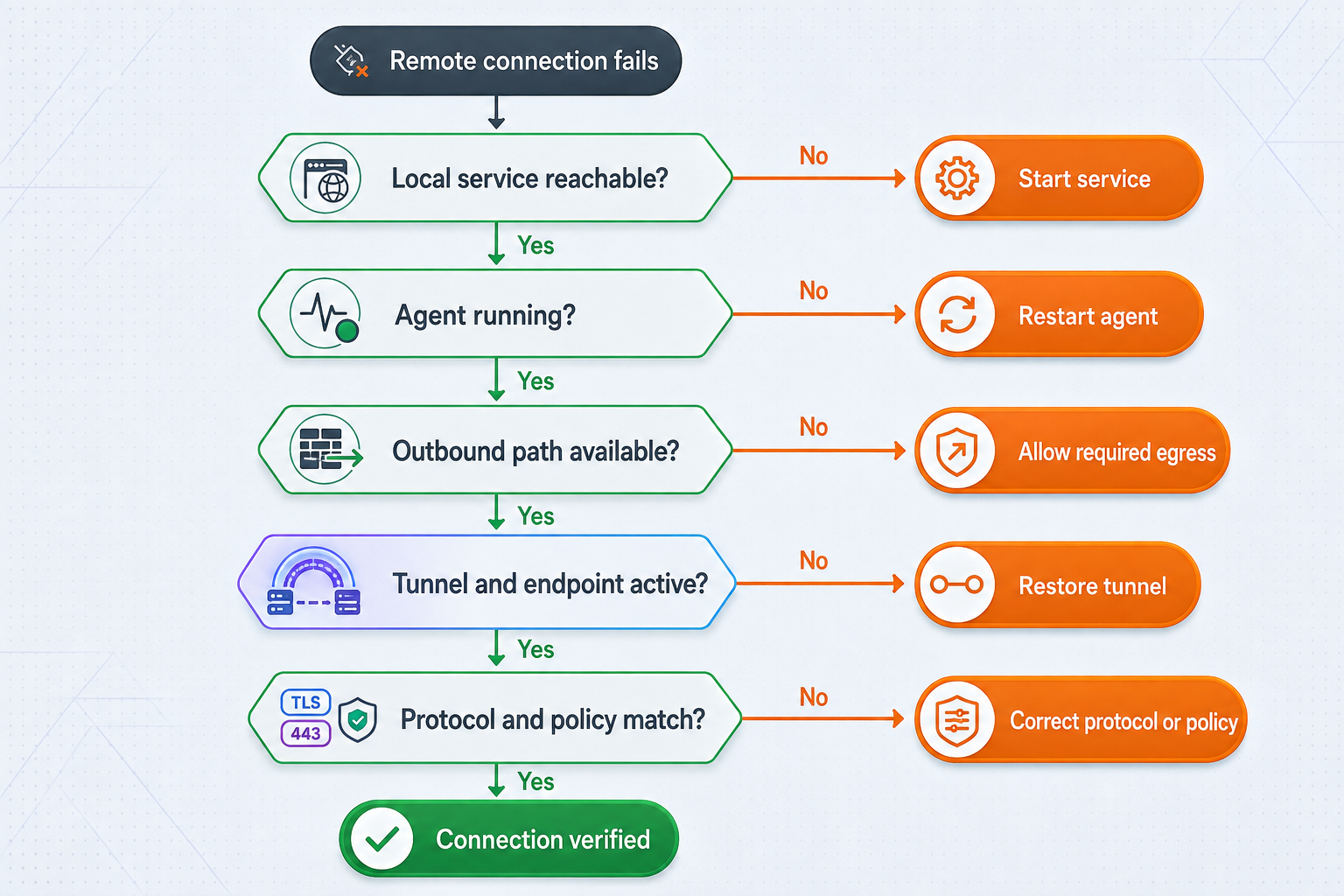
Troubleshooting is fastest when it follows the traffic path from the local application outward. Randomly changing tunnel types, relay selections, or ports can conceal the actual failure and create additional exposure.
The local service is unreachable from the client device
Confirm that the service process is running and listening on the expected address and port. Test from the device running Localtonet, not only from the service host. If those are different machines, inspect local routing and host firewall policy between them. Verify that any hostname resolves to the expected address from the client device.
For File Server, confirm that the folder path is valid on the client's operating system and accessible to the account running the client. A path copied from another machine or operating system may not exist locally.
The tunnel exists but the endpoint is unavailable
Check whether the selected device is connected and whether the tunnel was started. Creation does not imply a running state. If the client device is offline, restarting only the local target application will not restore the public endpoint.
Verify that the selected device is the one that can reach the target. In environments with similarly named hosts, an otherwise correct tunnel may be assigned to the wrong client identity.
A web page opens, but application behavior fails
A successful initial page load proves only part of the path. Test authentication, API calls, uploads, downloads, callbacks, and any long-running interactions the application uses. Review the application's own logs for hostname assumptions, redirects, cookie settings, and authorization failures.
Do not invent a custom-domain DNS record to solve a hostname problem. Consult the current dashboard and documentation for the exact custom-domain workflow.
A TCP or UDP client cannot complete its protocol exchange
Confirm that the selected tunnel matches the application's transport protocol. Test with the same native client and operation used by the real consumer. For an application that requires both UDP and TCP, verify both paths and evaluate the combined UDP/TCP tunnel instead of assuming one transport is sufficient.
Some protocol failures occur after a connection begins, so a basic reachability test may be misleading. Compare local and remote application behavior without recording credentials or confidential payloads.
Users have too much or too little file access
Review the Default File Server global permission flags and per-path overrides. The most specific path wins, and changes apply without restarting the tunnel. Check for a narrower override before changing a global permission, particularly when one project folder behaves differently from the rest of the shared tree.
Status alerts appear noisy or contradictory
Determine whether each event represents a Token or Tunnel and whether its status is Connected or Disconnected. Correlate the identifier with your internal service inventory. A planned shutdown should not be handled like an unexpected production outage.
Use verified Token Groups when selecting the scope of platform-wide webhooks. For broader operational distinctions such as production versus temporary access, use your internal inventory or naming process unless a current Localtonet feature explicitly provides another grouping mechanism.
The architecture has accumulated too many tunnels
This is usually a governance problem rather than a transport failure. Review each tunnel's owner, audience, protocol, target, and retirement condition. Consolidate only when doing so preserves least privilege. If many private device-to-device paths are being approximated with public endpoints, reassess whether VPN Manager provides a clearer private mesh model.
Frequently asked questions
Does an outbound tunnel require router port forwarding?
No. The Localtonet client establishes an outbound connection to our relay, so the workflow does not require inbound router port forwarding, firewall changes, VPN setup, or a public IP address. The local environment must still permit the required outbound connection, and organizational security policies still apply.
Is a Localtonet tunnel available as soon as it is created?
No. Creating a tunnel stores its configuration. It must also be started, and it remains available only while the selected Localtonet client is connected and the tunnel is running.
Can one generic procedure configure every Localtonet connectivity type?
No. HTTP and raw-port tunnels use a reachable local IP address and port. File Server uses a local folder path. Proxy tunnel types make the connected device the exit node. VPN Manager creates private mesh connectivity. Use the protocol-specific documentation and current dashboard for the selected family.
Should we use HTTP or TCP for a web application?
An HTTP/s tunnel is normally the appropriate model for a browser application, web API, dashboard, or webhook receiver. Use TCP when the remote client communicates through a raw TCP protocol rather than HTTP. Choose according to the application protocol, not merely the port number.
Is a standard Localtonet tunnel a VPN?
No. HTTP, TCP, UDP, TLS, and File Server tunnels expose specific services or folders. VPN Manager is our private mesh VPN capability, with granular firewall rules and support for bridging local LANs.
What is the difference between a proxy tunnel and a TCP tunnel?
A TCP tunnel forwards traffic to a selected local IP address and port. An HTTP or SOCKS5 proxy tunnel makes the connected device the proxy exit node and does not use a conventional local service target.
Does Localtonet provide a built-in tunnel scheduler?
A built-in scheduling feature is not established by the verified information used for this guide. Treat recurring access windows as an organizational operating or automation pattern unless the current dashboard or official documentation explicitly provides scheduling.
Can we monitor when a tunnel or client disconnects?
Yes. Platform-wide Token/Tunnel webhooks can send a POST when a token or tunnel in a selected Token Group changes to Connected or Disconnected. The event includes the identifier, action date, object type, and status.
Are platform-wide webhooks the same as File Server webhooks?
No. Platform-wide webhooks report Token or Tunnel Connected and Disconnected states. File Server webhooks report file-level upload, delete, rename, and move events and can use optional path filters and HMAC signing.
Which relay server or region should we select?
Select from the values currently available in the Localtonet dashboard and evaluate them against your users and operational requirements. Availability can vary by plan, client version, region, or deployment, so do not hardcode an unverified server code.
When should a temporary tunnel be deleted rather than only stopped?
Stop the tunnel when active access must end. Delete it when the saved configuration has no continuing approved purpose, subject to your retention and change-management policies. Also review temporary accounts, credentials, public share links, automation, and inventory records.
Build your next connectivity workflow with Localtonet
Start with one clearly classified workload, place our client where it can reach the target, select the appropriate tunnel or private mesh model, and verify the complete authorized user journey before expanding the design.
Get Started Free →